
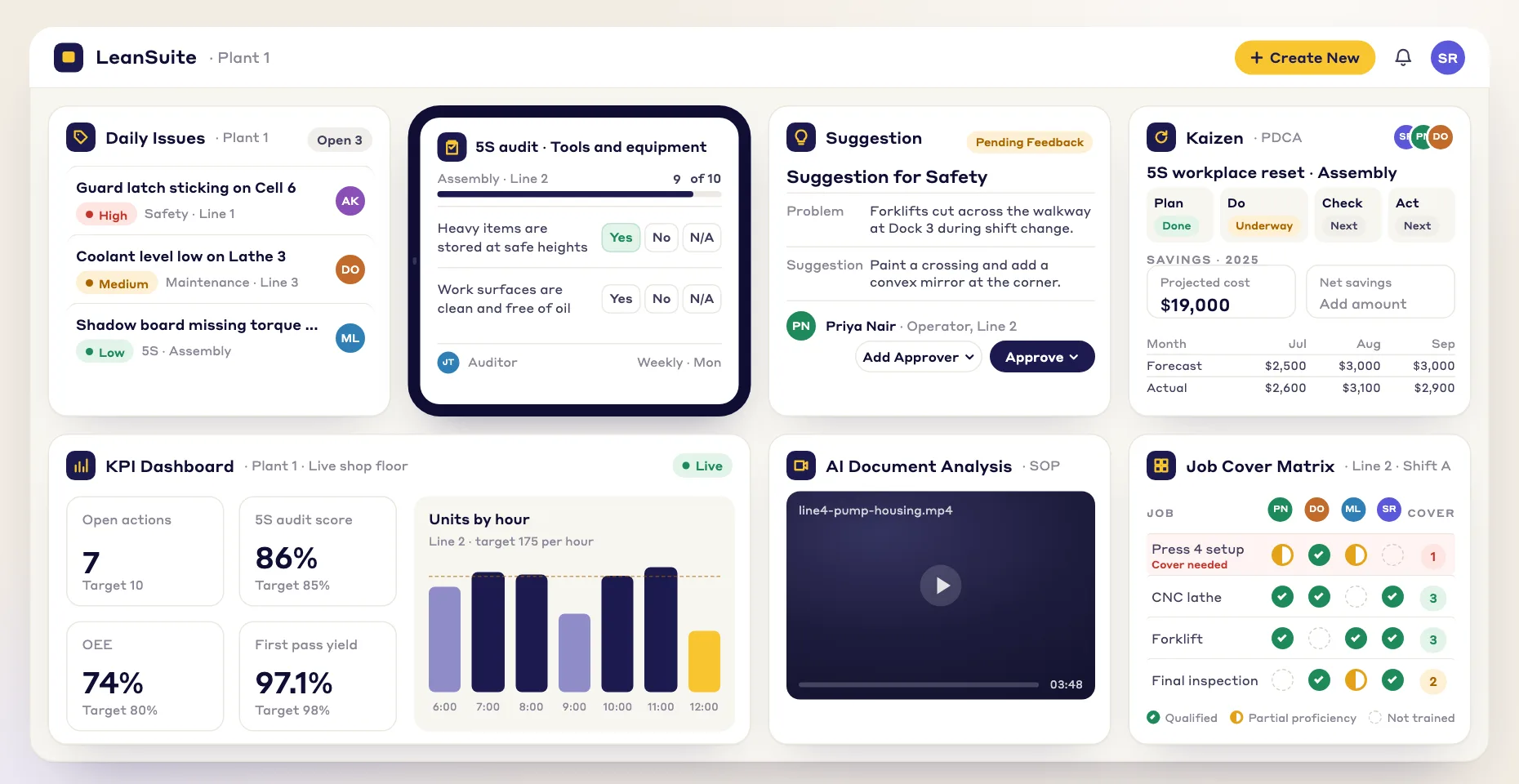
1. Define your critical competencies
Set the skills and levels each job profile needs, with clear criteria for moving up each level.
Competency management software records the skills each job needs and who has them. LeanSuite keeps it as a live skills matrix: people qualify through training and digital sign-offs, and gaps show up before they cost you a shift.
By clicking "Schedule Demo," you agree to the use of your data in accordance with LeanSuite's Privacy Notice, including for marketing purposes.
Buyer's guide
Competency management software records the skills and qualifications each job needs, who has them and at what level, and the evidence behind each level. In a plant it answers three questions a spreadsheet struggles with: who can run this job on this shift, where one absence would stop a line, and what proof an auditor will accept.
This guide is for the plant manager, training coordinator or quality lead choosing a competency management system (you will also see it called competency tracking or competency mapping software). It covers what the system has to do, eleven questions to ask every vendor, when a spreadsheet is enough, a rollout plan, cost drivers and where LeanSuite fits. Comparing skills matrix tools? See the best skills matrix software.
Updated by the LeanSuite team
In short
What it has to do
Shift supervisor
Staff every job with a qualified person when someone calls out.
Opens the job, sees who on this shift is qualified, ranked by level, and assigns cover in a minute.
Plant or operations manager
Find the jobs where one absence or retirement would stop a line.
Single points of failure are listed by area, with who is closest to qualifying.
Training coordinator
Decide what to train next month with limited trainer hours.
Gaps are ranked by risk and turned into assigned training, not a list in an email.
Quality, EHS or HR
Prove a person was qualified for a task on a given date, with evidence.
Each level links to its sign-off, quiz or certificate, and the matrix can be viewed as of any date.
Operator
Know what to learn next to move up a level.
Sees their own levels against the job's requirements and the training that closes each gap.
FLEXIBLE WORKFORCE
Define what each job needs, see who has it, then close the gaps.
Set the skills and levels each job profile needs, with clear criteria for moving up each level.
Levels update from courses, assessments and sign-offs, and the matrix shows strengths and gaps in color.
Put qualified people on each job and assign the training that closes each gap.
How it works
Job profiles set the bar; training and digital sign-offs move people up.
Each job profile (team) lists its required skills, levels and qualifications, such as required hours.
See how it worksEach person signs off their SOPs and OPLs digitally: an audit-ready record, not scanned paper.
Designated trainers or coordinators, not only supervisors, sign off on-the-job qualification checklists.
See how it worksSign-offs and passed courses raise skill levels, and the Job Cover Matrix shows who is qualified where.
See how it worksLevels rise through on-the-job assessment, self-assessment, classroom or online courses, SOPs and OPLs.
See how it worksRadar charts show required, starting and current levels. Pick a past date to see a team as it was.
See how it worksStrategic Workforce Development
LeanSuite keeps levels current and turns gaps into assigned training and projects.
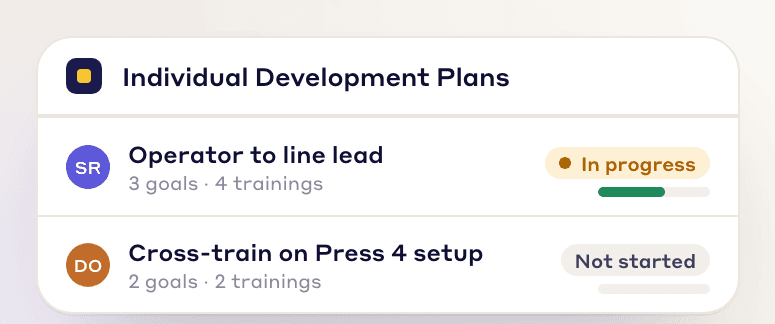
Give each employee their own development plan: set goals together, assign specific training and track progress toward a clear career path.
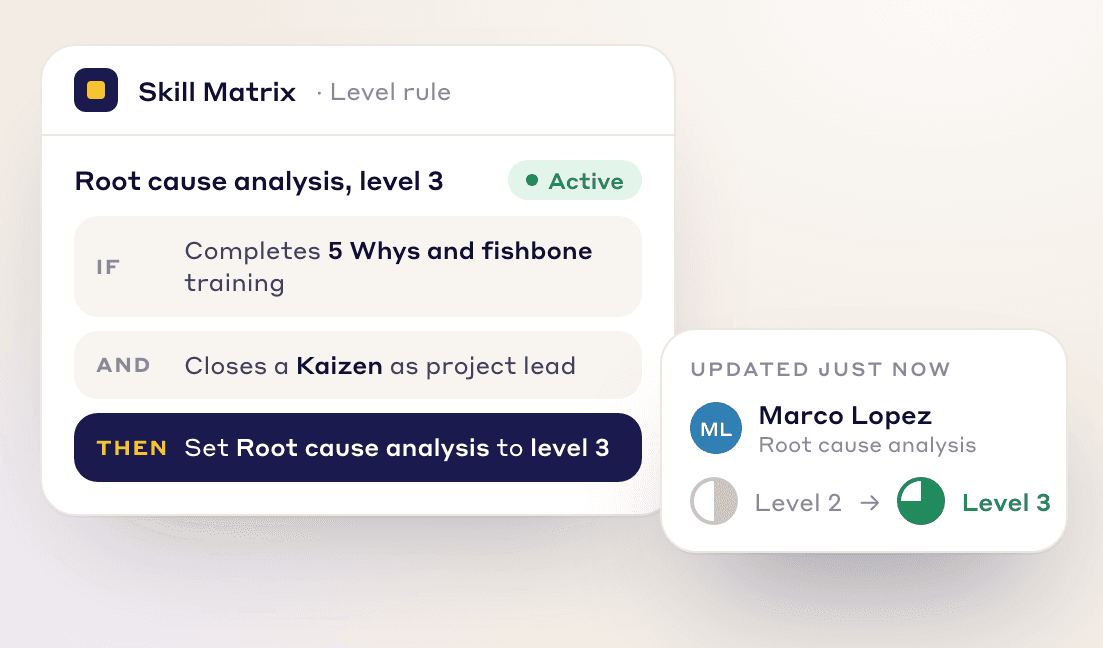
Set the criteria for each level, such as pass a course, apply the skill on Kaizen projects or complete train-the-trainer. Levels update as people meet them.
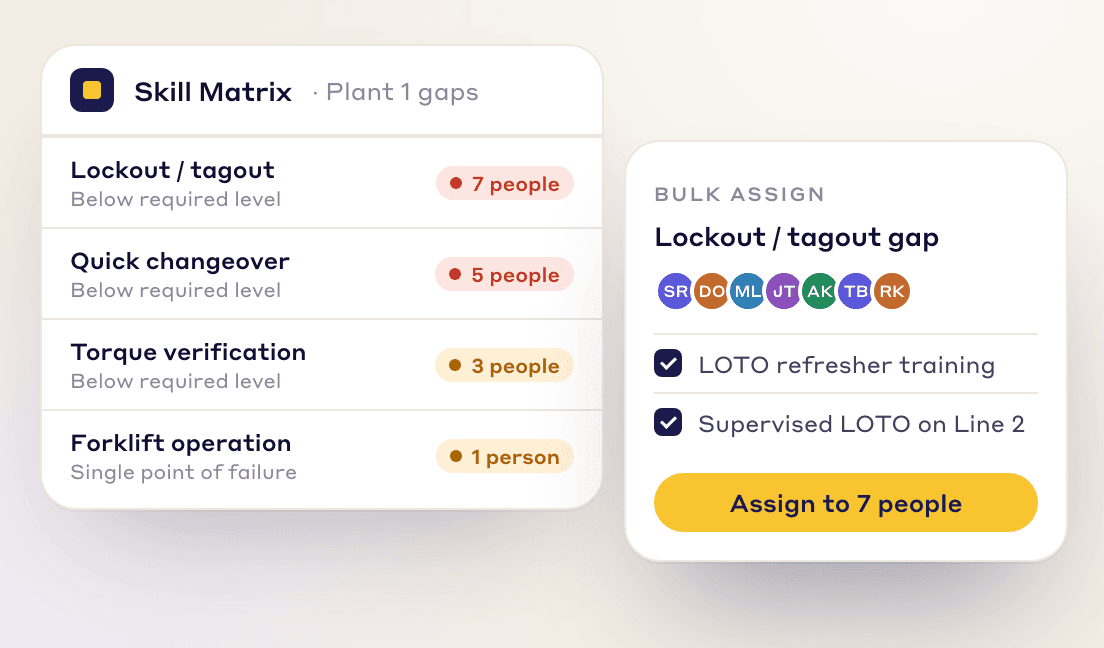
Gap planning shows who needs which skills across the facility and suggests courses and Kaizen projects to close each gap. Assign training straight from the gap view.
A CONNECTED SYSTEM
One skill list for projects, training and shift cover.
The Kaizen team builder suggests people by skill and workload, and skills used on projects count toward each person's level.
Passing a course linked to a skill level raises that level on the matrix.
The Job Cover Matrix shows single points of failure and who to cross-train first.
How to choose
A press operator and a millwright need different skills, and some procedures hold tasks that only certain people may do. If requirements live only at person level, nobody can say what a job needs.
Ask the vendor: Can I define required skills and levels for each job profile, add qualification rules such as hours, and break a procedure into task-level skills later without rebuilding?
LeanSuite: Each job profile lists its required skills, levels and qualifications such as required hours. Skills can be set for a whole job or down to single tasks inside a procedure.
Without criteria, one supervisor's level 3 is another's level 2, and the matrix measures who is generous. Criteria are what make a level defensible in an audit.
Ask the vendor: Where do I write what it takes to move from one level to the next, and can the move require specific evidence?
LeanSuite: You set the criteria for each level, such as passing a course, applying the skill on Kaizen projects or completing train-the-trainer, and levels update as people meet them.
ISO 9001 clause 7.2 asks for documented evidence of competence. Evidence on a floor is a trainer's observation, a passed quiz, a signed procedure or an outside certificate, not a cell someone typed.
Ask the vendor: Which kinds of evidence can raise a level (observation, quiz, document sign-off, outside course), and can I open the evidence behind any cell?
LeanSuite: Levels rise through on-the-job assessment, self-assessment, classroom or online courses in the built-in LMS, and SOP and OPL sign-offs. Vendor courses can be added to a person's record with their hours.
Supervisors are the bottleneck in most plants. Designated trainers and lead operators usually know the task better and are on the floor when the trainee is.
Ask the vendor: Can I name trainers or coordinators who sign off, not only supervisors? Is the sign-off done on a tablet and stamped with who and when?
LeanSuite: Designated trainers or coordinators as well as supervisors sign off on-the-job checklists on a tablet, and people sign off their SOPs and OPLs digitally: an audit-ready record instead of scanned paper.
Forklift, lockout/tagout and other authorizations lapse or need re-evaluation. OSHA requires a forklift operator's performance to be evaluated at least once every three years. An expired certificate should stop counting the day it expires.
Ask the vendor: How are expiry dates and refreshers handled, who is warned before a lapse, and does an expired qualification drop out of the cover count?
LeanSuite: Refresher courses reassign themselves, for example yearly, and late training shows as overdue. LOTO procedures are tied to the Skills Matrix: an expired or missing certification blocks the form.
The question at shift start is whether each job has enough qualified people today. A matrix that cannot answer that by shift or department is a report, not a tool.
Ask the vendor: Show me, for one job, everyone qualified on this shift, and the jobs only one person can do.
LeanSuite: The Job Cover Matrix filters qualified people by shift, department or proficiency and shows jobs only one person can do, so you cross-train there first. See how it handles an absence call-out.
After a customer complaint or an incident, the question is who was qualified on the day it happened, not who is qualified now.
Ask the vendor: Can I see and export a team's qualifications as they were on a date three months ago?
LeanSuite: Yes. Pick an "as of" date to see and export a team as it was that day.
Seeing a gap is half the job. If closing it means someone copying names into a training plan by hand, the gap stays open.
Ask the vendor: From a gap, can I assign training or a development plan in one step, and does the system suggest what closes it?
LeanSuite: Gap planning shows who needs which skills across the facility and suggests courses and Kaizen projects to close each gap; you assign training straight from the gap view or through an individual development plan.
The people being assessed are mostly operators. If they cannot sign in, they cannot sign their procedures or see what they need to learn next.
Ask the vendor: How does an operator with no email sign in, on a shared tablet or a phone?
LeanSuite: Operators sign in with an employee ID, no email needed, on shared tablets or the mobile apps.
A matrix starts from a roster, a job list and today's levels, usually in Excel. People join and leave every week, so the user list has to stay in step with HR.
Ask the vendor: How do I load people, managers, jobs and skills on day one? How do starters and leavers get from our HR system to you, and who maintains that link? Which SSO providers do you support?
LeanSuite: Admins bulk upload users and managers from a template and bulk-add skills. Single sign-on works with Microsoft Entra ID and Okta. For your HR system, we confirm on a call how users are kept in step.
A competency system only works if every person in scope is in it. Per-user pricing pushes plants to leave out temps and contractors, who are often the ones an auditor asks about.
Ask the vendor: What does it cost with every operator, temp and contractor in the system?
LeanSuite: One flat price per facility with unlimited users. See pricing.
Want to see the method on paper first? The free skills matrix template and competency assessment form use the same structure: requirements per job, a level scale with criteria, and the one-person assessment behind each rating. Training that expires, such as forklift and lockout/tagout refreshers, goes on the training matrix template with expiry dates.
Spreadsheet or software?
| Your situation | A spreadsheet is enough | Software earns its keep |
|---|---|---|
| Size of the matrix | One team of a dozen people and a short list of skills. | Several teams and shifts, with hundreds of person-skill cells. |
| How often it changes | A few changes a month. | Starters, temps and sign-offs change it every week. |
| Evidence | The supervisor's rating is accepted as it is. | Auditors or customers ask for the evidence behind each level. |
| Expiring qualifications | None, or one or two tracked by hand. | Forklift, LOTO, confined space or customer-specific authorizations with dates. |
| Who needs it | One supervisor plans the shift from it. | Every shift lead checks cover at shift start. |
| History | Nobody asks who was qualified last quarter. | Investigations need who was qualified on a past date. |
Mostly the middle column? Use the free skills matrix template and cross-training plan. Mostly the right column? The guide to moving from Excel to one system and LeanSuite vs spreadsheets cover the switch.
Rollout plan
Step 1 · Week 0
Pick one area where an absence already stops work or forces overtime: a press line, a packaging hall, maintenance. List its jobs and the people who do them on each shift.
Step 2 · Week 1
For each job, list the skills that decide whether it is done safely and to standard, the level each needs, and how many qualified people each shift should have. Keep lists short enough that a trainer can assess them.
Step 3 · Weeks 1 to 2
Write the evidence for each level once for the whole plant: for example, a passed quiz for level 2, a trainer's observation for level 3, and having trained someone else for level 4.
Step 4 · Weeks 2 to 5
Load current levels from the existing sheet, marked as unverified, and set a date by which each will be confirmed by a sign-off. Do the safety-critical skills and single points of failure first.
Step 5 · Weeks 4 to 10
Train the person closest to the next level on each single-point-of-failure job first. Review cover weekly at the area meeting until every job meets its target.
Step 6 · Weeks 10 to 12
Reuse the plant-wide level criteria and the job profile format; each new area mostly needs its own skill lists and a baseline.
What makes it take longer
With LeanSuite, our team handles setup and the first module is live in under a week. The 90-day pilot covers one facility, and at day 90 you decide whether to continue. Our article on closing plant-wide skill gaps in 90 days goes deeper.
Cost
Per user, per active user or per site. Count temps and contractors who must be in the matrix.
Trainers observing and signing off people at the machine. Short skill lists and clear criteria keep it manageable.
Writing job profiles, skill lists and level criteria. Reuse one plant-wide scale instead of one per area.
Loading today's levels and confirming them with evidence, starting with safety-critical skills.
Keeping users in step with HR, single sign-on and the security review.
Someone owns changes to jobs and criteria. Without an owner, any system decays back into a stale sheet.
How LeanSuite is priced
One flat price per facility with unlimited users; request a quote on the pricing page.
The 90-day pilot costs $3,000 per facility, and our team does the setup.
A small business plan is $499 a month for one facility with up to 25 employees (apply here).
Pitfalls
Each supervisor scores to their own standard, so the matrix cannot be compared across shifts.
Instead: Write one plant-wide scale with the evidence each level needs, and train assessors on it.
Levels drift up, and the first time anyone notices is an incident or an audit.
Instead: Let self-assessment start a conversation, and require a trainer's sign-off for the levels that clear someone to work alone.
A list of forty tasks per job never gets assessed, so most cells stay empty or guessed.
Instead: Keep the skills that decide safety and quality; group the rest under them.
Someone passed the quiz but has never done the changeover alone.
Instead: Require an on-the-job sign-off for every level that means works alone to standard.
Authorizations lapse quietly and the matrix still shows the person as qualified.
Instead: Give every expiring qualification a date and drop it from the cover count when it lapses.
It is accurate while that person is in the building and out of date the week they are on holiday.
Instead: Let trainers sign off where the work happens so the matrix updates itself.
See it on your problem
Required skills and levels for a job, a task-level skill inside a procedure, and the criteria for each level.
A trainer signs an on-the-job checklist on a tablet and the person's level and radar chart update.
The Job Cover Matrix filtered by shift, single points of failure, and who to cross-train first.
Gap planning suggesting courses and Kaizen projects, an individual development plan, and the matrix as of a past date.
“Great user-friendly software! It's covering everything that WCM or similar Lean Programs are asking to do, in a very effective way.”
 Elena M.Global Head of Marelli Manufacturing System Automotive, Marelli
“Customer support has been exceptional. The team is always available to answer questions and consistently provides prompt responses. I have been working closely with them to set up KPIs and time studies for our company, and their level of support throughout the process has been outstanding”
 Luis R.CI Engineer, Tomball Controls
“The Project Tracking System generates significant savings while ensuring seamless delivery... The Global Kaizen Power Pitch completely transformed our ability to share best practices.”
 Ramsey AljahmiSr. Director of NAR Operations Excellence, Whirlpool Corporation
FAQs
Competency management software records which skills each job needs and who has them, so you can see gaps and plan training. In LeanSuite it is a live skills matrix (also called a competency or training matrix): a grid of people against the skills their job needs that updates as people pass courses and sign off procedures.
It is the set of job requirements, level definitions, assessments, records and reviews that show each operator is qualified for the work they do. Software holds it in one place: required skills per job, each person's level with the evidence, expiry dates, and cover per job and shift.
Hold requirements per job (and per task where needed), level criteria, evidence from observations, quizzes, document sign-offs and outside courses, sign-off by designated trainers, expiry and refreshers, cover by shift, a look-back to past dates, and a path from each gap to assigned training.
It depends on what the matrix has to connect to. AG5 suits certifications synced with HR software, Poka suits skills proven by exams and expert endorsement, Augmentir and Azumuta tie skills to work instructions, and L2L and Redzone keep skills inside a production platform. LeanSuite suits plants that want levels to rise as SOP, OPL and on-the-job sign-offs happen, with a Job Cover Matrix for absences. Our skills matrix software comparison sets each one out from the vendor's own pages.
An LMS delivers courses and records who completed them. Competency management records which skills each job needs and who is qualified, including on-the-job sign-offs that no course can prove. In LeanSuite the two are linked: passing a linked course or an on-the-job sign-off raises the person's level in the skills matrix.
Plants use the three names for nearly the same grid. A training matrix usually tracks which trainings each person has completed, a skills matrix rates how well each person can do each task, and a competency matrix adds the level each job requires and the evidence behind each rating.
Give every rating a source (an observation, a quiz, a signed procedure or a certificate) and give every expiring qualification a date and a refresher interval. Software then flags what is due, drops expired qualifications from the cover count and warns before a job runs short.
ISO 9001 clause 7.2 asks you to determine the competence each role needs, make sure people have it, check that training worked and keep documented evidence. IATF 16949 adds on-the-job training for new or changed jobs affecting quality, including agency staff. OSHA rules such as the forklift standard name what a certification must show.
For one team with a short skill list and few changes, yes. Once several shifts depend on it, qualifications expire, auditors ask for evidence or you need to know who was qualified on a past date, the sheet becomes a full-time job and is usually out of date.
For one area, about a week to load people and write job profiles, then a few weeks to verify baseline levels with sign-offs, safety-critical skills first. With LeanSuite our team handles setup and the first module is live in under a week.
Cost depends on the pricing model (per user or per site), assessor time, building the framework and integration. LeanSuite is one flat price per facility with unlimited users, and a 90-day pilot costs $3,000 per facility.
Yes. Define skills at job level or down to the individual tasks inside a procedure.
Designated trainers or coordinators as well as supervisors, on a tablet. People also sign off their SOPs and OPLs digitally, giving an audit-ready record instead of scanned paper.
Yes. Pick an 'as of' date to see and export a team as it was that day.
Admins bulk upload users and managers from a template and bulk-add skills. Operators sign in with an employee ID, no email needed.
An IDP is an employee's own development plan. In LeanSuite you set goals together, assign specific training and track progress toward a clear career path.
FREE RESOURCES
Not ready for software yet? Start with these free resources.
Bring one area's jobs and we'll show how LeanSuite tracks qualifications, sign-offs and cover, and what a 90-day pilot covers.