

Closed in the tracker
The savings figure is a guess typed on the last day, with hard and soft sitting in the same column. The project is closed and the money is unprovable.
Unproven Kaizen savings
The savings number was typed into the spreadsheet on closing day and nobody has trusted it since. Set the target when the project opens, and the kaizen cost savings show up month over month against the year's target.
By clicking "Schedule Demo," you agree to the use of your data in accordance with LeanSuite's Privacy Notice, including for marketing purposes.
TRUSTED BY INNOVATIVE LEADERS
Same project, two runs
The same improvement project run on a spreadsheet and run with a target attached. One dies at the moment finance asks.
The savings figure is a guess typed on the last day, with hard and soft sitting in the same column. The project is closed and the money is unprovable.
The target savings, target cost and target date are set when the project opens, so the number exists before the work starts. Finance adjusts the month and the year's gap moves in front of everyone.
Sound familiar?
You have a folder of A3s and a tracker with a Closed column. Somebody typed a savings figure into the cell the day the project shut, and nobody has touched it since. Finance asks what the year's improvement work returned, and all you can show is a kaizen project closed, no savings anyone will stand behind. By the time the gap to the target is obvious, there are no months left to run projects.
Savings typed in at close
The number goes in on the last day of the project and nobody revisits it.
Hard and soft all mixed
Everything lands in one column, so finance discounts the whole total.
The gap shows up in December
You find out you are short of the target with no months left to run projects.
A target on every project
Each Kaizen carries its target savings, hard or soft, a target cost and a target date.
Open projects on the glide path
Open projects show as projected savings month over month, so the gap to the yearly target is visible now, not at close.
Finance edits the month
Finance can change a single month's savings, and hard savings update on the glide path.
If nothing changes
Nobody decides to lose track of the money. It happens one closing day at a time.
The yearly savings number is announced in a kickoff meeting and never attaches to a single project.
A savings figure gets typed into the tracker on the last day, with no split between hard and soft.
Finance asks which of the closed projects they can actually book, and the answers take a week to assemble.
The shortfall is visible for the first time, with no months left to open projects that could cover it.
How it works
The money is defined at the start of the project, not guessed at the end. Every open Kaizen then feeds the same glide path, and finance keeps the monthly numbers honest.
Step 1
Loss trees built in the cost module show the losses in dollar terms, and you initiate a Kaizen straight from the top one. The system suggests the team based on the skills matrix and warns when someone is already loaded.
Step 2
Target savings, hard or soft, target cost and target date sit on the project itself. Workflow validation can stop a Kaizen advancing until those fields are filled.
Step 3
Set the yearly savings target for the facility and distribute it by department. Open projects appear as projected savings month over month, next to last year's carryover and what has actually closed, so the gap is visible in March instead of December.
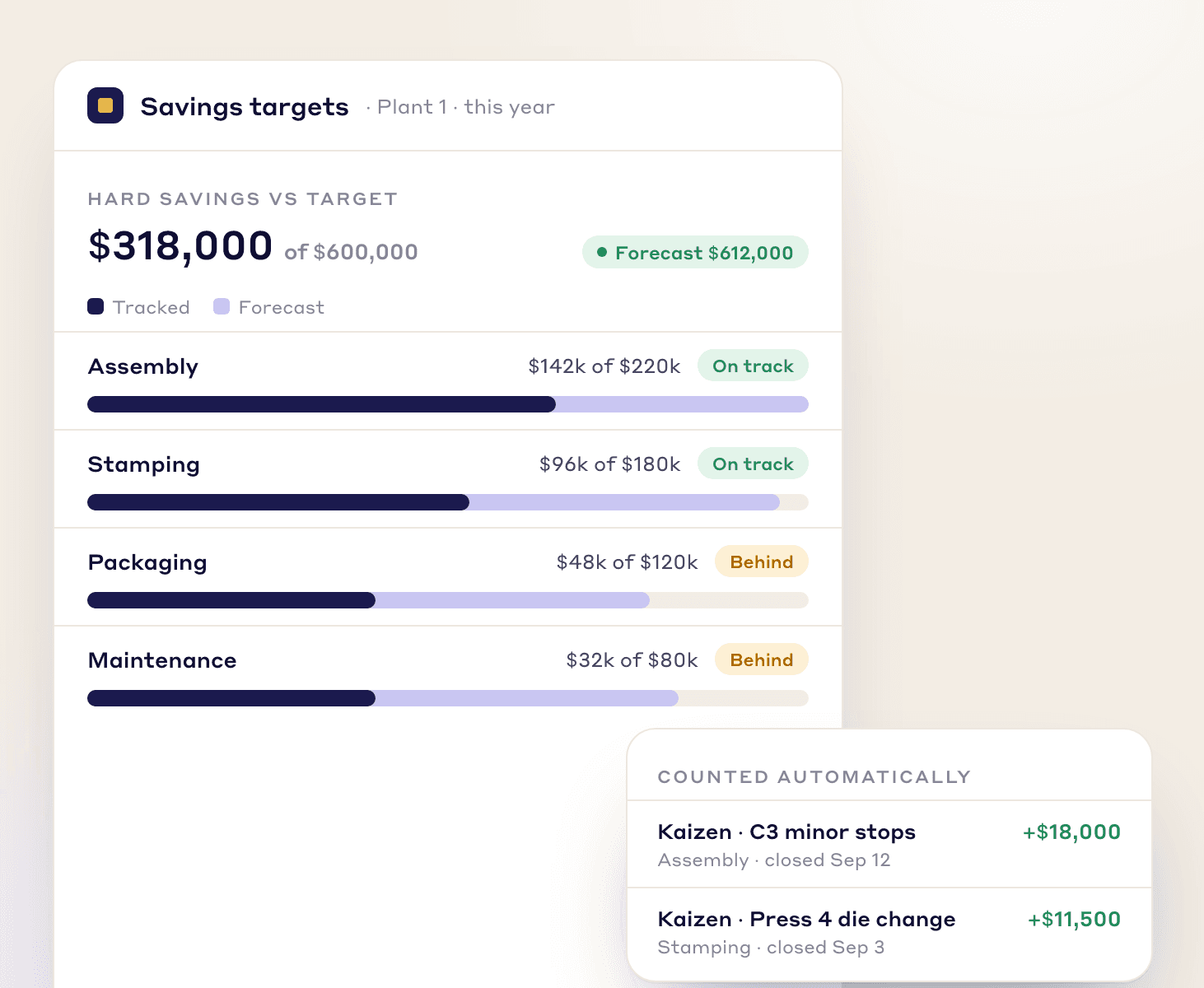
Step 4
Savings are broken down into rolling 12-month figures, so finance can go into a single month and change what was actually saved. Hard savings then reflect on the glide path and the year's view updates.
Who feels it
The same missing number costs three people something different.
You defend savings numbers you inherited from whoever closed the project.
With LeanSuiteEvery Kaizen carries its own target savings, target cost and target date from the day it opens.
You cannot tell in March whether this year's projects will land the target.
With LeanSuiteThe glide path shows carryover, closed and projected savings month over month, with the gap on top.
You discount the improvement total because nothing behind it can be checked.
With LeanSuiteYou edit the actual savings for a single month, and hard savings update on the glide path.

From our co-founder
“It starts off by adding savings targets. As the Kaizens flow in, it builds your glide path and pipeline towards your targets and shows you if there's any gap by the end of the year or not.”
Where to next
The savings question comes back every year, so the next step is tracking project results and the losses behind them as they happen. These three pages cover the portfolio view, where the losses sit, and what the spending looks like.
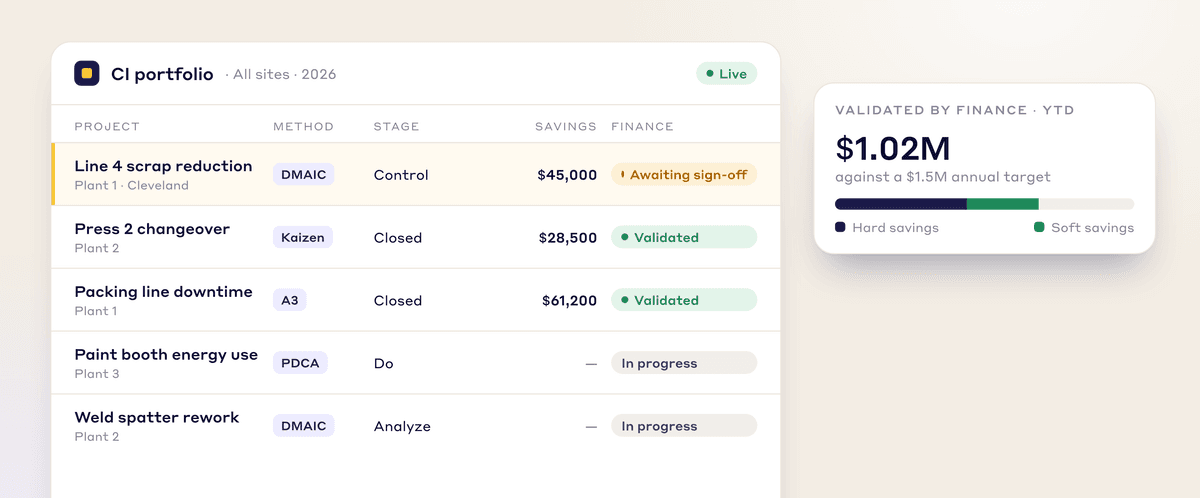
Keeps all Kaizen projects in one portfolio and updates them in real time instead of one typed figure at closeout. Gives leadership the financial impact of each improvement when they ask.
See how it works →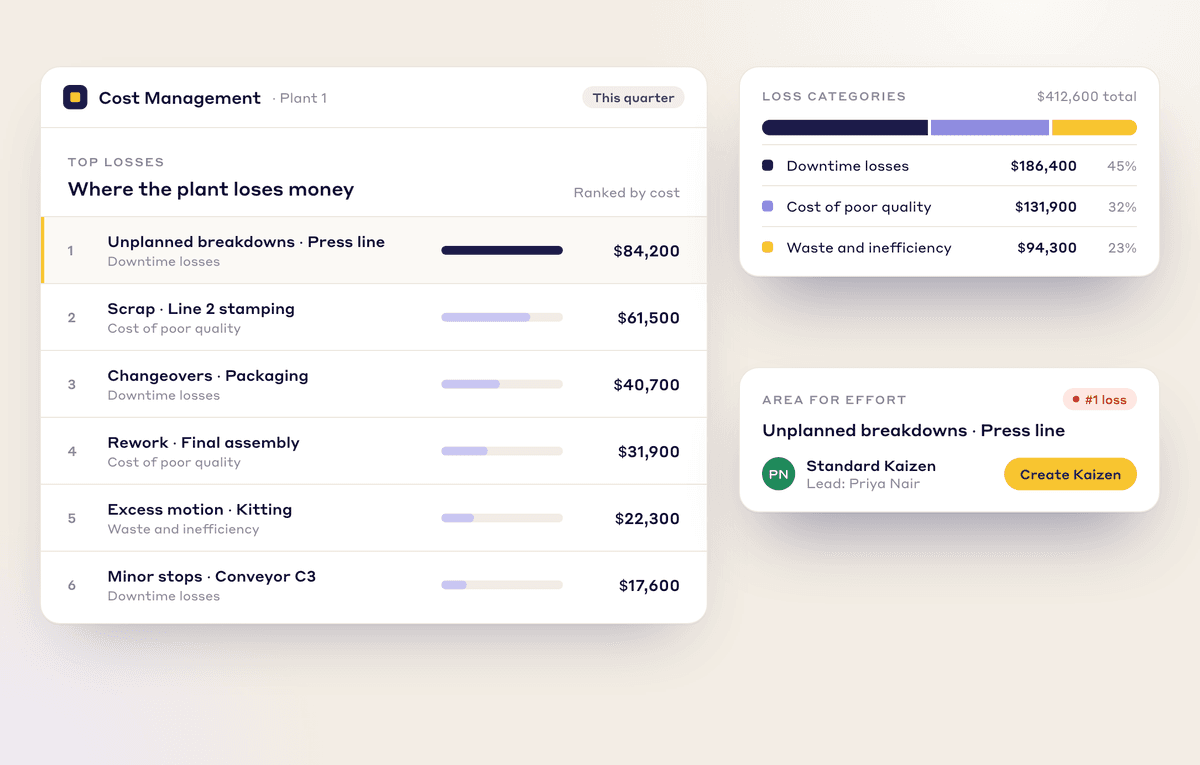
Puts a number on losses from downtime, quality, and waste, so projects start from a figure Finance can see. That same visibility is what lets you show the loss was removed.
See how it works →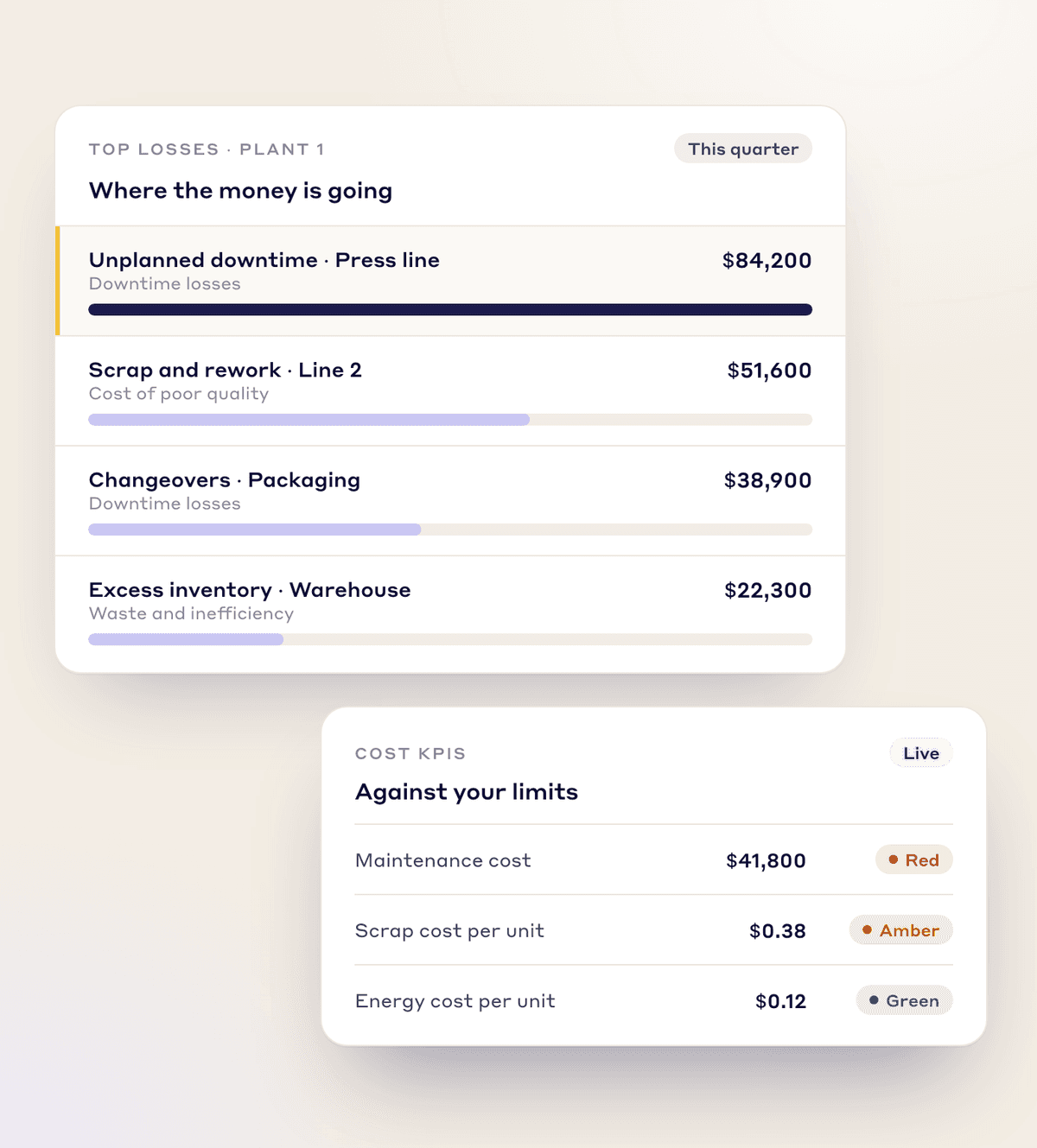
Shows manufacturing costs so you can see where money is going before the year is gone. Useful when you need to know the gap to target while there are still months left to run projects.
See how it works →Usually because the money was never defined before the work started, so a figure gets typed in on closing day. In LeanSuite the target savings, hard or soft, target cost and target date sit on the project from the day it opens, and workflow validation can block a Kaizen from advancing until those fields are filled.
No. You define the target savings and the category, and finance can adjust the actual figure month by month. LeanSuite is not an MES and does not collect downtime itself, though it can connect to one and build loss trees in dollar terms from that data.
Yes. Savings are categorised when you enter them, and hard savings are what reflect on the glide path, so the year's view is not inflated by soft numbers. Soft savings are still tracked on the project for reporting.
Getting the system stood up takes about twenty four hours on our side; the wait is usually collecting your users, plant structure, assets and any historical projects from Excel, which typically takes a couple of weeks. For the first 60 to 90 days we run twice-weekly sessions so questions get answered while you set targets.
Bring one of your closed Kaizens and one open one, and we will show what the target fields and the glide path would say about your year.