Skip to content

CI Portfolio & ROI Management: Stop Guessing Your Continuous Improvement ROI. Prove It.

CI portfolio management puts every improvement project and its savings in one place. LeanSuite replaces project spreadsheets with a live portfolio where Finance verifies the savings from every Kaizen and a glide path tracks them against target.

By clicking "Schedule Demo," you agree to the use of your data in accordance with LeanSuite's Privacy Notice, including for marketing purposes.

The Visibility Gap

The true cost of the "spreadsheet black hole"

When CI projects live in scattered Excel files and slide decks, projects stall and the CFO doubts the reported savings.

The reporting nightmare

  • Unverified "Funny Money"

    Engineers claim savings Finance can't find in the P&L.

  • Stalled Execution

    Kaizen events start strong but fizzle out without central tracking of 30-60-90 day actions.

  • Multi-Site Blindness

    The VP of Operations can't see what sister plants are working on.
The LeanSuite ROI engine

  • Hard Financial Validation

    Workflow rules require Finance to sign off on savings before a project closes.

  • Automated Accountability

    Reminders and late-phase alerts keep owners on their sustaining tasks.

  • Executive Visibility

    One live portfolio rolls up projects, timelines and savings across every plant.

Schedule Demo

HOW IT WORKS

Three modules, one validated CI portfolio

Kaizen & Projects runs every improvement from charter to closure. The Financial Engine routes savings to Finance for sign-off. KPIs & Dashboards roll verified savings up for leadership.

Kaizen & Projects
Financial Engine
KPIs & Dashboards

Kaizen & Projects

Structured Problem-Solving Framework

Standardized execution

Every project follows the method and workflow set for its type, from a quick Kaizen to a DMAIC or CapEx project.

  • One repository for every CI project

  • Standard DMAIC, A3 and PDCA templates, or your own methodology

  • Workflow rules set who can move a project and what must be filled in first

  • Automatic reminders for 30-60-90 day sustaining tasks

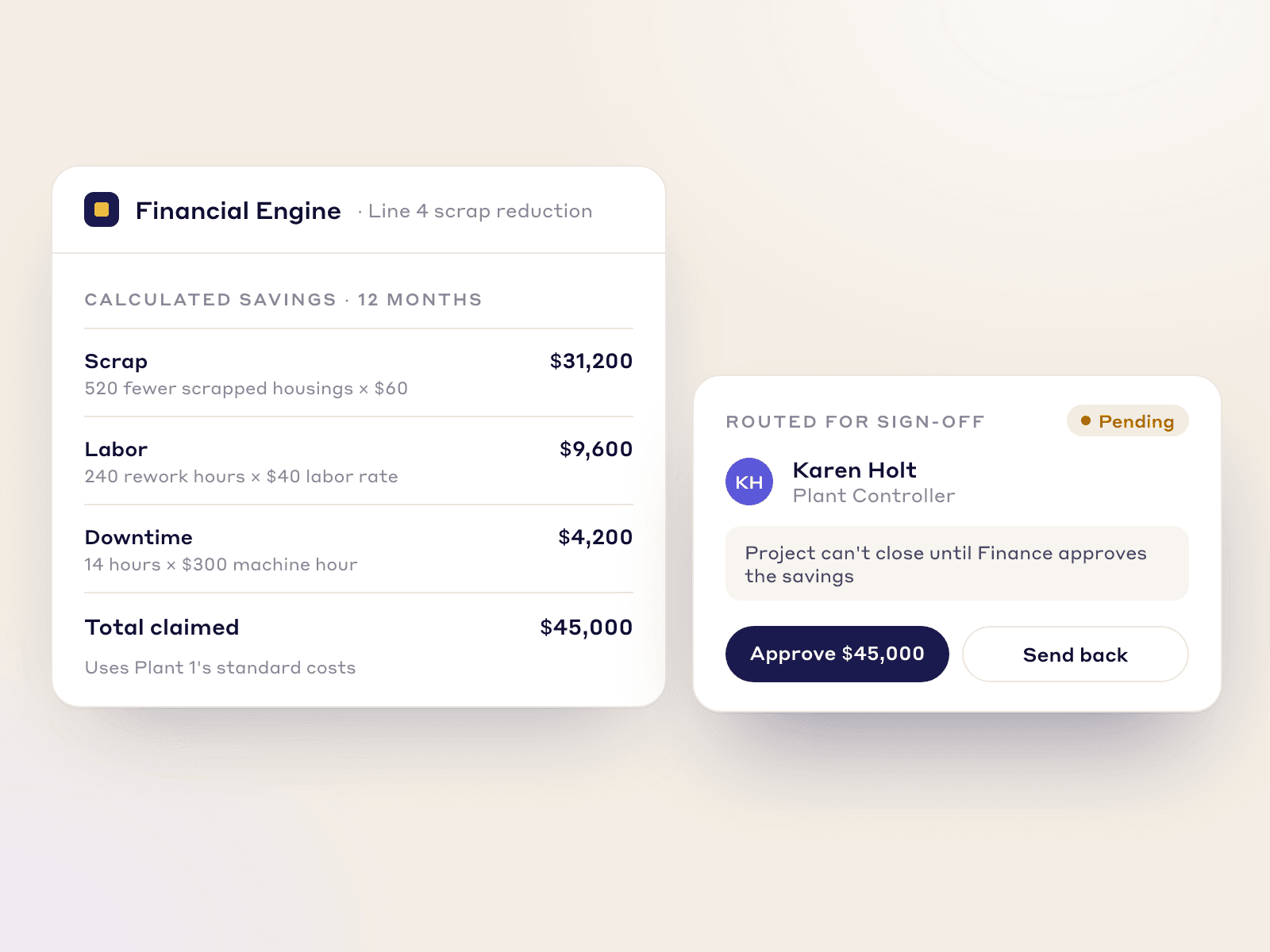
Labor, scrap and downtime savings worked out for a kaizen and routed to the Plant Controller for sign-off before it closes

Financial Engine

Validated ROI Calculation

Finance-approved workflows

Before a project is marked "Closed," the system automatically routes the calculated savings (labor, scrap, downtime) to the Plant Controller for digital verification, eliminating "funny money."

  • Savings are calculated from your own labor, downtime and scrap rates

  • The Plant Controller signs off digitally before the project closes

  • Stage-gates can require review above a savings amount you set

  • Only Finance-approved ROI reaches corporate reporting

  • Savings can be split between the lead, sponsor, coach and team

KPIs & Dashboards

Real-Time ROI Visibility

The executive command center

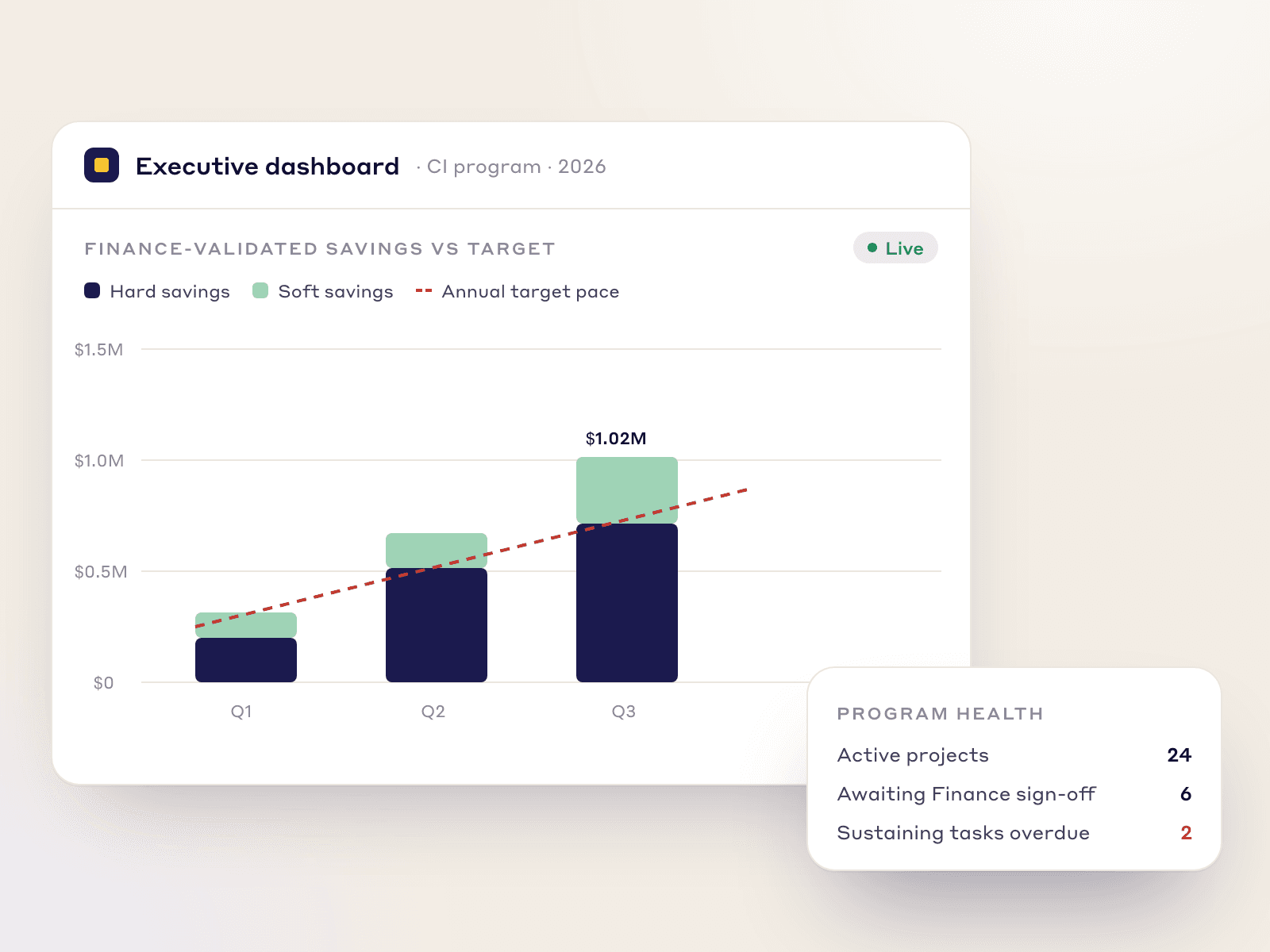
Verified savings feed the executive dashboard, and the glide path shows closed, projected and carried-over savings against the target, month by month.

  • CI program health across every site in one view

  • Glide path of closed, projected and carried-over savings against target

  • Rolling 12-month savings, adjusted by Finance month by month

  • Hard and soft savings, cost avoidance and CapEx tracked separately

Executive dashboard of Finance-validated savings by quarter against the annual target, split into hard and soft savings
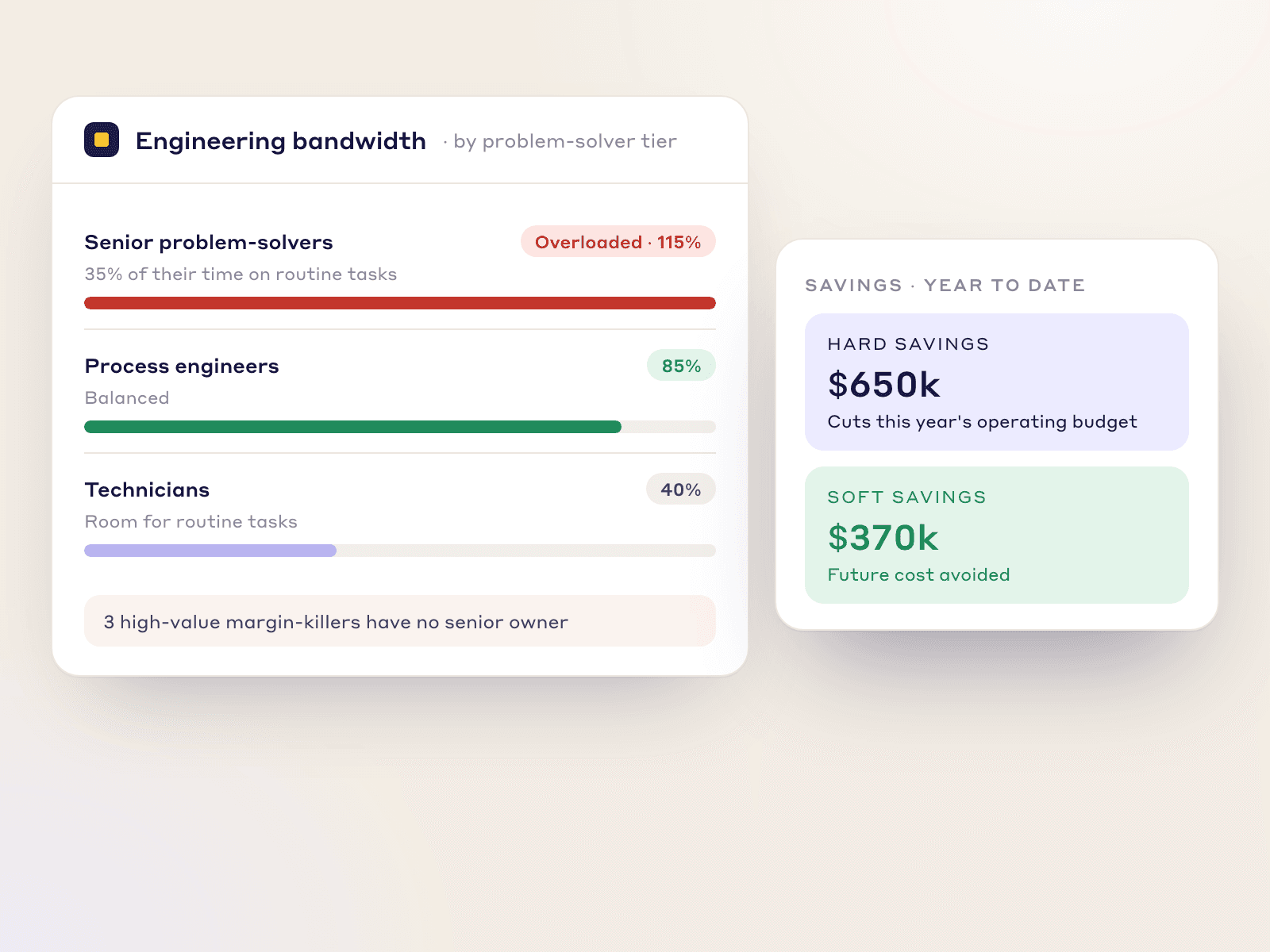
Engineering bandwidth by problem-solver tier with the top tier overloaded, next to hard and soft savings shown separately

Bridging the Gap

Connect the Shop Floor to the P&L

CI works when Operations and Finance agree on the numbers. LeanSuite applies the same financial check to every project.

Track Soft vs. Hard Savings

Separate projects that avoid future costs (soft savings) from those that cut this year's operating budget (hard savings).

Resource Allocation

See planned against actual hours per person, so your best problem-solvers are not stuck on minor tasks while big losses wait.

Operations and Finance

Built for the VP of Operations and the CFO.

Simple execution tools for engineers, and auditable financial governance for executives.

  • Standard DMAIC, A3 and PDCA templates

  • Plant Controller sign-off before a project closes

  • CI program health across every site

  • Hard and soft savings tracked separately

FAQs

Frequently Asked Questions

  1. CI portfolio management is tracking every improvement project, its status and its savings in one place. In LeanSuite each project records its savings, Finance verifies them, and dashboards roll them up against targets.

  2. It plots closed, projected and carried-over savings against the plant target, month by month, so you see whether open projects will reach the year's target.

  3. You configure stage gates in the workflow. For example, a project claiming over $10,000 can require the Plant Controller's sign-off before its ROI reaches the dashboard.

  4. Yes. You enter your plant's standard costs for labor, machine downtime and scrap, so savings are calculated from your own financial baseline.

  5. Yes. You can schedule 30, 60 and 90-day verification audits after a Kaizen closes to check that the savings hold.

  6. Yes. Any project can be shown as branded slides in presentation mode or exported as a PDF, and the project list exports to Excel.

  7. Yes. During onboarding our team helps you bulk-import past project logs, so your dashboards start with a baseline.

  8. Yes. Each project records its one-time and ongoing costs next to its savings, and reports show benefits against costs.

  9. Yes. Budgeted, forecast and actual savings are kept apart, and a variance view shows which projects are slipping.

Ready to Prove the Value of Your CI Program?

See how three connected modules show the validated savings behind every CI project.