

Corrective action log: Replace the paper sheet with one list of issues, owners and due dates
A digital corrective action log keeps every shop floor issue on one list, with a title, an owner and a due date, until someone closes it. In LeanSuite anyone raises the issue from a phone, a rule assigns it by area or machine, and it stays on the open list until it is closed.
The problem
Why the paper sheet on the production board stalls
The sheet is quick to write on. The trouble starts after the line is written.
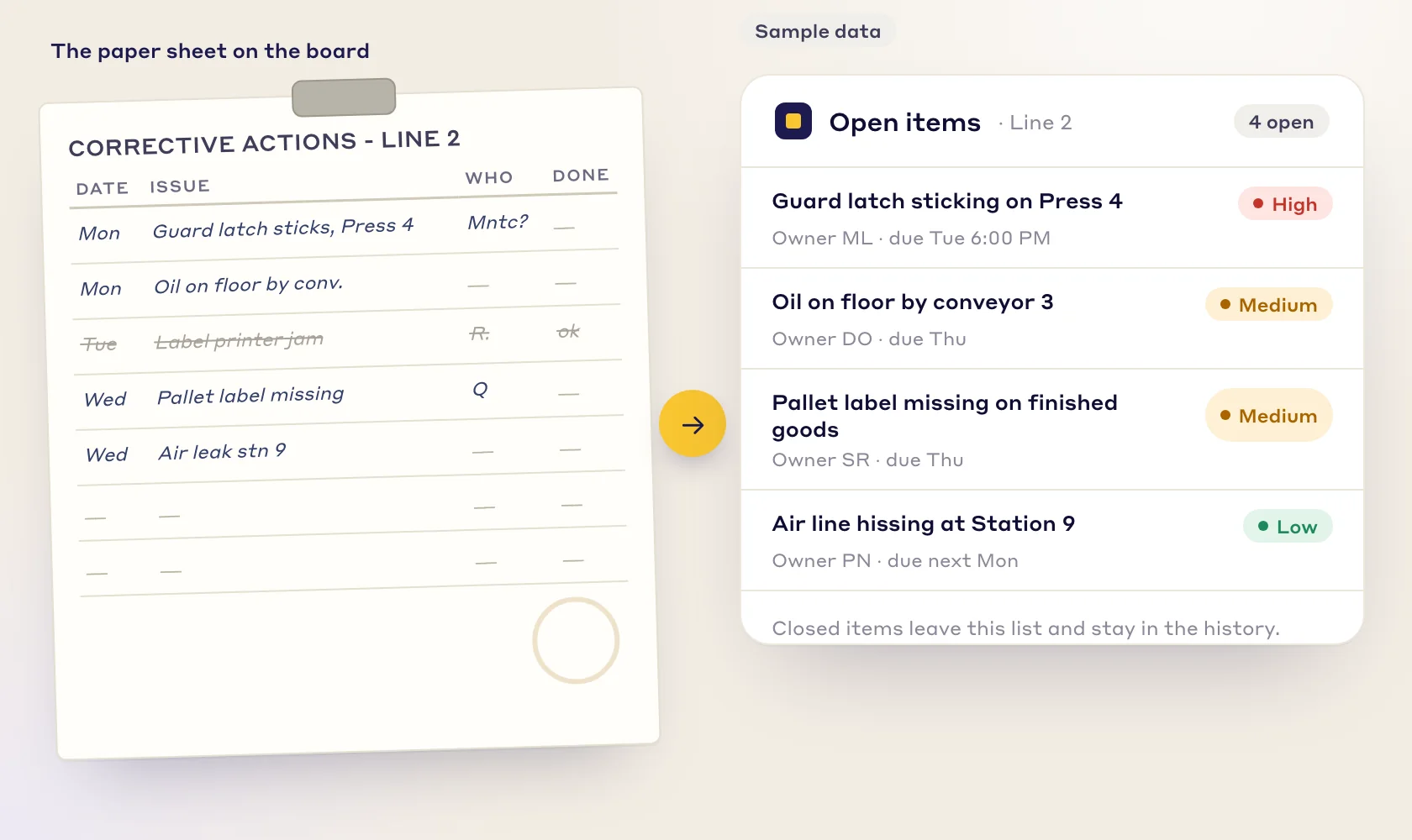
Paper sheet
- Nobody is named. A paper sheet often says "maintenance" or an initial, so each person assumes someone else has it.
- The owner is not told. A line added to a sheet reaches its owner only when someone says so, or when they walk past the board.
- No photo, no exact place. A note like "air leak stn 9" sends the next shift to look for it again.
- Open items cannot be counted. Finding out what is open, who has it and what is late means reading the whole sheet, and closed lines vanish into a binder.
One list
- Every issue has a title, a description and an owner, and a due date that follows its priority.
- Open items sit on one list that anyone with access can open, on a phone or at a desk.
- A photo and the exact machine travel with the issue.
- Closed items leave the open list and keep their history.
How it works
Raise it, assign it, work it, close it
Four steps, and a picture of each. All of it runs in the Daily Issue Management module.
Step 01
Raise it where it happens
Scan the QR code on the machine, or tap the machine on the floor plan. The department, line, workstation and asset fill in from the plan, so the person raising the issue only adds a title and a description, and a photo if it helps.
The form asks for little by default. Your admin can show, rename or require more fields, and add your own issue types.
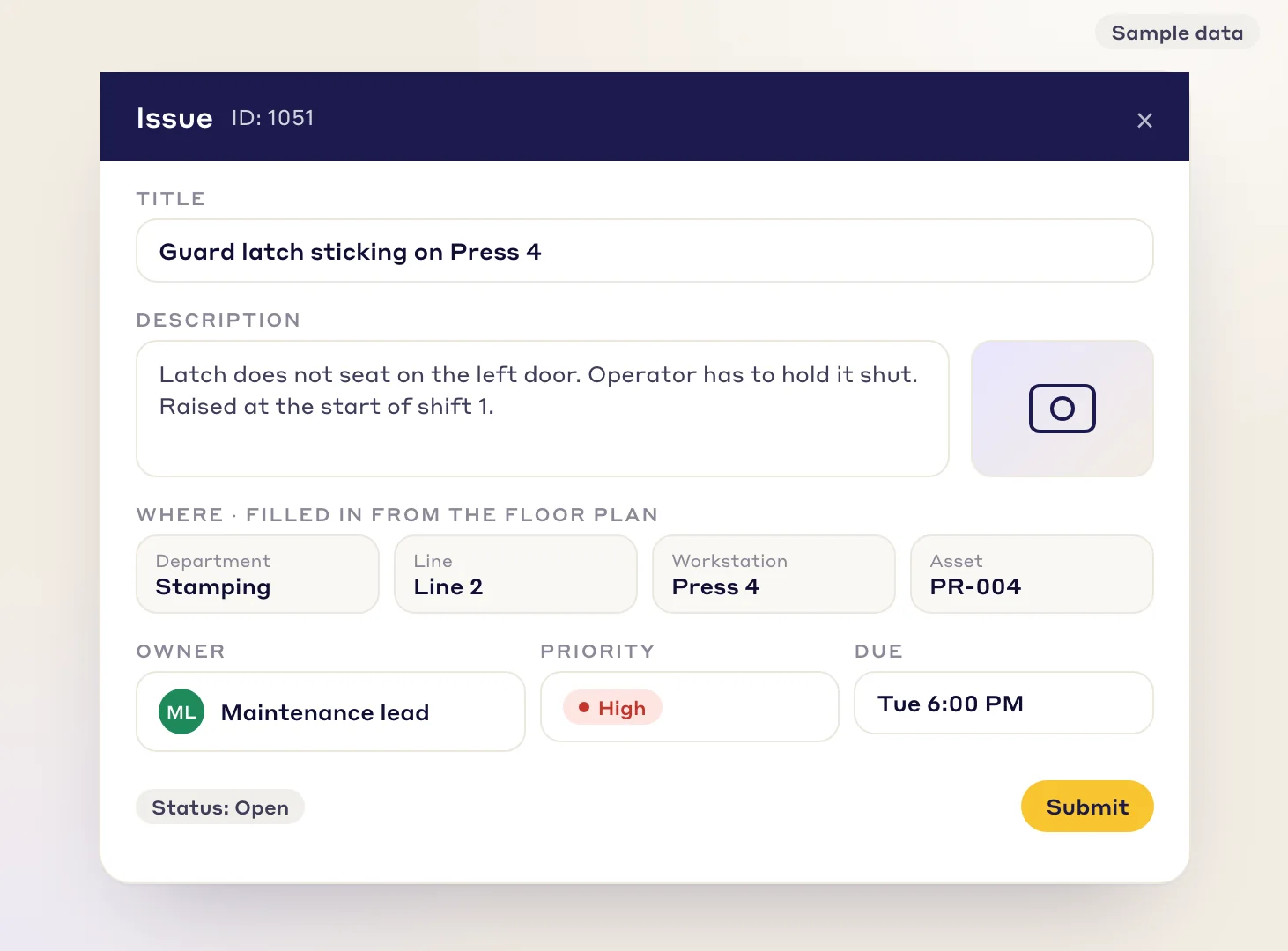
The issue form. Where the problem is comes from the floor plan. Sample data. Step 02
Let a rule assign it
Rules send each issue to an owner by area and machine, and also by issue type, department and priority. The owner is notified in the app, by email or by push, and due dates can follow priority, so urgent issues come first.
You can cap how many times an issue can be reassigned, so it does not bounce between people.
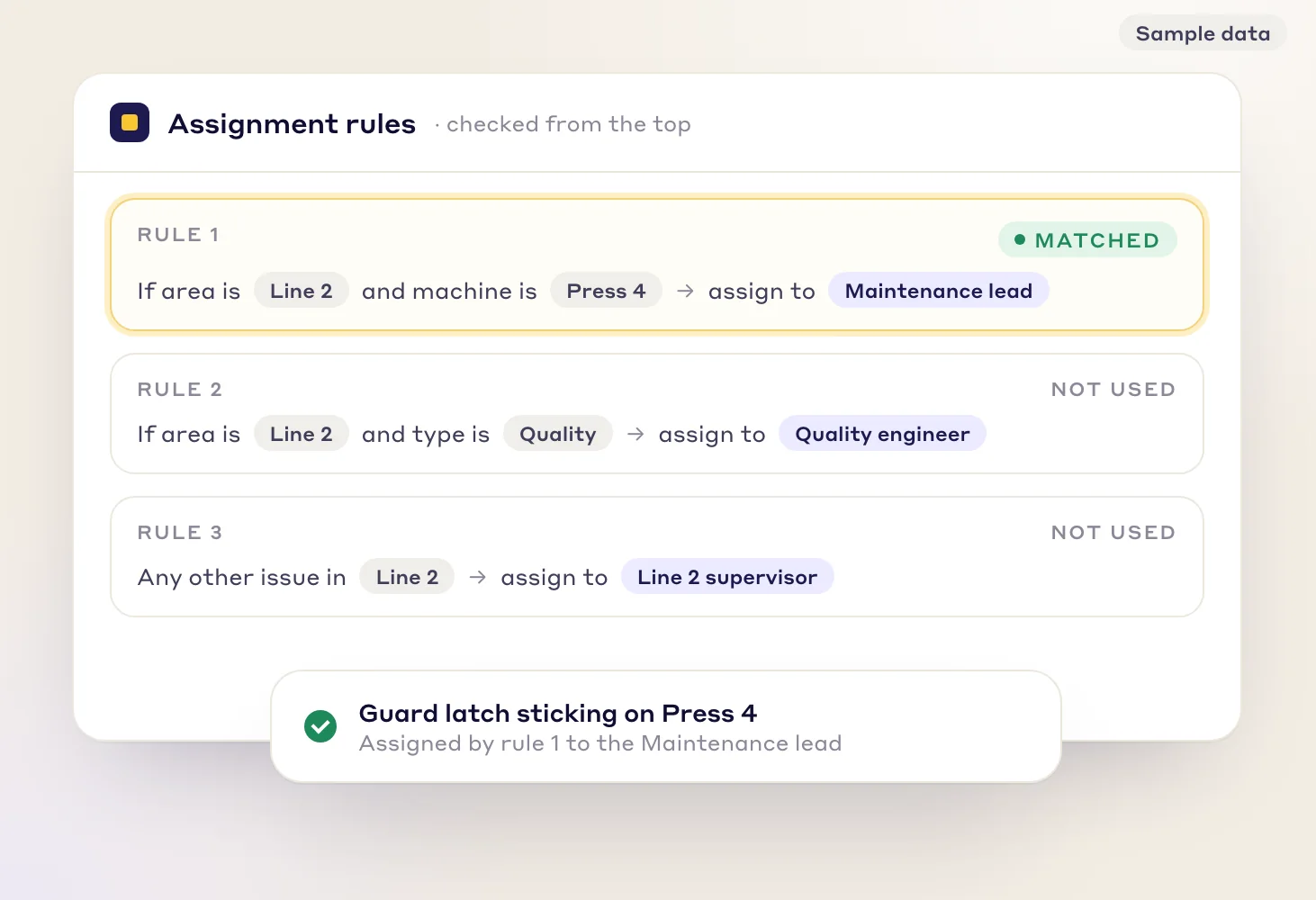
Rules are checked from the top and the first match sets the owner. Sample data. Step 03
Work from one list and one map
Open items show on one list, and the floor plan shows where they are. Tapping a machine lists what is open there and raises a new issue on it. Save a filter as a view for your line, or put the floor plan on a shop-floor TV.
A Kanban board and built-in reports of opened against closed items and hot spots by area are in the same module.
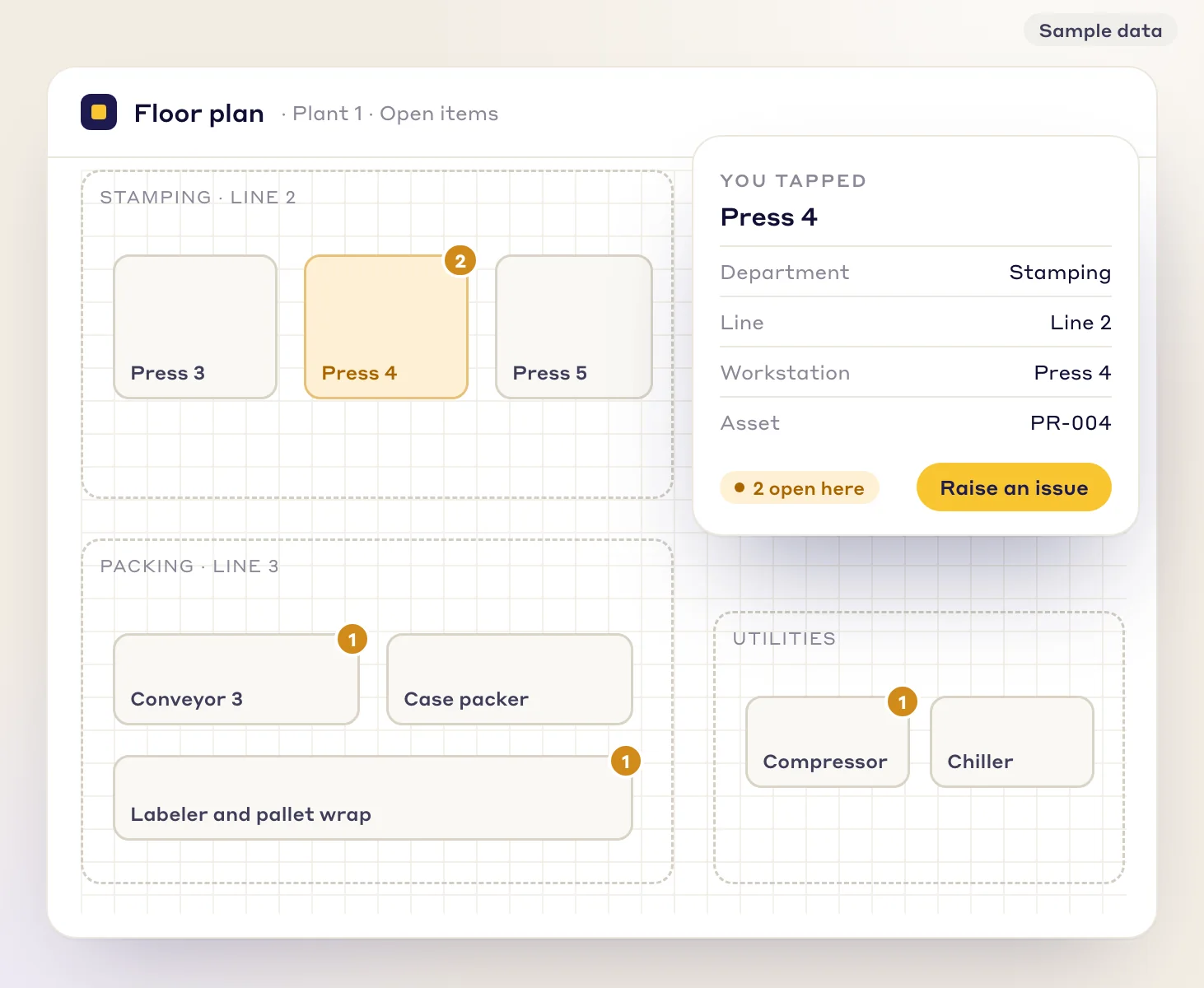
Tap a machine on the floor plan to see what is open there and raise a new issue. Sample data. Step 04
Close it and keep the history
The owner enters the fix. It waits for verification before the issue closes, then it leaves the open list. Its history, comments and changes stay on the issue for the next review or audit.
An issue that keeps coming back can be escalated into a Kaizen or A3 project in one click.
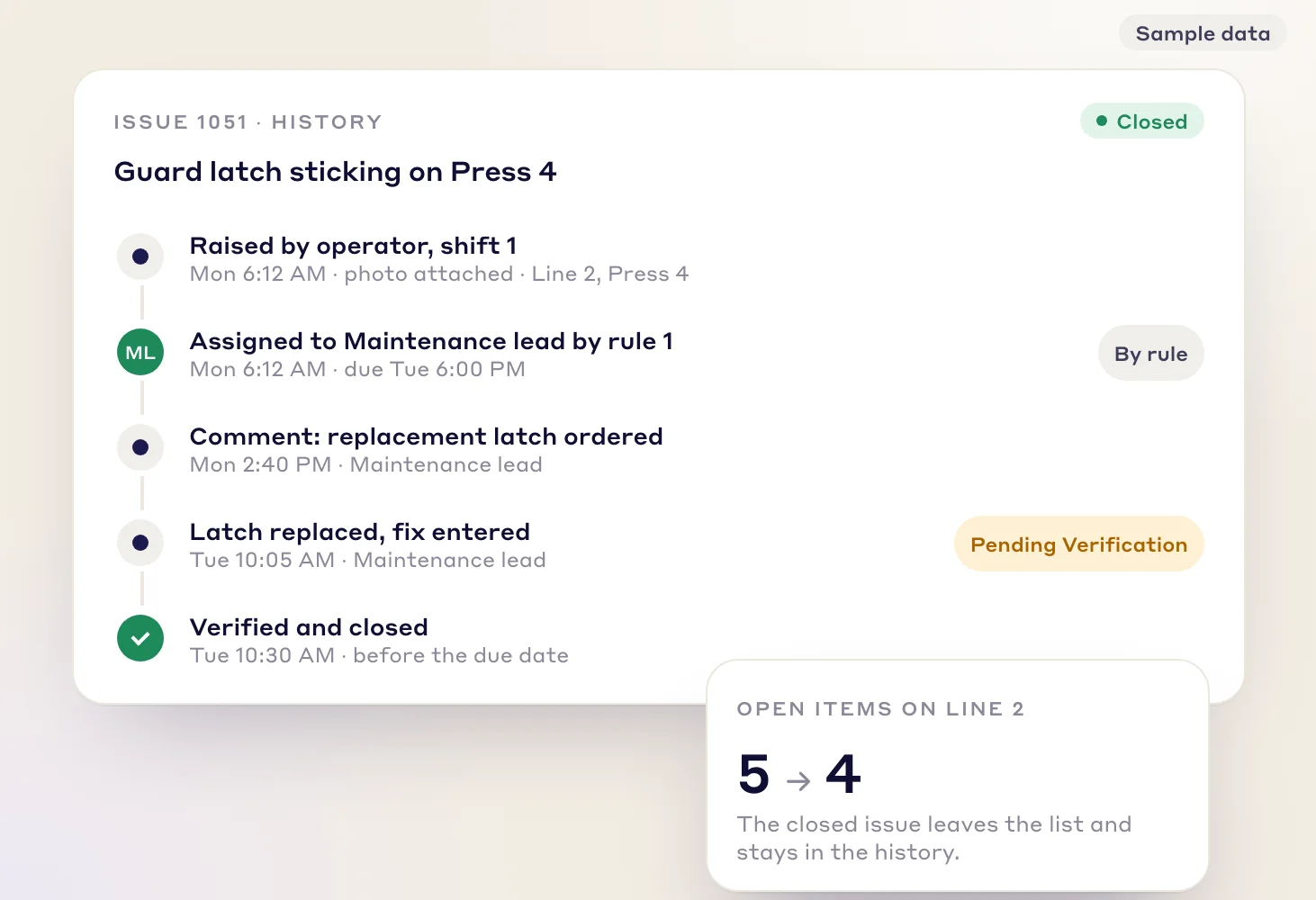
A closed issue leaves the open list and keeps its history. Sample data.
Who it is for
Who uses the log, and for what
Users are unlimited per facility, so the operators who see the problems can raise them.
Production supervisors and team leads
- Raise and see issues for your own line without a clipboard.
- Run the daily review from the open list instead of the sheet.
Maintenance, quality and safety owners
- Get the issues that match your area or machine, with the photo and the place.
- Enter the fix and see what is waiting for verification.
Plant and continuous improvement managers
- See how many issues are open and late, by area.
- Turn repeat issues into Kaizen projects.
Pick the right record
An issue tag, a CAPA project or a Kaizen
The log is for everyday problems. Bigger work moves to the record that fits it.
An issue tag
A problem with an owner and a date
Use it for the daily problems the paper sheet holds: a damaged guard, a missing label, a leak. Raise, assign, fix, verify, close.
A CAPA project
A systemic quality problem
A systemic non-conformance can run as a CAPA project with its own approval steps, root cause sections and an action plan. The NCR page shows how.
Non-conformance and CAPAA Kaizen
An improvement with benefit and cost
Kaizen is for projects where you track benefit and cost. A recurring issue can be escalated into one.
Kaizen & Projects
Worked example
One guard latch, from Monday morning to Friday review
Sample dataInvented to show the flow. The names, times and counts are not from any plant.
| When | What happened | Who |
|---|---|---|
| Mon 6:12 AM | An operator taps Press 4 on the floor plan. Department, line, workstation and asset fill in. A title and a photo are added and the issue is submitted. | Operator, shift 1 |
| Mon 6:12 AM | Rule 1 (Line 2 and Press 4) assigns it to the Maintenance lead. Priority is high, so it is due Tue 6:00 PM. | Rule |
| Mon 2:40 PM | Comment added: replacement latch ordered. | Maintenance lead |
| Tue 10:05 AM | Latch replaced and the fix entered. The issue waits for verification. | Maintenance lead |
| Tue 10:30 AM | Verified and closed before the due date. Open items on Line 2 go from 5 to 4. | Maintenance lead |
| Fri 2:00 PM | Weekly review. 12 raised this week, 8 closed, 4 open. Two of the open ones are past their due date and are named in the review. | Line 2 team |
On paper, the same latch would be one line that says "Mntc?" with no photo and no due date. Here the owner was named at once, the next shift could see the photo, and the Friday review read the open list instead of the sheet.
What it does not do
The limits, stated plainly
- It does not decide what your quality system needs. Whether a tag log, a CAPA project or both meet your standard or a customer's rule is for your quality lead and auditor to decide.
- It is not a CMMS. LeanSuite works alongside yours, and a tag can carry the work-order number from your maintenance system.
- It is not a project tool. Work that needs benefit and cost tracking belongs in a Kaizen.
- It needs a connection. There is no offline mode.
LeanSuite has a SOC 2 Type 1 report and a 4.5 rating on Capterra from 8 reviews. Details are on the security page.
FAQ
Corrective action logs: common questions
A corrective action log is the list of problems a site has found and what is being done about each one: who owns it, when it is due and whether it is closed. A digital one replaces the paper sheet or spreadsheet with a single list everyone can open. In LeanSuite each issue is a tag with a title, a description and an owner, and open items show on one list.
Corrective action removes the cause of a problem that has already happened, so it does not come back. A correction is the quick fix of that one instance, such as reworking a bad part. Preventive action removes the cause of a problem that could happen but has not yet, and CAPA is the name for managing both together. ISO 9001:2015 no longer has a separate preventive action clause and covers prevention through risk-based thinking, while ISO 13485 still has corrective action in clause 8.5.2 and preventive action in clause 8.5.3.
No. A log covers the day-to-day part: an owner, a due date, a close-out and a history for each issue. A systemic quality problem can run as a CAPA project in LeanSuite, with approval steps, root cause sections and an action plan, and a tag can be where it starts. Which records your quality standard requires is for your quality lead and auditor to decide.
They scan the QR code on the machine, or tap the machine on the floor plan, and check whether the problem is already open. The department, line, workstation and asset fill in from the plan. They add a title and a description, and a photo if it helps, and submit.
Assignment rules pick the owner by area and machine, and by issue type, department and priority. The owner is notified in the app, by email or by push. You can cap how many times an issue is reassigned, and an issue that cannot be fixed locally can be escalated to the next tier with its history.
Use an issue tag for a problem that one owner can fix by a date. Use a Kaizen for an improvement project where you track benefit and cost. If the same issue keeps coming back, escalate it from the tag into a Kaizen or A3 project and work on the root cause.
Sources for the definitions
- DeGrandson: correction, corrective action and preventive action, quoting the ISO 9000:2015 definitions
- Advisera: ISO 9001:2015 clause 10.2, correction versus corrective action
- ECESIS: ISO 9001:2015 clause 10.2, and preventive action folded into risk-based thinking
- Greenlight Guru: the FDA QMSR, ISO 13485 clauses 8.5.2 and 8.5.3
FREE RESOURCES
Free templates and tools
Not ready for software yet? Start with these free resources.
- CAPA log templateAn Excel CAPA tracker with status, days open, late flags and counts by source, plus a printable log and monthly review.
- Andon response logEvery andon call with response and fix times, flags against your targets, and counts by type and station.
- Corrective action request (CAPA) formOne problem from containment to proof the fix worked, with occurrence and escape causes and a closure check that tells you when it can close.
Try it on one line for 90 days
$3,000 per facility for 90 days, and our team does the setup. Your first module is live in under a week.