Skip to content
LeanSuite

SOP Software for Manufacturing: Written from a video of the real job

SOP software for manufacturing writes, controls and signs off the procedures operators follow. LeanSuite is AI SOP software: film the task once and get a draft with purpose, scope, PPE, warnings and a photo for each step, then version it and collect each person's signature.

By clicking "Schedule Demo," you agree to the use of your data in accordance with LeanSuite's Privacy Notice, including for marketing purposes.

SOP software, explained

What SOP software for manufacturing does

A standard operating procedure says how a task is done, in order, safely and the same way every shift. SOP software for manufacturing covers four jobs: writing the procedure, controlling its versions and approvals, getting it in front of the operator at the station, and recording who has signed for which revision. LeanSuite does the writing from a video of the real job, which is where most plants lose the time.

SOP, work instruction, SMP, one-point lesson and standard work: which document for which job
DocumentWhat it answersTypical lengthWhere to start
SOPHow is this task done, safely and in order, and who approved it?One task, several stepsCreate an SOP from video
Work instructionWhat does the operator do at this station, step by step, with pictures?One station or operationDigital work instructions
Standard maintenance procedure (SMP)How is this machine cleaned, checked or repaired?One machine taskStandard maintenance procedures
One-point lesson (OPL)What is the one thing to know or remember?One page, one ideaOne-point lessons
Standard workIn what sequence, at what pace and with what stock is the job done?One operator cycleStandardized work software

Plants use these words loosely. Pick the document by the question it answers, and keep one owner per document.

Watch

A short story from the plant floor

· 5:13

An SOP Nobody Owns Is Just a Suggestion

Your SOP says one thing. Everyone does another. In this story a new hire follows the page at a fastening station, the housings leak, and she gets the blame. The page said bolts one to six. The crew had tightened them crisscross for two years. The page had no owner. No name, no review date, nobody to tell when the fixture changed. An SOP with no owner isn't…

Press play to load the player from YouTube, or watch it on YouTube.
The problem

Why standard operating procedures fall behind

Hand-written SOPs eat engineering time, copies drift out of date, and long text rarely gets read.

  • Authoring Bottleneck

    Engineers format Word documents instead of improving processes.

  • Version Chaos

    Binders, intranets and shared drives, and none of them current.

  • Low Adoption

    Walls of text rarely get read, or followed, on the floor.

How it works

How AI SOP creation works

Film the job once, let the AI draft the SOP, then approve it and publish it to the floor.

  • 1. Record the Process

    Film your subject-matter expert running the procedure from start to finish.

  • 2. Generate the SOP

    The AI writes a structured SOP with numbered steps, photos from the video and safety callouts.

  • 3. Approve & Publish

    Route the draft for sign-off, then publish it to the tablets at each workstation.

Features

SOP features, from video to sign-off

No AI expertise needed.

Feature 01

Structured SOP from Video

Your process video becomes a structured SOP. Narrating while you film improves the result.

  • Numbered steps from the footage

  • Purpose, scope, PPE and tools filled in

  • A picture for every step

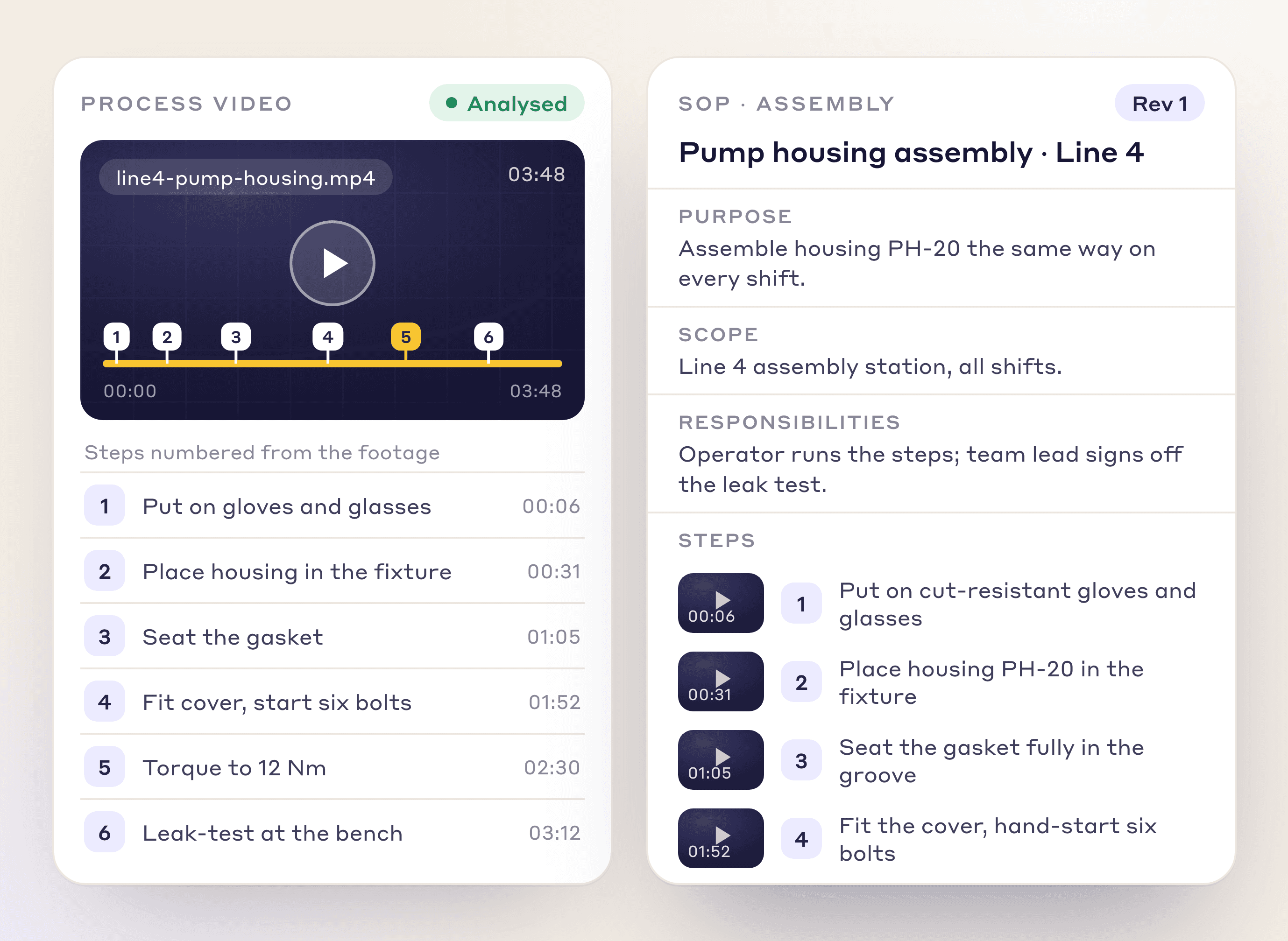
A process video with six detected steps next to the SOP drafted from it: purpose, scope, responsibilities and steps

Feature 02

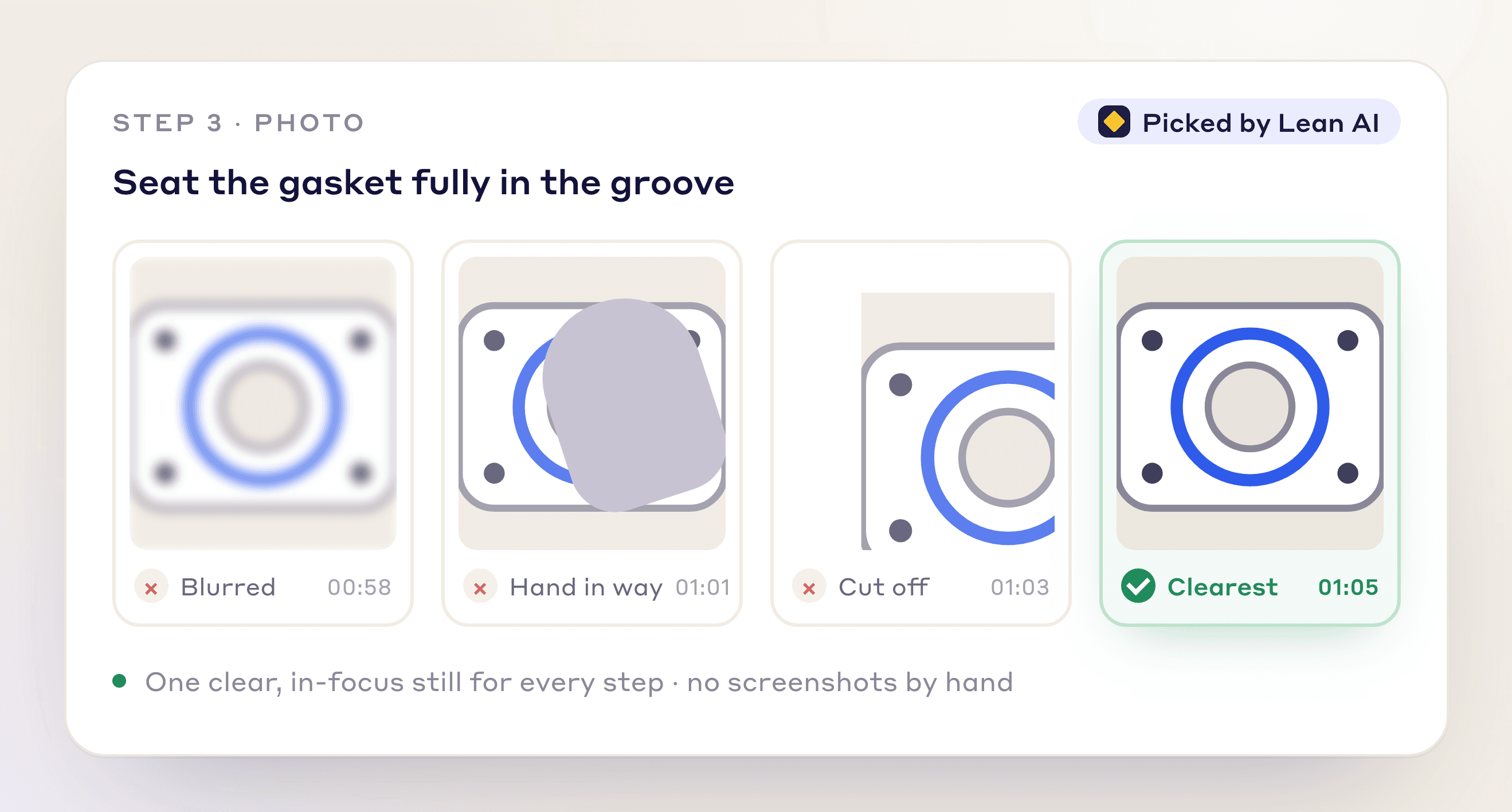
Smart Photo Capture

The AI picks the clearest frame for each step. Swap it if you prefer another.

  • Best frame picked per step

  • Swap any step's picture

  • No manual screenshots

Four candidate frames for one SOP step: blurred, hand in the way, part cut off, and the clearest frame the AI picked

Feature 03

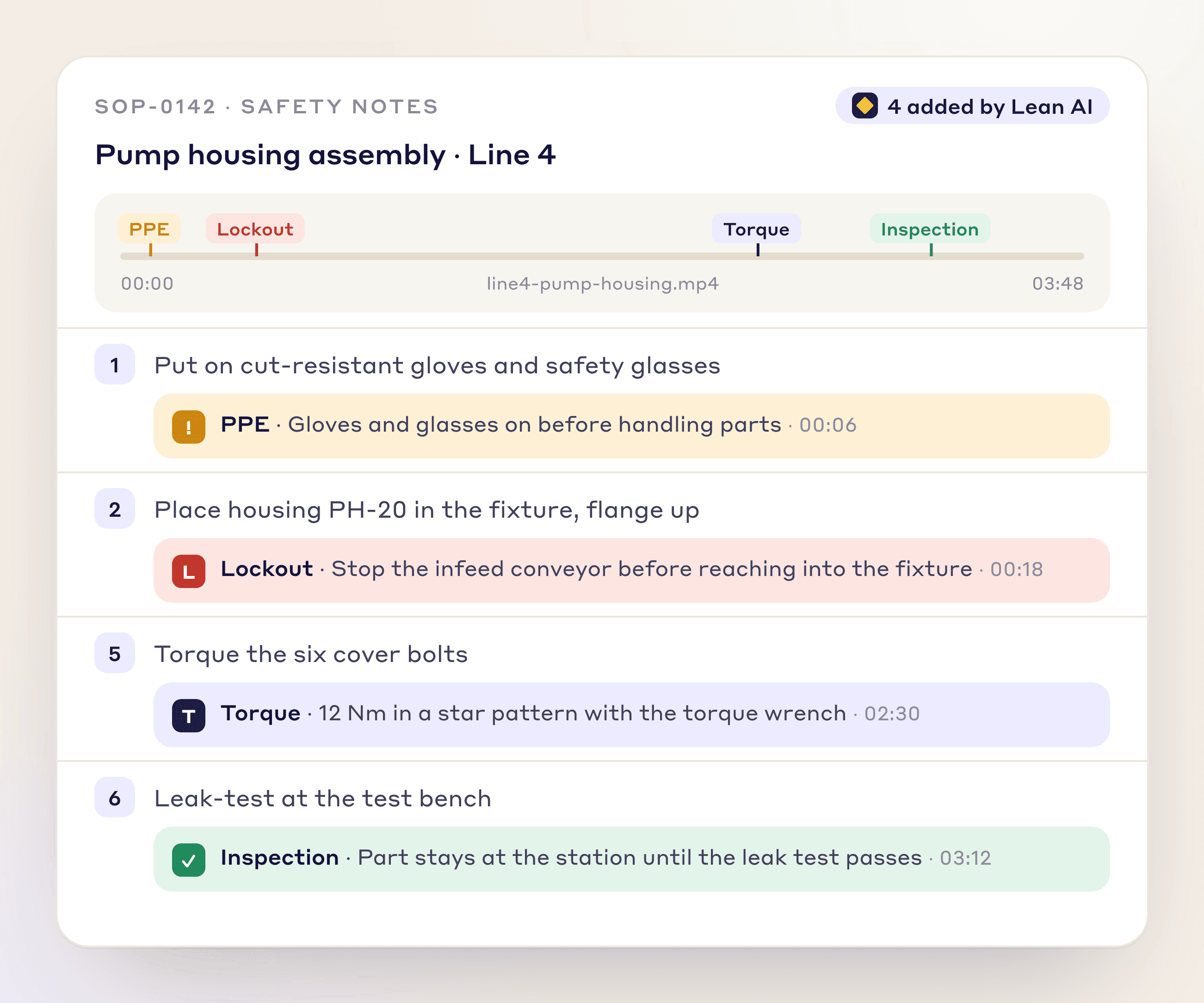
Safety Notes Auto-Insert

The AI spots PPE, tools and warnings in the video and adds callouts to those steps.

  • Automatic PPE detection

  • Tool and warning callouts

  • Safety notes tied to the exact frame

SOP steps with PPE, tool and warning callouts added from marked moments in the video

Feature 04

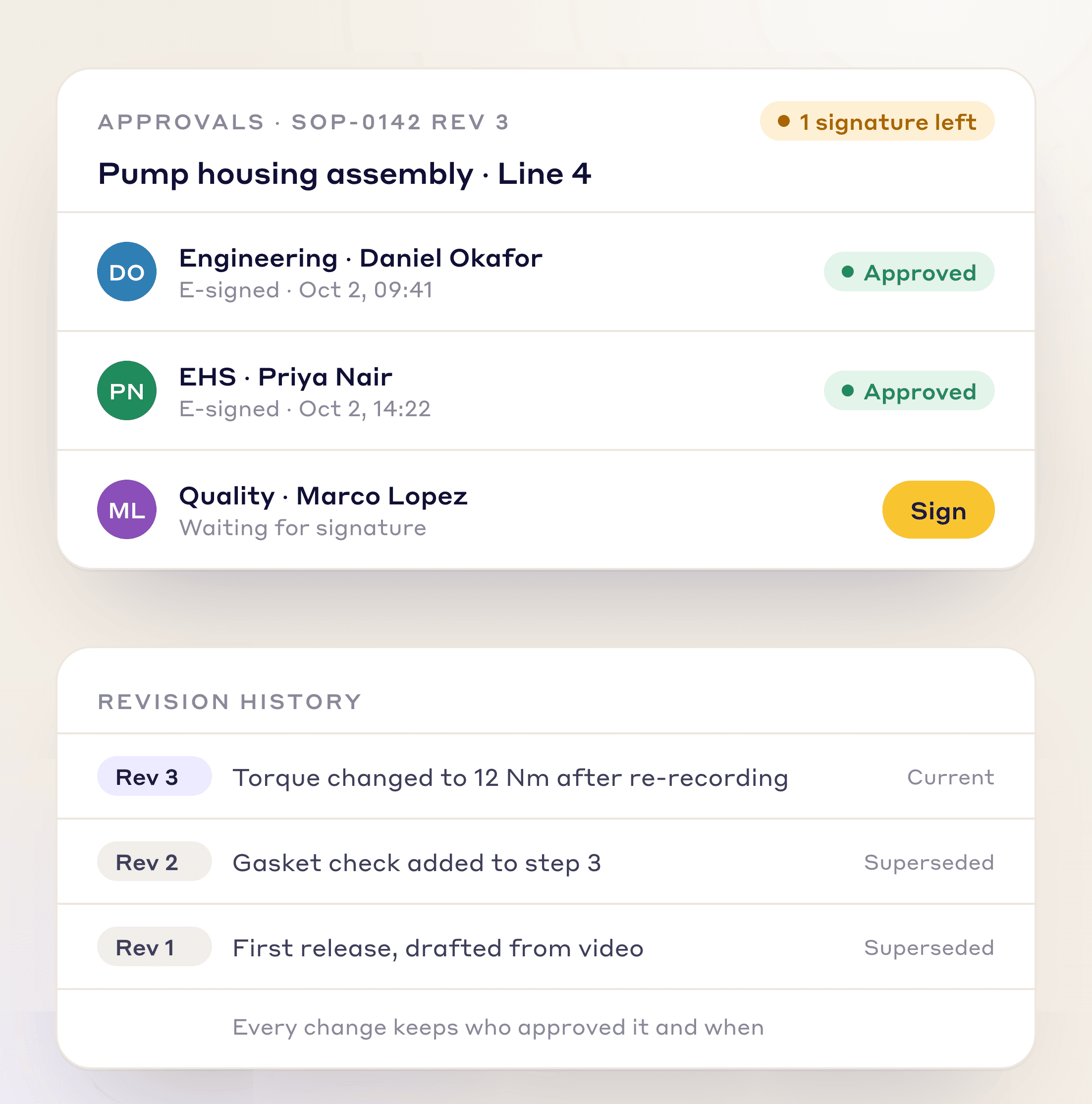
Revision Control & E-Signatures

Route drafts to engineering, EHS and quality for e-signature, with an audit trail and version history.

  • Multi-stakeholder approval routing

  • Built-in e-signature and audit trail

  • Version control across every plant

SOP approvals signed by engineering and EHS with quality still to sign, above the revision history

Feature 05

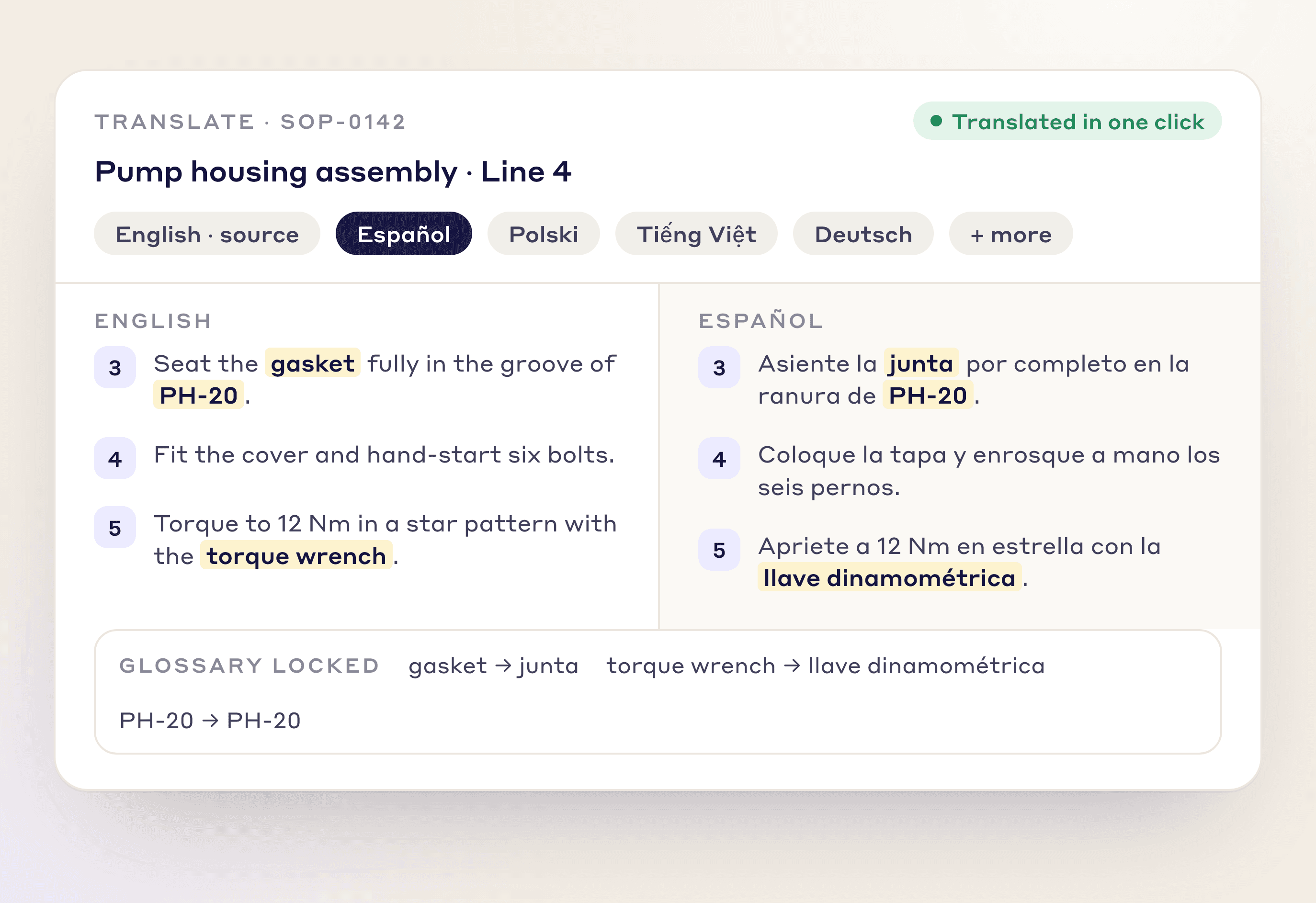
Multi-Language Translation

Translate a whole SOP into the languages your teams speak, with your glossary locked.

  • AI translation into the languages your teams speak

  • Glossary-preserved technical terminology

  • Consistent terms across all translated versions

An SOP step in English and Spanish side by side, with locked glossary terms

More than video

Create, control and sign off every SOP

Buying guide

What to check when choosing SOP software

  • Authoring effort: how long from the real job to a published draft, and who has to type it.
  • Version control: one current version per plant, with a history of what changed and why.
  • Approvals and sign-off per person: who signed which revision, and what is overdue.
  • Language: can the same SOP be shown in the languages your teams speak, with technical terms kept consistent.
  • Access without email: can an operator sign in with an employee ID instead of a company address.
  • Link to the work: can an SOP attach to a part, station, work order or skill.
  • Print and audit export: can you hand an auditor a copy and show the revision trail.
  • Fit with standard work: does the SOP sit beside your work instructions and training records, or in a separate silo.
Three kinds of tool that get called SOP software
KindStrong atUsually weak at
Document libraryStoring and revising controlled filesWriting the procedure, and getting it in front of the operator
Checklist and workflow executionRunning a procedure as tasks with sign-offsAuthoring from the real job; the SOP still has to be written somewhere
Video-first authoring (LeanSuite)Drafting the SOP from footage of the task, then versioning and per-person sign-offReplacing your MES, ERP or CMMS; it works alongside them

Many plants use more than one. Compare vendors on the [best digital work instructions software](/compare/best-digital-work-instructions-software) and [Dozuki alternatives](/compare/dozuki-alternatives) pages.

From video

An SOP from one video, step by step

The same footage that gives you a time study drafts the standard operating procedure.

  1. Film the task

    Record the process end to end on a phone. Narrating while you film improves the result.

  2. Upload in Create with AI

    Drop the video into Lean Creator's Create with AI and pick the SOP.

  3. Get the structured draft

    The AI turns the video into an SOP with purpose, scope, PPE, tools, steps, safety warnings and a frame per step.

  4. Edit, approve and publish

    Every generated document opens in Lean Creator for editing and approval, with revision control and e-signatures.

A process video with six detected steps next to the SOP drafted from it: purpose, scope, responsibilities and steps

What you get back

  • Purpose, scope, PPE and tools filled in
  • Auto-numbered steps
  • Embedded photo evidence, a frame per step
  • Safety warnings on the steps that need them
  • Revision control and e-signatures
  • A standard maintenance procedure from the same kind of video

Straight answers

Regulated industries, and what this is not

Every LeanSuite SOP is versioned, routed for approval and signed, with a history of who changed what and when. That is the record an auditor asks to see. Whether it meets a specific rule, such as ISO 9001 clauses or the requirements of a regulator in your industry, is for your quality team to check against that rule. We do not claim a validation on your behalf, so bring your requirement to the demo and we will show where each part is covered.

  • It is not an MES, ERP or CMMS. It works alongside them, and a connection goes through our API and is set up case by case.
  • It is not machine monitoring. It does not read data from your equipment.
  • It does not write a perfect SOP unattended. The AI drafts, and a person reviews, edits and approves before anything is published.
  • It is not a way to skip the filming. A clear video of the real task, ideally narrated, gives the best draft.
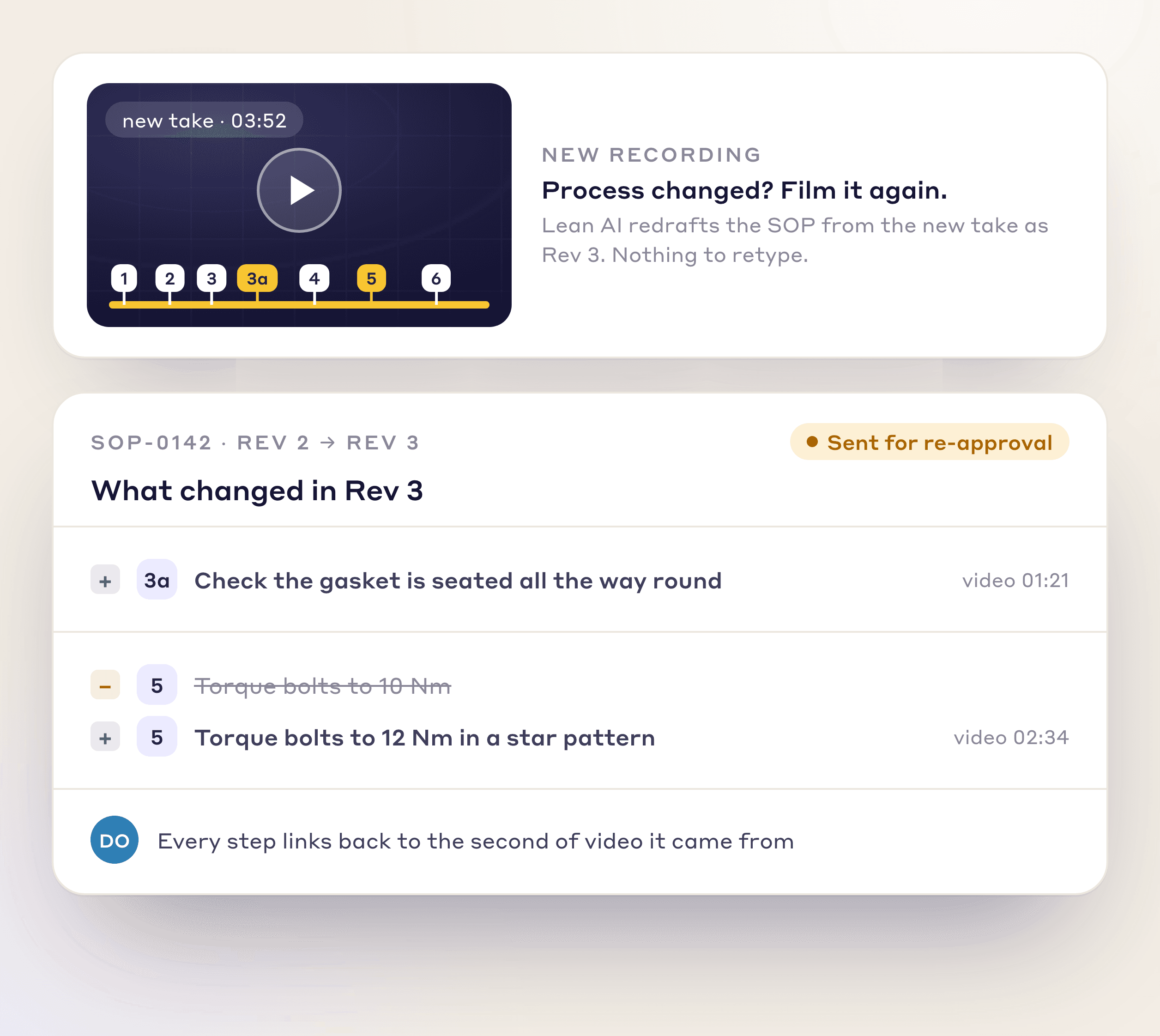
A new recording of the process and the changes it made to the SOP, sent for re-approval

Why It Matters

Why teams write SOPs from video

Instead of typing steps and rewriting the document every time the process changes, film the task and get a versioned, signed SOP.

Audit-Ready

Versioned, signed and traceable to the source video.

Always Current

When the process changes, re-record it instead of rewriting a Word document.

Operator-Friendly

Photo-led steps that are easy to follow on a tablet, even wearing gloves.

FAQs

Frequently Asked Questions

  1. Software that writes, controls and signs off the standard operating procedures operators follow. LeanSuite is AI SOP software: it drafts the SOP from a video of the task, then handles versions, approvals and per-person sign-off.

  2. For SOPs that operators follow at the station, choose by where the SOP starts and what it must connect to. LeanSuite drafts the SOP from a video of the task, routes it for e-signature and records each operator's sign-off next to their skills. Dozuki suits converting a library of existing documents with every change acknowledged, and Poka or Azumuta tie SOPs to skills. For validated document control in a regulated quality system, compare quality management software as well.

  3. An SOP describes how a task is done, safely and in order, and who approved it. A work instruction is the operator's step-by-step guide for one station or operation, usually with pictures. Many plants use the two words loosely, so keep one owner per document.

  4. Yes. Upload one end-to-end video in Lean Creator's Create with AI and the SOP arrives as a private draft with purpose, scope, PPE, tools, warnings and a picture for each step. You review and edit it before publishing. No video? Upload a paper or PDF procedure, or use Combine Docs to merge several SOPs into one.

  5. Yes. Route drafts to engineering, EHS and quality for e-signature, with an audit trail and version history. Every change is versioned, traceable to source video timestamps, and routed for re-approval.

  6. Yes. SOPs can be translated with AI, and terminology glossaries keep technical terms consistent. Operators read them on a phone or tablet, and each printed step carries a QR code.

  7. Every SOP is versioned, routed for approval and signed, with a history of who changed what and when, for you to check against your own regulatory requirements. We do not claim a validation for you.

  8. Assign it to individual people, a role or an asset; each must open the SOP before signing, and overdue sign-offs show in red. Staff sign in with an employee ID, so no company email is needed.

  9. Yes. Document Management gives each document an owner, a review date with reminders, version history and read-and-sign. Role-based permissions control authoring, approval and viewing per site and area.

  10. Yes. Link an SOP by part, routing, station, work order, zone, team or skill. A connection to your MES or ERP goes through our API and is set up case by case.

  11. Yes. Download an SOP or print it, and each printed step carries a QR code that opens its clip in the LeanSuite mobile app. Viewers log in to watch.

FREE RESOURCES

Free templates and posters

Not ready for software yet? Start with these free resources.

Ready to see AI SOP creation in action?

Bring one process video and leave with a draft SOP your plant can use this week.