Skip to content

CapEx project tracking: Run a CapEx request from first form to final approval in one place

LeanSuite runs a CapEx or engineering project through phases you define, with a form in each phase, approvals routed by role and by amount, and cost and benefit recorded on the project.

The problem

Where a CapEx request stalls on paper and in Excel

The money is approved at the end of a chain nobody can see. Here is what changes when the chain is a workflow.

Paper and spreadsheets

  • The request is a file that gets emailed round

    A spreadsheet or PDF goes from desk to desk, and each reply is a new version.

  • Nobody can say who has it today

    The requester chases, and approvers find it in a long inbox.

  • The approval limit lives in a policy document

    Someone has to remember which requests need which signatures.

  • Cost and benefit sit in another file

    The case for the money is separate from the request that asked for it.

  • A late purchase has no recorded reason

    When a date moves, the why is in someone's memory.

In LeanSuite

  • One record per project, with its form in the current phase

    The request, its quotes and its history stay together.

  • Each approver opens a list of what is waiting for them

    A change of state can also send an email.

  • A rule adds the approver by amount

    Small requests stop at the plant manager; larger ones also go to finance.

  • Cost and benefit are fields on the project

    Capital cost, depreciation years, hard and soft savings and cost avoidance.

  • A due date change needs a reason and an approval

    Delay reports show why projects slipped.

How it works

From the first form to the final approval, in five steps

You set this up once as a CapEx project type. Every request then follows the same path.

  1. Step 1

    Define the project type and its phases

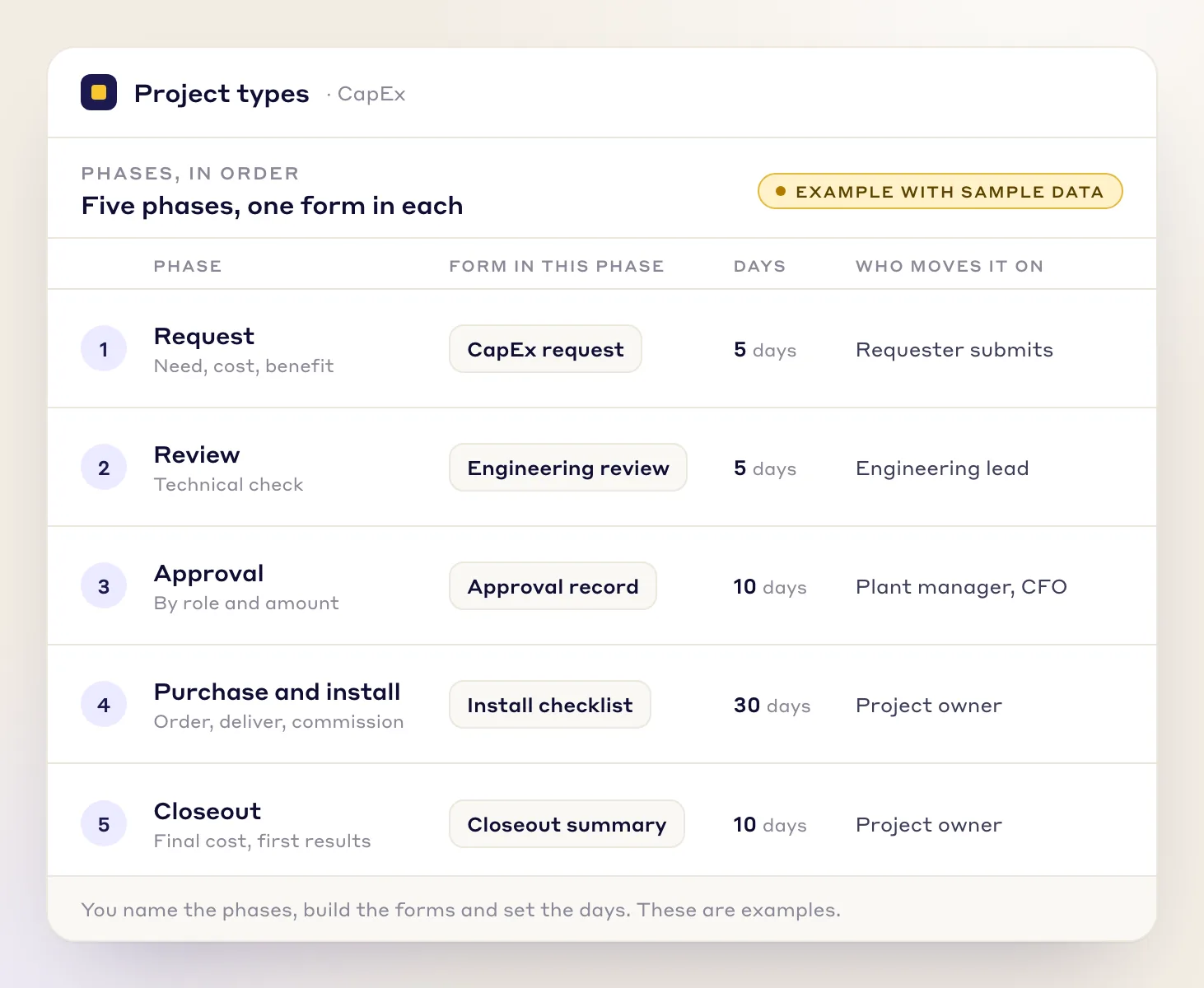
    Create a CapEx project type and name its phases. The picture shows five as an example: request, review, approval, purchase and install, closeout. You set the names, the days each phase should take, and who can move a project on to the next one.

    A CapEx project type with five phases, each with its form, days and who moves it on, drawn with sample data
    A CapEx project type. The phases, forms and days are an example you replace with your own.
  2. Step 2

    Put a form in each phase

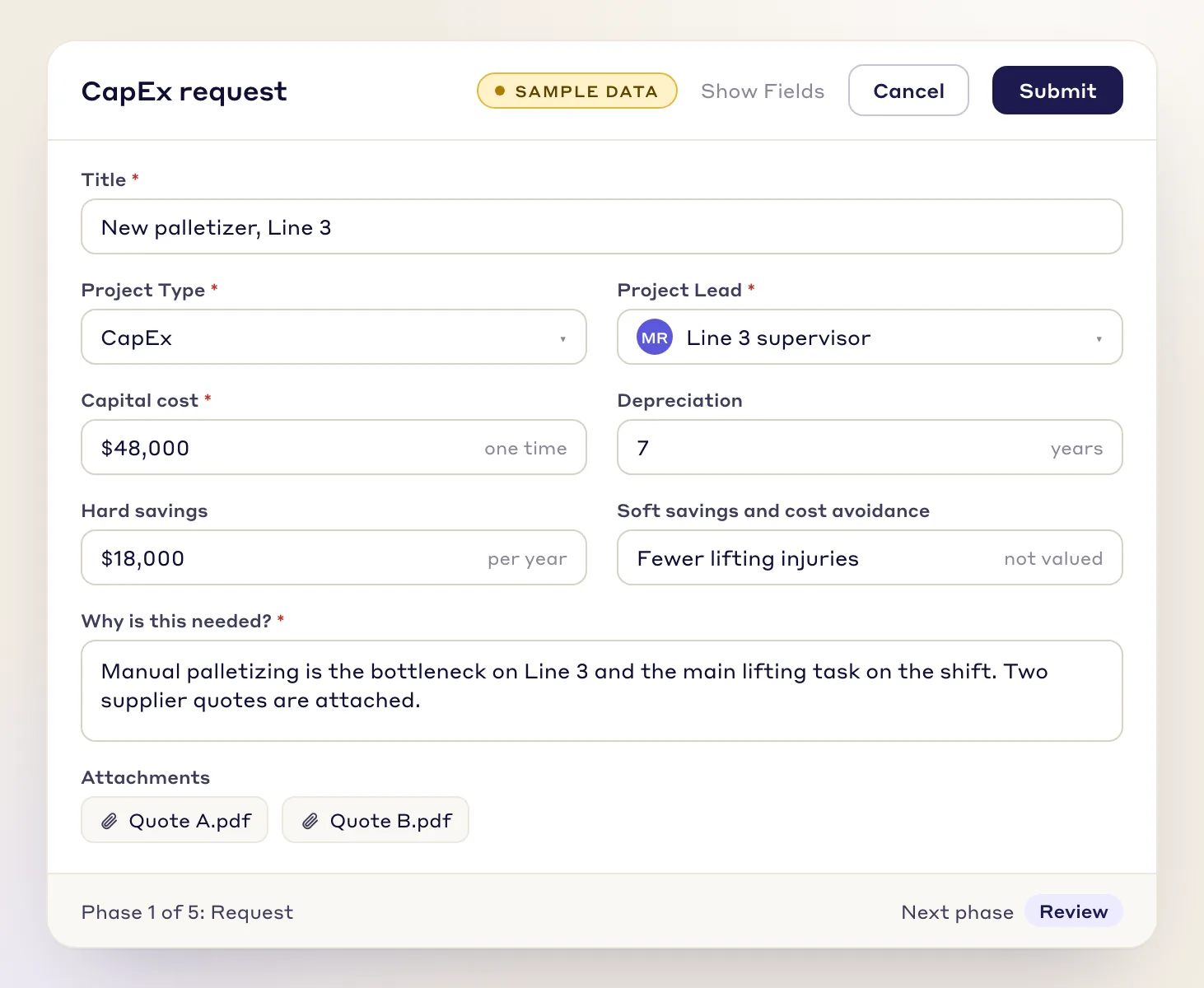
    Each phase can hold a form built in Lean Creator. The request form takes the need, the cost and the benefit. Later phases get their own, such as an engineering review, an install checklist and a closeout summary. Capital cost records depreciation years, and savings are marked hard, soft or cost avoidance.

    A CapEx request form with title, capital cost, depreciation, hard and soft savings and two quotes attached, sample data
    The request form for phase 1, filled in with sample data.
  3. Step 3

    Route approvals by role and by amount

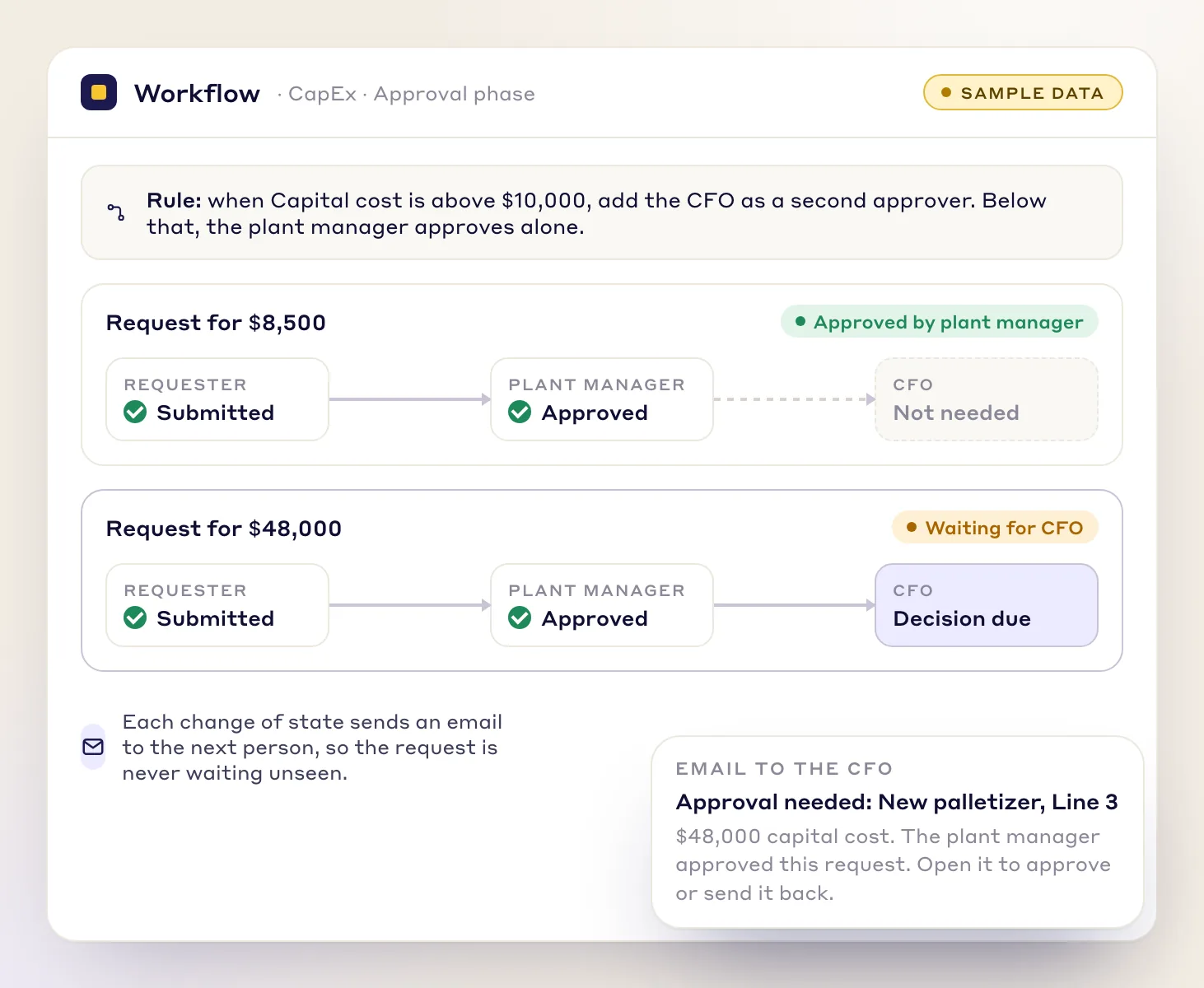
    A workflow rule decides who can move the request on and what must be filled in first. A rule can add an approver by amount: above a limit you set, the CFO is added to the plant manager. A change of state can send an email, and an approver can send a request back for rework.

    Two requests on a workflow: $8,500 stops at the plant manager, $48,000 also goes to the CFO, with an email to the CFO
    An approval rule by amount. The $10,000 limit is an example; your finance policy sets yours.
  4. Step 4

    Give each approver a list of what is waiting

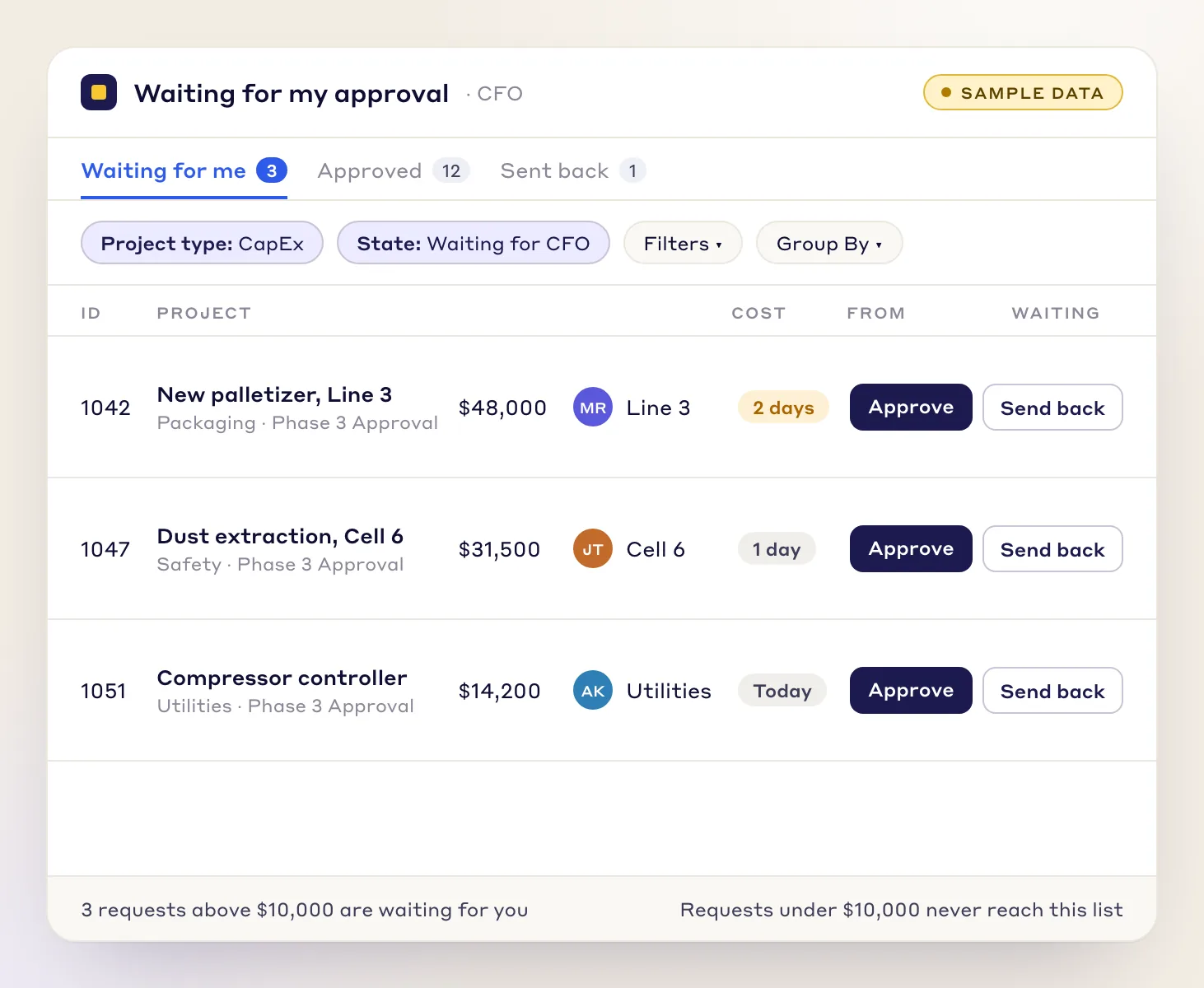
    Approvers do not hunt through a shared spreadsheet. Each one opens a view filtered to the CapEx requests waiting for their decision, and approves or sends the request back from there.

    An approver's list filtered to CapEx requests waiting for the CFO, with cost, requester, days waiting, Approve and Send back
    The CFO's list. Requests below the limit never reach it, because the rule does not add the CFO.
  5. Step 5

    Watch the phases and catch slips

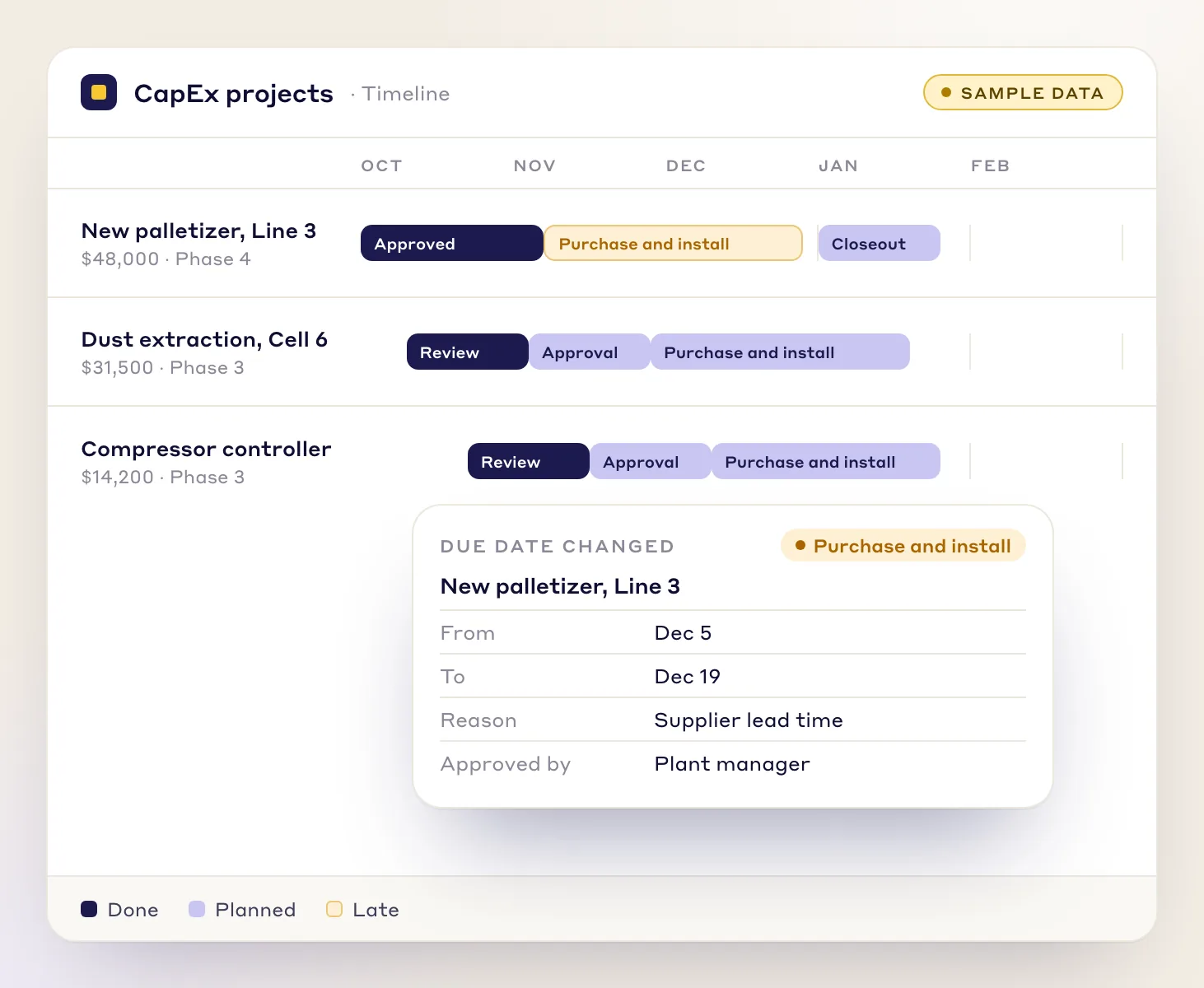
    Days per phase give every project a timeline, and late phases alert the project owner. Moving a due date needs a reason and an approval, so the record shows why a purchase slipped. Projects line up on a Gantt timeline.

    A timeline of three CapEx projects by phase, with a changed due date for purchase and install and the reason given
    A timeline by phase, with the reason for a changed due date.

Worked example

A $48,000 palletizer, from request to closeout

A line supervisor wants a palletizer for Line 3. Every name and number here is sample data, and your phases, roles and limits will differ.

Sample data

  1. 1 Request

    Day 0

    The supervisor fills in the CapEx request: capital cost $48,000, depreciation over 7 years, hard savings $18,000 a year, two quotes attached.

  2. 2 Review

    Day 3

    The engineering lead completes the review form and moves the project to approval.

  3. 3 Approval

    Day 5 and day 7

    The rule adds the CFO because $48,000 is above the $10,000 limit. The plant manager approves on day 5, the CFO gets an email and approves on day 7. A request for $8,500 would have stopped at the plant manager.

  4. 4 Purchase and install

    Dec 5, moved to Dec 19

    The supplier lead time slips. The owner moves the due date to Dec 19 with the reason Supplier lead time, and the plant manager approves the change.

  5. 5 Closeout

    After commissioning

    The closeout form records the final cost, $46,500, and the first results, and the project closes.

Simple payback on the request: $48,000 divided by $18,000 a year is 2.7 years. The free CapEx request form works out the same sum, plus NPV, in Excel. Open the CapEx request form.


Who it is for

Everyone on a capital request sees their part

Plants that run capital requests through spreadsheets and email, and want the path, the approvals and the cost in one record.

  • The requester

    A supervisor or engineer fills in the request form and sees which phase it is in, without chasing anyone.

  • The approvers

    A plant manager or finance lead gets an email, opens a list of what is waiting, and approves or sends back.

  • The project owner

    Moves the project through review, purchase and install, and closeout, and gives the reason when a date moves.

  • Finance and CI leaders

    See cost and benefit on every project, and every approval, in one place instead of in several spreadsheets.

Looking at the whole engineering portfolio rather than one request? See Kaizen and project management for engineering leaders for stage gates, spend and ROI across projects.

What you get

What every CapEx project keeps on record

When finance or an auditor asks how a purchase was approved, the answer is on the project.

  • The request and its quotes

    The need, the options and the attached quotes stay on the project.

  • Cost

    Capital cost with depreciation years, and one-time against ongoing cost.

  • Benefit

    Hard savings, soft savings and cost avoidance, kept apart.

  • Every approval

    Who approved or sent the request back.

  • Why dates moved

    Each due date change, with its reason and its approval.

  • The closeout

    A closeout form, for example the final cost and the first results.

Limits

What it does not do

So you know where LeanSuite stops and your other systems carry on.

  • It is not your accounting or ERP system

    Purchase orders, invoices and the general ledger stay where they are. LeanSuite follows the request, the approvals and the project.

  • It does not set your limits

    Your finance policy decides who approves what. LeanSuite applies the rule you give it, and you can change the rule later.

  • It starts from your process

    You choose the phases, forms and rules. LeanSuite staff help you set up the first CapEx project type.

FAQs

CapEx tracking questions, answered

  1. It is the path a capital request takes from the first form to the final decision: who reviews it, who must approve it at its size, and what happens next. In LeanSuite you build that path as a project type with phases, a form in each phase and approval rules. Each step is recorded on the project.

  2. You write a rule on the approval step, for example that a capital cost above $10,000 adds the CFO as an approver. Smaller requests stop at the plant manager. The roles and amounts come from your own finance policy, and the $10,000 here is only an example.

  3. Yes. You define the project type, name the phases, set the days for each and build a form for each phase in Lean Creator. LeanSuite's team helps set up the first project type, so you start from your own process instead of a fixed one.

  4. A change of state can send an email to the next approver, and each approver can open a list filtered to the requests waiting for them. From there they approve, or send the request back for rework.

  5. Each phase has a number of days, so a project gets due dates, and a late phase alerts its owner. Changing a due date needs a reason and an approval, which leaves a record of why projects slipped. A Gantt timeline shows every project by phase.

  6. No. LeanSuite follows the request, the approvals and the project, not purchase orders, invoices or your ledger. Capital cost, depreciation years and hard and soft savings are recorded on the project, and the free CapEx request form works out simple payback and NPV in Excel before you submit.

See your CapEx process in LeanSuite

Bring your current request form and approval limits. We will show you how they run as phases, forms and rules.