Skip to content
LeanSuite

Eradicating Micro-Stops: Stop Losing Capacity to 2-Minute Machine Jams.

Micro-stops are brief machine stops, often under a few minutes, that quietly drag down OEE. In LeanSuite, operators log each one in one tap, and the stops are added up and costed so you fix the most expensive first.

By clicking "Schedule Demo," you agree to the use of your data in accordance with LeanSuite's Privacy Notice, including for marketing purposes.

The Hidden Factory

The true cost of "death by a thousand cuts"

Your ERP and MES catch major downtime. Forty one-minute jams a shift add up to 40 minutes of lost run time, two hours a day on three shifts, and they rarely reach the management report.

The hidden factory

  • Unmeasured Losses

    Operators simply clear the jam and restart the machine without logging the event.

  • False OEE Scores

    Your performance metric looks fine on paper, but you are constantly missing production targets.

  • Misguided Engineering

    CI teams spend months speeding up a cycle time when the real issue is constant minor stops.
The LeanSuite spotlight

  • 1-Click Capture

    Operators log a micro-stop in two seconds without leaving their station.

  • AI-Driven Aggregation

    LeanSuite groups hundreds of minor stops and puts a dollar value on the total.

  • Targeted Elimination

    The data feeds Kaizen workflows, so teams can engineer out the nuisance stops.

Schedule Demo

HOW IT WORKS

Three modules to find and fix micro-stops

Issue Management logs each minor stop with its category, duration and cause. Cost Management adds them up into a costed loss tree per machine. Kaizen & Projects turns the biggest losses into improvement projects.

Issue Management
Cost Management
Kaizen & Projects

Daily Issue Management

Real-Time Micro-Stop Capture

Log a micro-stop in one tap

No more paper tally marks. Operators tap large buttons on a tablet to log a misfeed, sensor fault or minor jam the moment it happens.

  • Large, custom buttons for your most common faults

  • One tap per stop, then straight back to clearing the jam

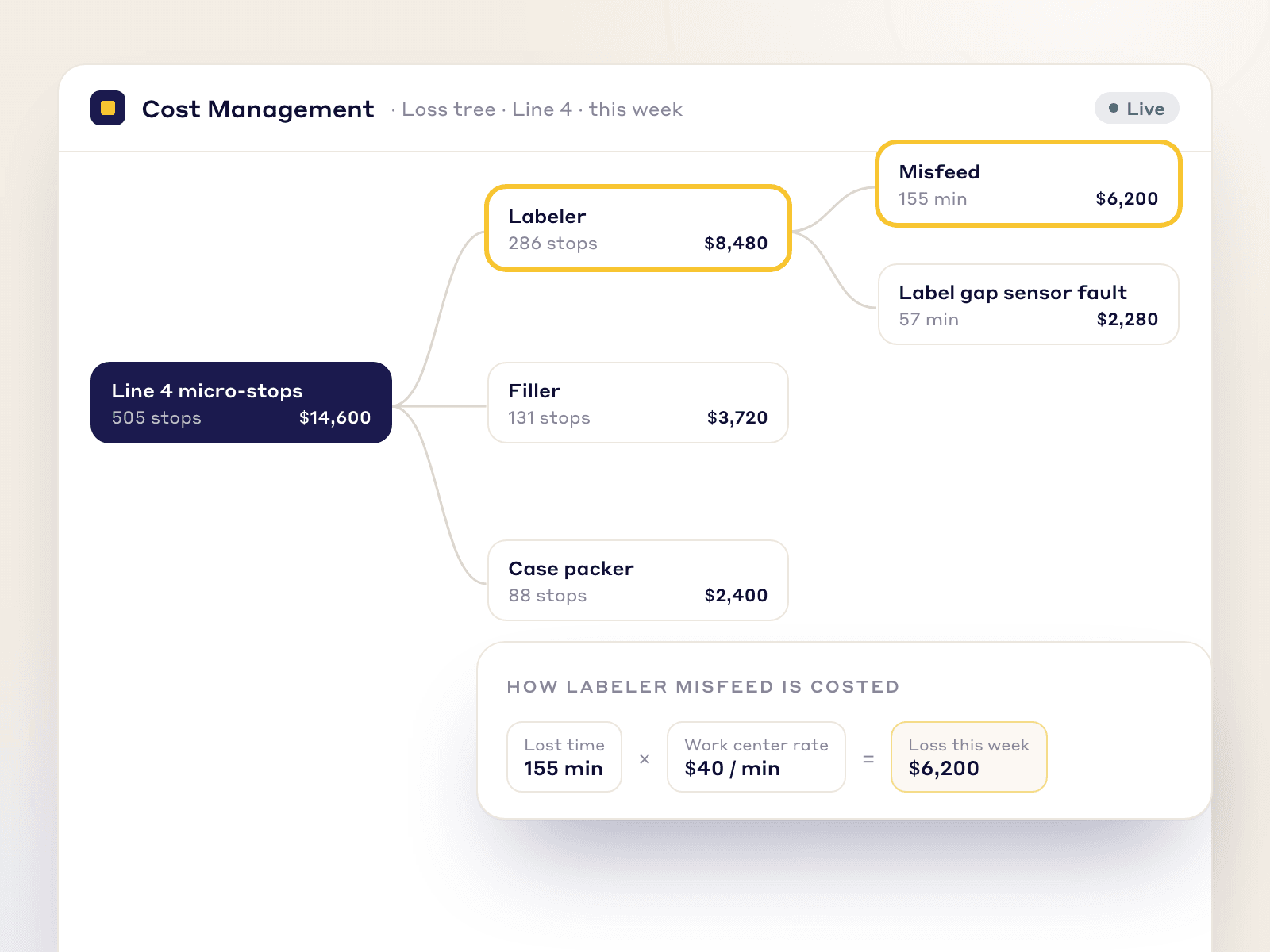
Loss tree of Line 4 micro-stops by machine and cause, each costed from lost minutes and the work center cost rate

Loss & Cost Management

Financial Impact Visibility

Build the financial loss tree

LeanSuite adds up the micro-stops, calculates the lost cycle time and puts a dollar value on it, building a live Pareto chart of your biggest hidden losses.

  • Micro-stops added up across lines and shifts

  • Lost time multiplied by each work center's cost rate

  • A live Pareto of your biggest hidden losses

Kaizen & Projects

Targeted Improvement Initiatives

Engineer out the root cause

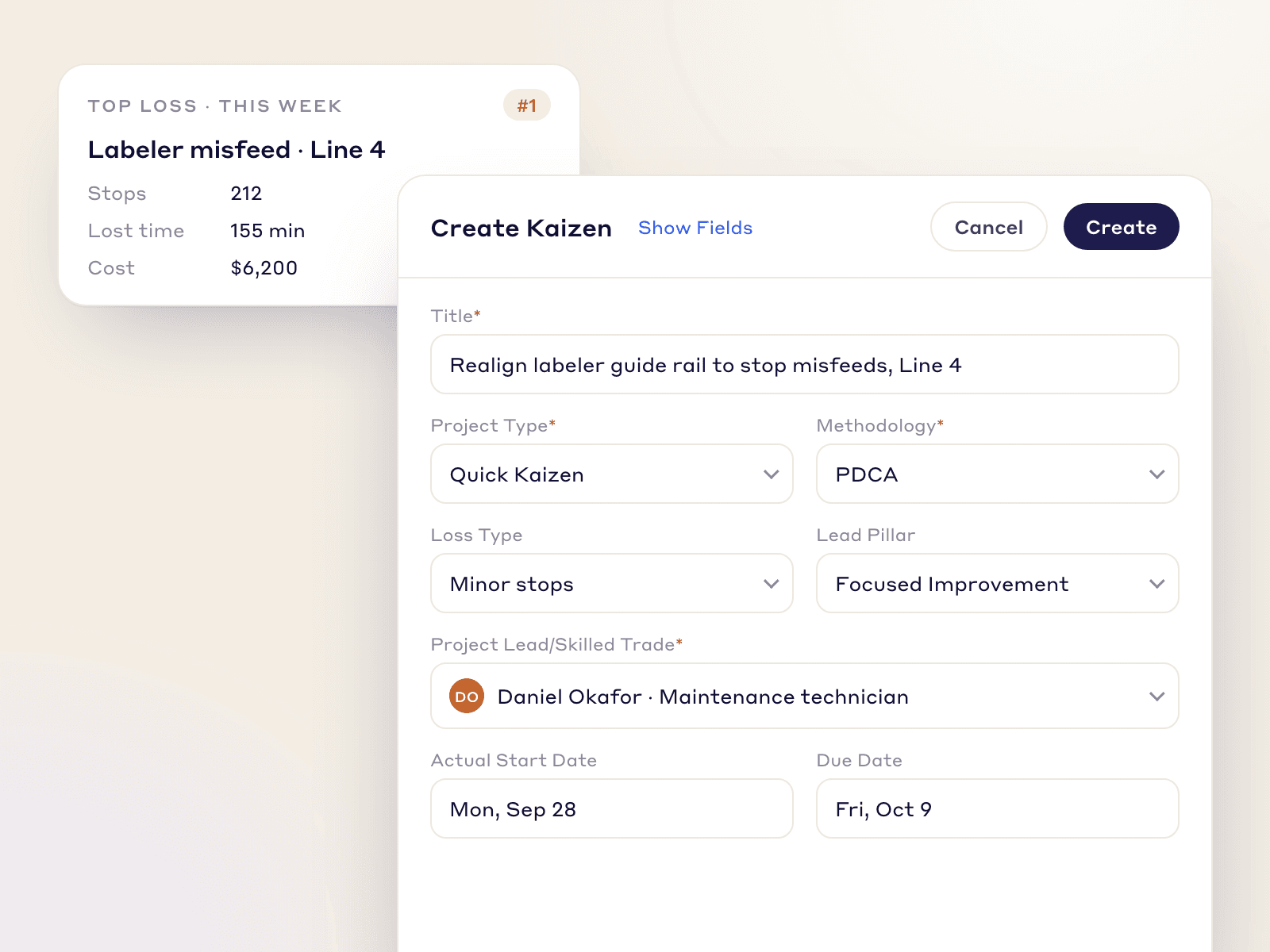
With the losses visible, CI and engineering can launch targeted Kaizen events to fix the faulty sensor or misaligned guide rail behind the stops.

  • Launch Kaizen events straight from the loss data

  • Put CI and engineering time on the biggest losses

  • Remove root causes, not just symptoms

Create Kaizen form opened from the top micro-stop loss, with loss type, pillar and project lead
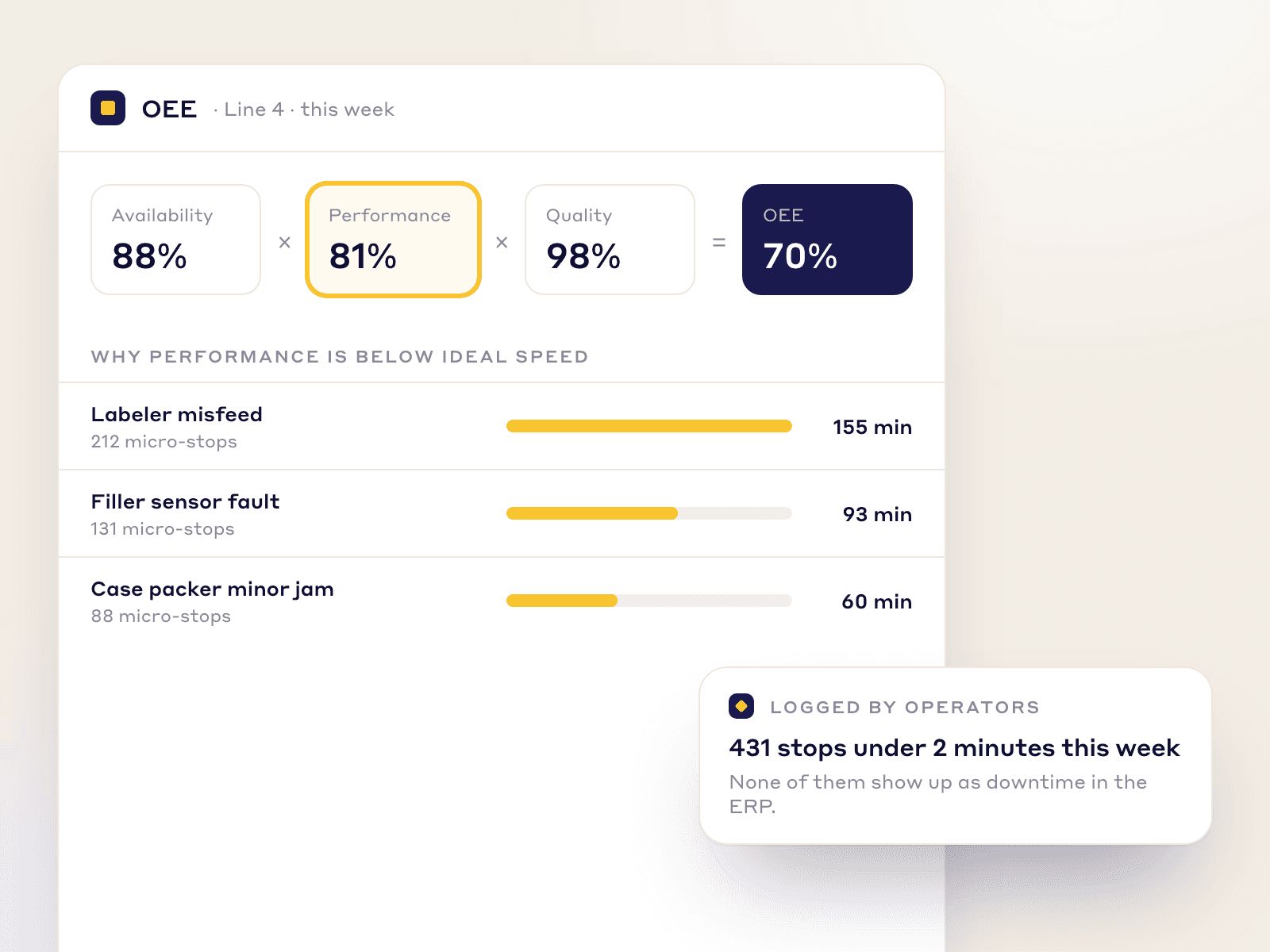
OEE broken into availability, performance and quality, with the micro-stop reasons behind lost performance

OEE Optimization

Win Back Capacity Without Buying New Machines

When you're sold out, a new line is a multi-million-dollar gamble. Removing micro-stops frees capacity from the equipment you already own.

Fix the Performance Metric

OEE is Availability × Performance × Quality. Micro-stops quietly drag down Performance, and LeanSuite shows why a machine isn't running at its ideal speed.

A Voice for Operators

Operators finally have the data to show management how often these "minor" stops happen.

High-Speed Manufacturing

Built for high-volume, high-speed environments.

If logging a stop takes longer than clearing the jam, operators won't do it, so LeanSuite's screens are built to be fast.

  • SOC 2 Type 1 report

  • First module live in under a week

  • Unlimited users per facility

  • 99.5% monthly uptime commitment

FAQs

Frequently Asked Questions

  1. A micro-stop is a short interruption, such as a jam, misfeed or sensor fault, that an operator clears in seconds or minutes without calling maintenance. Each one is small, but together they cut the performance factor of OEE.

  2. Operators log each stop in one tap in Issue Management, Cost Management adds the lost time up and puts a cost on it, and the biggest losses become Kaizen projects.

  3. No. Tablets show large, color-coded buttons for the most common faults, so one tap logs the event and the operator gets straight back to clearing the jam.

  4. Multiply the lost time by what an hour of that work center costs, then add the stops up over the shift. Example with illustrative numbers: 40 stops of 30 seconds is 20 minutes a shift; at $600 an hour that is $200 a shift, or $600 a day on three shifts. If the line is sold out, an hour lost is output you cannot make up, so also count the margin on the lost units, as the downtime cost calculator at theleansuite.com/tools/downtime-cost-calculator does. In LeanSuite you enter the cost per hour for each work center and it multiplies the lost time by that rate.

  5. Not directly. LeanSuite doesn't read PLCs or sensors itself. If your stop data already sits in a database or a spreadsheet, it can be pulled in on a schedule; otherwise operators log each stop with a tap.

  6. ERPs log a 4-hour breakdown well but rarely capture fifty 1-minute stops. LeanSuite captures these short, frequent events on the floor.

  7. Yes. A KPI can record reasons as Pareto categories, so the top causes of lost time are ranked on a dashboard or a Lean Studio huddle board.

Ready to Expose Your Hidden Factory?

See how LeanSuite's connected modules find your micro-stops and win back OEE.