Skip to content

5S Audit Software: Keep 5S going after audit day

5S audit software puts the scored 5S checklist on a tablet, requires a photo for each check, turns every failed line into an action with an owner and due date, and shows scores by area. LeanSuite also schedules the audits, so they happen every week, not just before a visit.

By clicking "Schedule Demo," you agree to the use of your data in accordance with LeanSuite's Privacy Notice, including for marketing purposes.

5S audits, explained

What a digital 5S audit should include

A 5S audit checks one area against its written standard for each of the five S: Sort, Set in Order, Shine, Standardize and Sustain. The digital version adds what paper cannot: a required photo, a score, an action for every failed line, and a record of which audits did not happen. Start with a few clear questions per S, each with a pass condition.

Illustrative 5S audit scoring: one question per S with points, a photo rule and an action on fail
SSample questionPointsPhotoOn fail
SortIs everything at the station needed for today's job?0 to 2RequiredRed-tag the item and assign removal
Set in OrderIs every tool on its shadow board or marked location?0 to 2RequiredAction to restore the location
ShineIs the floor around the machine free of oil, dust and debris?0 to 2RequiredClean-up action with an owner and due date
StandardizeAre the 5S standard and floor markings visible and current?0 to 2OptionalAction to update the standard
SustainWas the last audit done on time and its actions closed?0 to 2Not neededEscalate to the area lead

Illustrative, not a standard: set the questions, points and pass mark with your own team. Free starting points: the [5S audit checklist](/templates/5s-audit-checklist) and the [office 5S audit checklist](/templates/office-5s-audit-checklist).

Watch

A short story from the plant floor

· 5:17

Your 5S Audit Passes Every Week and Fixes Nothing

The 5S walk happens every Friday. The binder fills up. The same hose is still across the aisle three weeks later. In this episode the crew finds out why audits start strong and fade: a finding with no name on it is only a wish. They try something simple. Every finding gets one owner, one date and one place on the huddle board where everyone walks past. The…

Press play to load the player from YouTube, or watch it on YouTube.
The Audit Trap

The true cost of 5S that doesn't stick

The plant gets cleaned up for a big event, then slides back. Without a system, 5S is an event, not a culture.

The chaos of paper

  • The Event Mentality

    Standards spike for the walkthrough, then degrade. Nobody owns the follow-through.

  • Unverifiable Audits

    Paper checklists get filled out at a desk. No photos, no timestamps, no proof the audit happened.

  • No Corrective Loop

    A failed score goes into a binder. Nobody gets a task, and next month's score is just as low.

The LeanSuite solution

  • Photo-Verified Audits

    Auditors take before-and-after photos on a tablet, and the checklist can't be completed without them. Timestamps and GPS are logged automatically.

  • Automatic Corrective Actions

    A failed audit line creates a corrective action with an owner and a due date.

  • One Dashboard for Every Area

    All audit results roll up into one dashboard, so leaders see what's sliding before the next gemba walk.

Schedule Demo

HOW IT WORKS

Three modules, one closed-loop 5S system

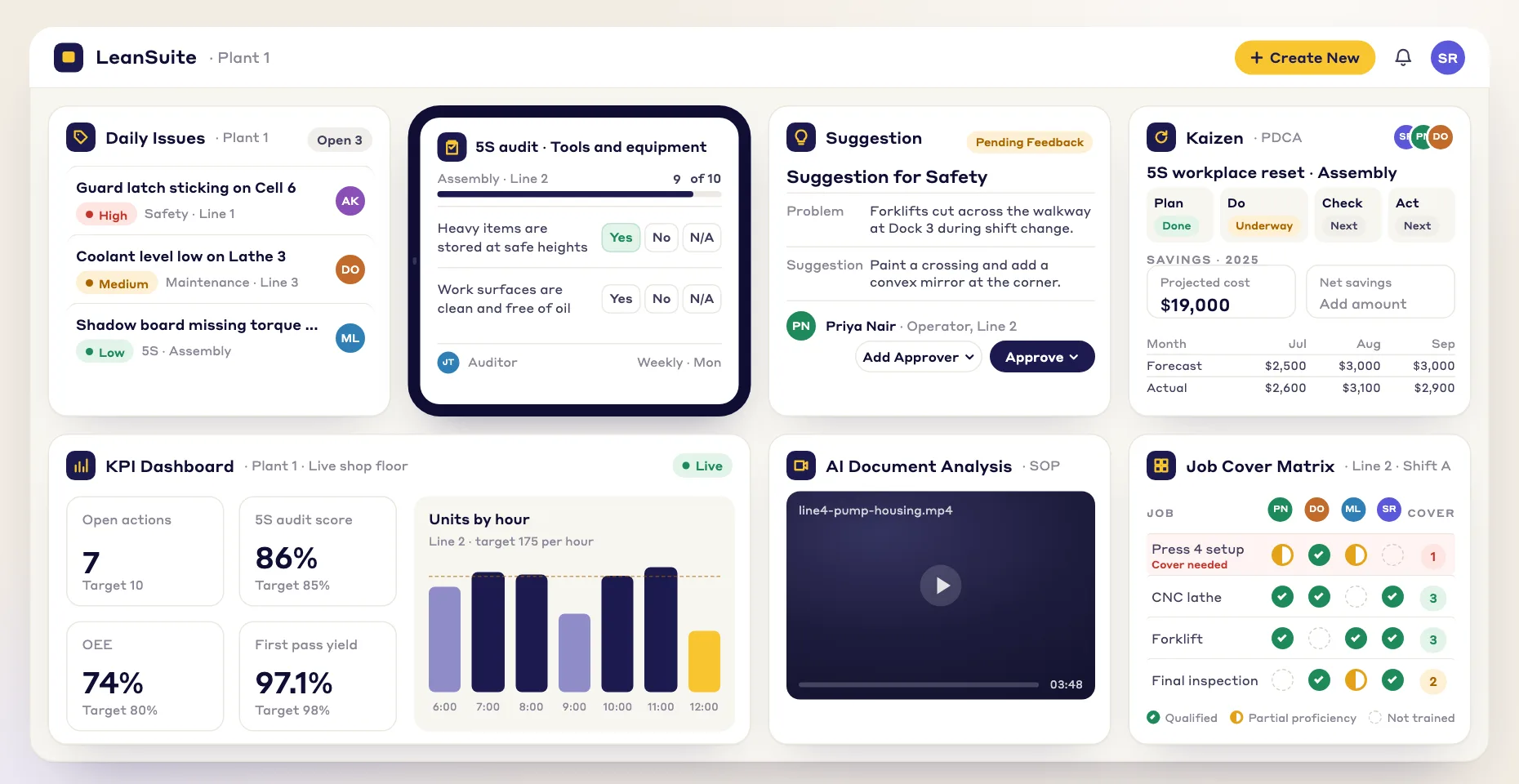
Lean Creator runs photo-required 5S audits. Issue Management turns each failed line into a corrective action with an owner and due date. Dashboards show live scores for every department.

Lean Creator
Issue Management
Dashboards & KPIs

LEAN CREATOR

Build & Execute Visual Audits

Photo-required 5S audit forms

Auditors complete photo-required 5S audits on a tablet at the workstation, not at a desk. Every finding is timestamped, geotagged and tied to an area.

  • A checklist can't be completed without before-and-after photos

  • Scoring logic per category: Sort, Set in Order, Shine, Standardize, Sustain

  • Lean AI converts your paper 5S audit sheet into a digital form, or start from a marketplace template

  • Schedule audits in Daily Standard Work to a person, a role or an asset; missed audits show in red

Buying guide

How to choose 5S audit software

  • Scoring: points per answer, a pass mark and a score you can compare between areas.
  • Photo evidence: can an audit be completed without the photos, and are they timestamped.
  • Action closure: does a failed line become an action with an owner and due date, and can it close without proof.
  • Scheduling and missed audits: are audits assigned to a person, a role or an area, and do late ones show.
  • Multi-site comparability: can the same form run in every plant so scores mean the same thing.
  • Operator sign-in: can an auditor sign in with an employee ID instead of a company email.
Four ways to run 5S audits
ApproachWorks whenWhere it breaks down
Paper checklistOne small area and one careful auditorNo proof the audit happened, scores sit in a binder, nobody owns the follow-up
SpreadsheetA few areas and one person who collects the resultsPhotos live elsewhere, versions drift, actions are tracked by hand
Generic forms appYou need quick digital checklistsFailed answers rarely become tracked actions, and scores rarely roll up by area
Purpose-built (LeanSuite)Several areas or plants and you want the loop closedOverkill for a single area that a paper sheet already covers

More options on [best 5S audit software](/compare/best-5s-audit-software) and [LeanSuite vs spreadsheets](/compare/leansuite-vs-spreadsheets). LeanSuite runs 5S audits and the actions that follow; it is not machine monitoring and does not replace your CMMS.

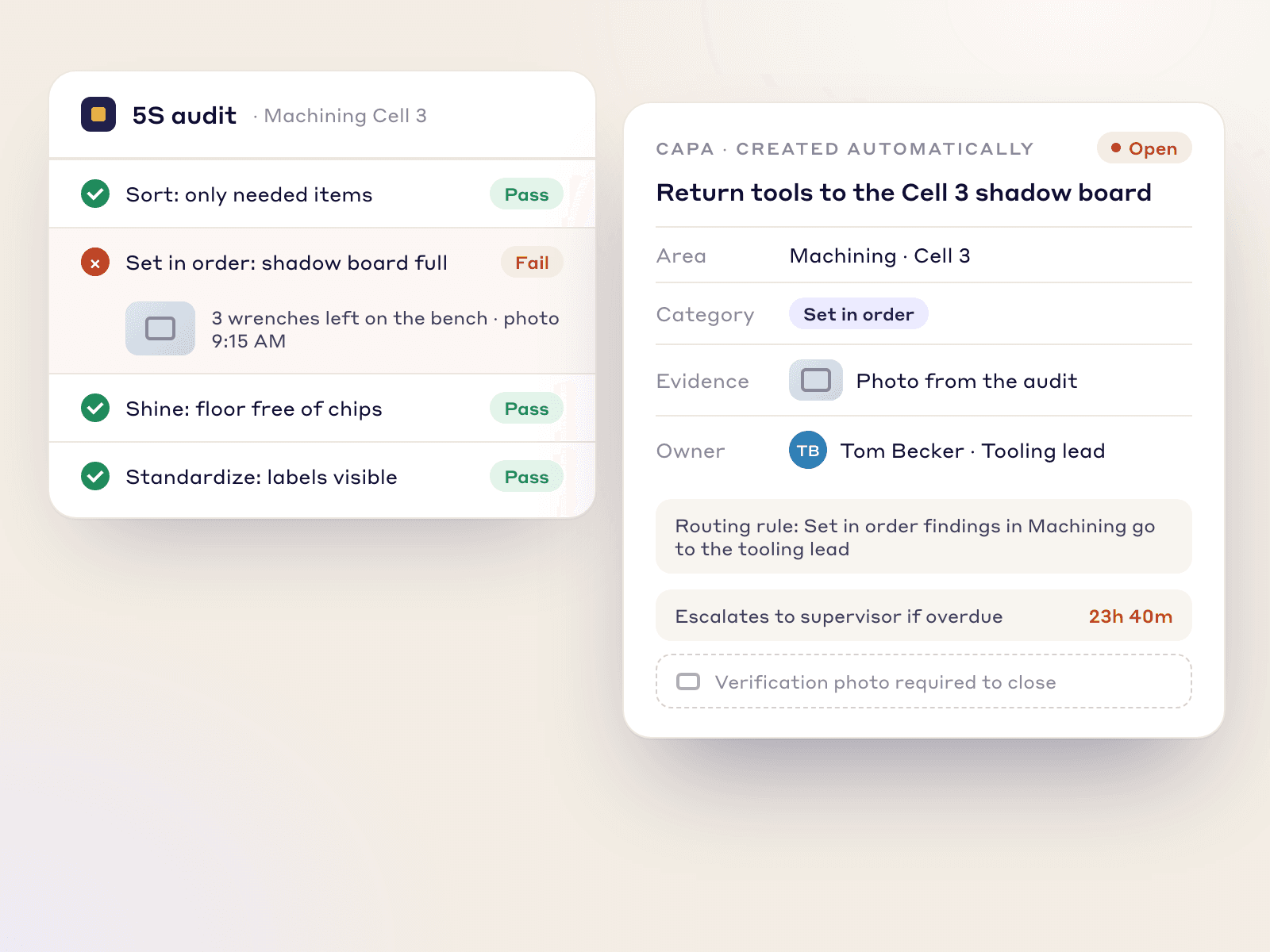
A failed Set in Order line turned into a CAPA with its photo, sent to the tooling lead, needing a verification photo to close

ISSUE MANAGEMENT

Auto-Generate & Close CAPAs

Failed audits become automatic corrective actions

Every failed audit line becomes a CAPA with an owner, category and due date.

  • CAPAs fill themselves in: title, area, category and photo evidence come from the failed item

  • Routing rules send each CAPA to the right department lead by category and zone

  • Escalation timers: supervisor and manager notified automatically if overdue

  • A CAPA can't close without a verification photo, so nobody can just click 'Done'

Dashboards & KPIs

Track Scores Across Departments Over Time

Live 5S scores for every department

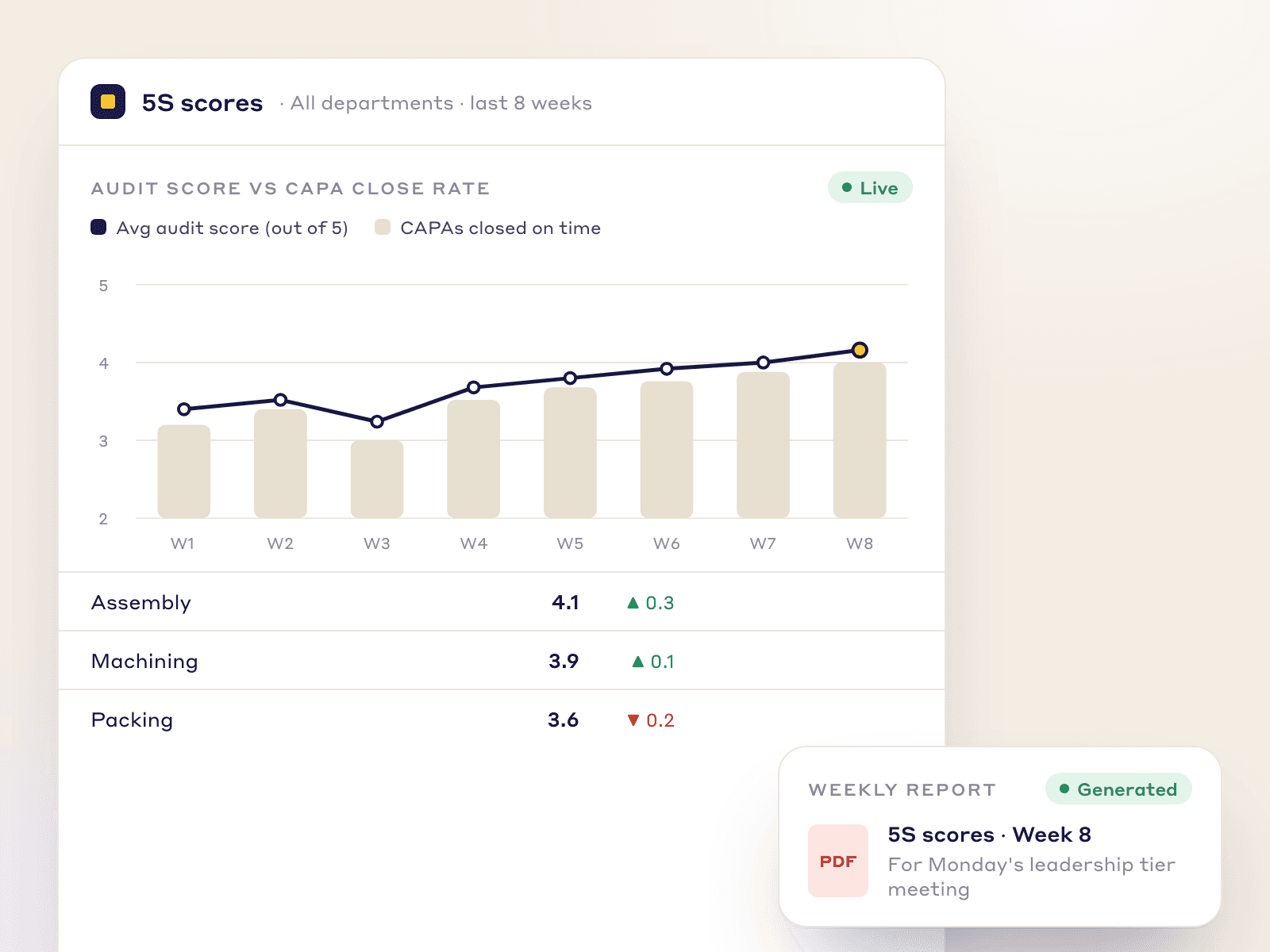
Every audit score rolls up by department, week over week, so leaders see which areas are sliding before the next walkthrough.

  • 8-week trend line per category shows when and where standards slipped

  • CAPA close rate overlaid on audit scores, in one view

  • An automatic PDF report for the weekly leadership tier meeting

Eight-week 5S audit score trend with CAPA close rate, department scores and the weekly PDF report for the tier meeting
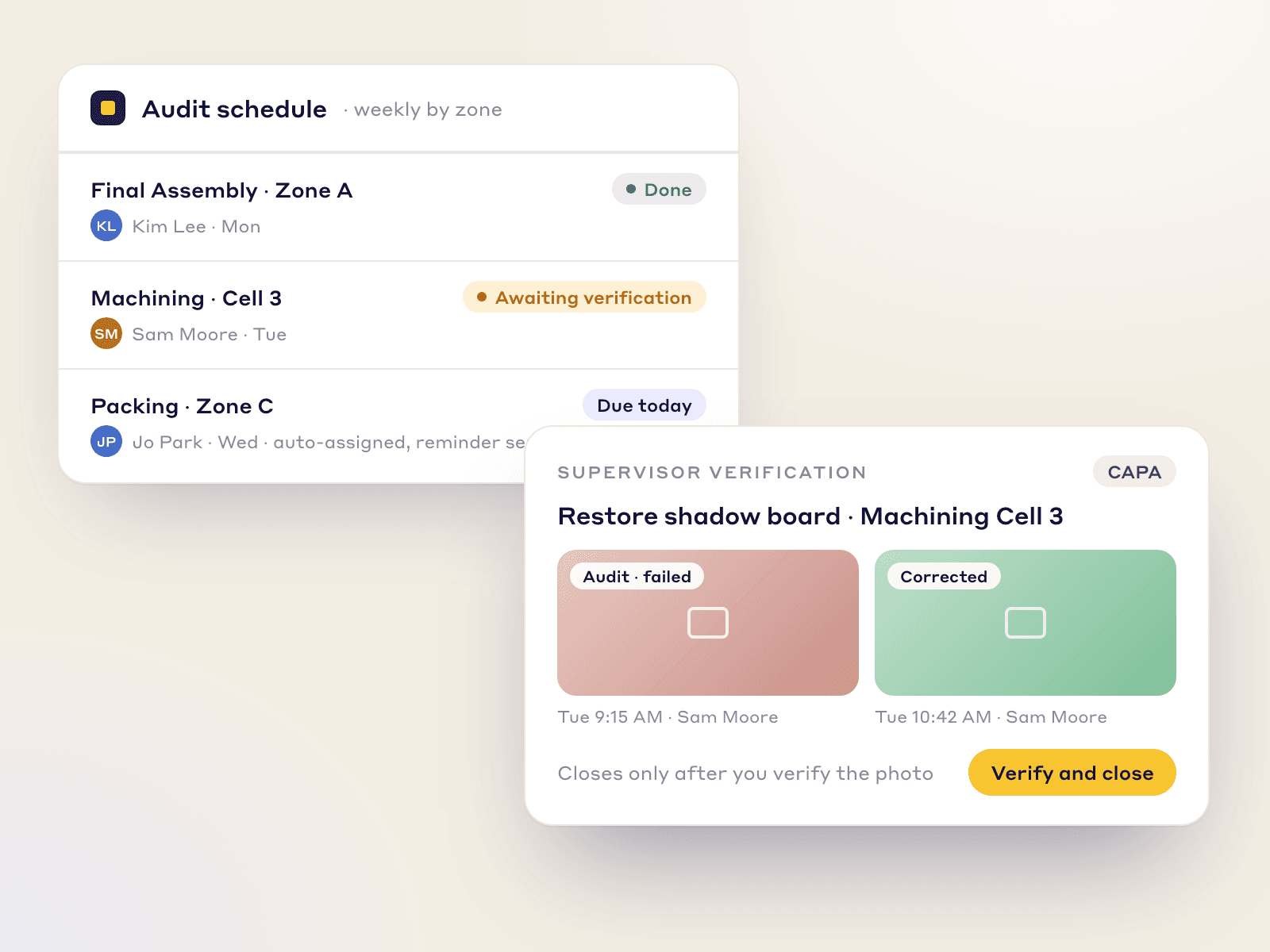
Weekly 5S audits scheduled by zone with auditors assigned, and a CAPA awaiting sign-off with before and after photos

The 5S Science

Why “Sustain” Is Always the Hardest S

The first four S's are events. The fifth is a system: without a loop from audit to corrective action, standards slip back.

Recurring Audit Cadence

Weekly audits by zone with assigned auditors and reminders, so reviews happen every week, not just before a visit.

Verification Closure Loop

CAPAs close only with a photo of the corrected condition, verified by a supervisor.

After the audit

From 5S audit to sustained 5S

The audit finds the gap. Keeping the standard takes the tools around it: red tags to remove what does not belong, shadow boards and floor markings to give everything a place, and a short daily check by the people who work in the area. Use the red tag log, the shadow board planner, the floor marking color guide and the Kamishibai audit board to set these up on paper first. Then move one area into LeanSuite and review its scores in the tier meeting. Read the 5S audit guide, the 5S implementation guide and the 5S guide for the method itself, or take the lean maturity assessment as a next step.

BUILT FOR THE SHOP FLOOR

Made for 5S that lasts past the audit.

We built LeanSuite for the problems plants hit every day, including 5S gains that fade a month after the audit.

  • SOC 2 Type 1 report

  • First module live in under a week

  • Unlimited users per facility

  • 99.5% monthly uptime commitment

FAQs

Frequently Asked Questions

  1. Software that puts the 5S audit checklist on a tablet, scores it, requires photo evidence and turns failed lines into actions with an owner and due date. In LeanSuite, scores also roll up by department and missed audits show in red.

  2. A digital audit has timestamped photos, a score, a corrective action for every failed line and a visible record of audits that were missed. A paper checklist is filled in at a desk and filed, with no proof and no follow-up.

  3. Give each question points and set a pass mark. In LeanSuite each audit shows pass or fail, and the score is tracked per category and per department over time. The free 5S audit checklist template shows a sample scoring layout.

  4. Plants commonly audit each area weekly and add a monthly audit by leaders, but it varies by plant and risk. What matters is that the schedule is fixed and missed audits are visible.

  5. Yes. Staff sign in with an employee ID, so no company email is needed, and audits run on a phone or tablet at the workstation.

  6. Build the 5S audit in Lean Creator or have the AI draft it from your paper sheet, then schedule it in Daily Standard Work. Rules require photos or raise a tag when a check fails.

  7. 5S is a workplace organization method with five steps: Sort, Set in order, Shine, Standardize and Sustain. Teams remove what is not needed, give everything a place, clean, write the standard down and audit it so the area stays that way.

  8. Yes, when the same audit form runs in each plant. Scores roll up by department into one dashboard, so leaders see what is sliding before the next gemba walk.

  9. It also covers other audits, issue management, kaizen and standard work, and it works alongside your MES, ERP and CMMS. It does not read data from machines.

  10. Book a demo to see 5S audits on your own areas. The first module is typically live in under a week; the 90-day pilot is $3,000 per facility.

FREE RESOURCES

Free templates and posters

Not ready for software yet? Start with these free resources.

Ready for 5S That Sticks?

See how three connected modules keep your 5S standards from sliding after the audit.