

The 1-1-90 method: 1 area, 1 pain point, 90 days, then expand
The 1-1-90 method is a way to roll out continuous improvement in a plant: pick 1 area and 1 pain point, run it for 90 days with a small team, then expand what worked to the next areas and plants.
It is for plant managers, continuous improvement leads and operations teams who want a rollout that sticks, whether they are starting lean, adding software or restarting a program that stalled.
It is not a new idea. It is how we already work with our customers, and it never had a name until now.
The 1-1-90 method, from Angad Singh and the LeanSuite team
The idea in one picture
One area, one pain point, 90 days, then expand
1area
One line, one cell, one shift or one department.
1pain point
One problem, written as one sentence with a number.
90days
A fixed run with a decision at the end.
thenexpand
Copy what worked to the next area, then to other plants.
Why start small
Four reasons to start in one place
When you start everywhere at once, one team ends up spread across too many problems.
- 1
One team learns the system properly
The people in the pilot area get time to learn the routine, make their mistakes on a small problem and get good at it. Later they are the ones who show everyone else.
- 2
You get a real result to show
A number from your own floor, with your own people behind it, is easier to believe than a slide. It is what the next area and the next plant will ask to see.
- 3
You do not ask ten plants to change at once
Every plant has its own habits and its own busy weeks. One area at a time means one set of changes to support and one place to fix what you got wrong.
- 4
The same few people cannot carry everything
Most of the time it is the same people working on the projects. At some point you have to spread that knowledge and bring in more and more people, and a small first run is how you find and train them.
In Angad's words
“What we usually say is, pick one pilot area and pick one very specific pain point and start there, and then grow your team and do the train the trainer and expand it throughout the facility.”
1 area
Pick where to start
An area is a place one small team can own: one line, one cell, one shift or one department. Score two to four candidates from 1 to 5 on the five questions below, and start with the highest total.
- 1
A team that wants it
A 5 means: the people who work there asked for a fix and will give it time every week.
- 2
Data you can see
A 5 means: you can get a number for the problem today, from a log, a report or a count.
- 3
A supervisor on board
A 5 means: the supervisor backs the team and will give it ten minutes a day.
- 4
Big enough to matter
A 5 means: the plant manager would notice a result here and other areas would want it.
- 5
Small enough to finish
A 5 means: one team can finish the work in 90 days without waiting on other departments.
Examples of an area
- One production line
- One cell on a line
- One shift
- One department, such as receiving or maintenance
Avoid the area that already runs well. A result there does not convince the plant, and it teaches the team little.
This is the same idea as a model area. The model area guide shows how ten improvement pillars each choose theirs, starting from loss data. Read the model area guide.
1 pain point
Write it as one sentence with a number
A pain point is one specific problem in your area. Quality is a topic. A pain point has a place, a thing that goes wrong and a number you can measure this week.
The frame
In (area), (what goes wrong): (before number) (unit) today. We want (target number) by day 90.
- Write the before number first, so you have something to compare with at day 90.
- If it needs two sentences, it is two pain points. Pick one.
- Pick the clearest problem, not the loudest. The loudest usually has many causes and many owners.
Examples (made up, to show the shape; not customer results)
Changeovers on line 3 take too long and nobody can see why.
- The before number
- Minutes per changeover
- Where it could come from
- A stopwatch and a changeover log
- Start with
- SMED worksheetSMED
Small problems on night shift go unreported, so the same ones come back.
- The before number
- Problems written down per week
- Where it could come from
- The issue board or a tag log
- Start with
- Daily issue managementTPM tag log
Audits get done, but the actions stay open.
- The before number
- Audit actions closed on time
- Where it could come from
- The audit log
- Start with
- Audit management5S audit checklist
Nobody knows who can cover when someone calls out.
- The before number
- Call-outs a month where the line ran short
- Where it could come from
- The shift log
- Start with
- Job cover matrixSkills matrix
Good ideas from operators go nowhere.
- The before number
- Ideas sent in and ideas answered each month
- Where it could come from
- The suggestion box or idea log
- Start with
- Idea managementSuggestion form
| Pain point | The before number | Where it could come from | Start with |
|---|---|---|---|
| Changeovers on line 3 take too long and nobody can see why. | Minutes per changeover | A stopwatch and a changeover log | |
| Small problems on night shift go unreported, so the same ones come back. | Problems written down per week | The issue board or a tag log | |
| Audits get done, but the actions stay open. | Audit actions closed on time | The audit log | |
| Nobody knows who can cover when someone calls out. | Call-outs a month where the line ran short | The shift log | |
| Good ideas from operators go nowhere. | Ideas sent in and ideas answered each month | The suggestion box or idea log |
Start with one module, two at most. A small start is easy to get used to. Open everything at once and, in our experience, people tend to use none of it.
Templates to run the pain point
- Kaizen event charterWrite the area, the pain point, the team and the target before you start.
- A3 problem solvingOne page from the problem to the countermeasures.
- PDCA cycleTest a change on a small scale and check it.
- Gemba walk checklistSee the pain point where it happens.
- 5S audit checklistCheck the area holds its standard.
- SMED changeover worksheetBreak a changeover into steps and time each one.
90 days
A short run with a decision at the end
Ninety days is long enough for a small team to set up, measure, fix the main causes and write a standard. It is short enough that people stay interested and the decision is close.
- Day 1Start
- Day 30Checkpoint
- Day 60Checkpoint
- Day 90Decide
Days 1 to 30
Set up and measure
Write the pain point sentence and the before number. Name the owner and the team and book a weekly meeting. Start one small countermeasure.
At day 30: is the number written and measured every week, and does the team meet?
Days 31 to 60
Find the causes and fix them
Find the main causes with the people who do the work, put countermeasures in place and keep measuring every week.
At day 60: is the number moving toward the target, and if not, do we know why?
Days 61 to 90
Write the standard and decide
Write down what the team now does and follow it without help for two weeks. Then compare the result with the before number and the target.
At day 90: expand to the next areas, run another round on this area, or stop.
A plan to run inside it
Want a week-by-week plan to run inside the 90 days? The 90-day model area plans lay out 13 weeks in three phases for ten improvement pillars, each with a day-90 gate and an expansion plan, as free PDF and Excel downloads.
See the 90-day model area plansRunning the 90 days with LeanSuite
The 90-day pilot is this method with our team doing the setup. Your first module is live in under a week, we check in every two weeks, and at day 90 you decide with your own results. The price and what is included are on the pilot page. Our Kaizen Kickstarter is a 90-day pilot as well, with its own offer.
Then expand
Copy what worked, then go wider
At day 90 you have one area with a result, a written standard and a team that knows the way. Now you copy it.
- 1
Train the trainers
The people who ran the pilot coach the next area, on the floor and not in a classroom. They already know where it gets hard.
- 2
Copy what worked to the next area
Take the standard, the forms and the measure, and let the new team adapt them to their own conditions. This is yokoten, horizontal deployment. See the yokoten glossary entry and the yokoten tracker, which keeps the record of what was copied where.
- 3
Give each area its own number and owner
A new area has its own before number and its own owner. Compare it with the first area, not with the plant average.
- 4
Then go to other plants
Once you have gone through the whole process in one plant, it is much faster to expand to the others, because the people, the forms and the standards already exist.
- 5
Add modules slowly
Add one module, two at most, at a time. Each one gets its own area, pain point and 90 days.
Common mistakes
Six ways it goes wrong
Starting with five modules
Start with one, two at most. The more you switch on at once, the less any of it gets used.
No owner
Every pain point needs one named owner with time set aside for it. Without one, the weekly meeting is the first thing to slip.
No baseline number
Without a before number, you cannot say at day 90 whether anything changed. Measure it in week 1, even as a rough count on paper.
Picking the loudest problem
The loudest problem usually has several causes and several owners. Pick the one you can write in a sentence and measure this week.
Declaring victory without a standard
A result that is not written down slides back. Write down what the team now does and check that it is followed.
Never expanding
A pilot that never expands never reaches the rest of the plant. Name the next three areas and who trains them before day 90.
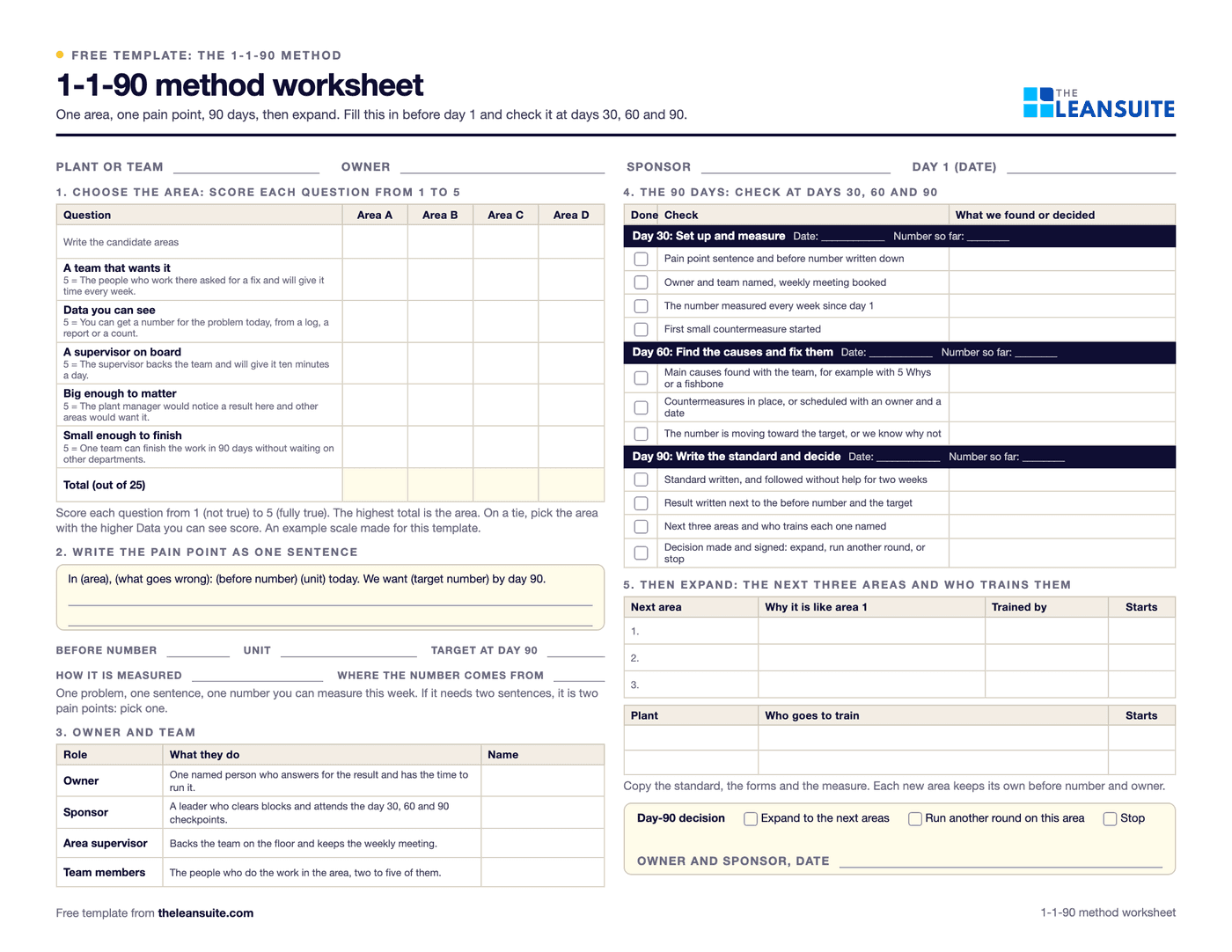
Free worksheet
The 1-1-90 worksheet
One page that holds the whole plan: a grid to score your candidate areas, the pain point as one sentence with a before number and a target, the owner and team, the day 30, 60 and 90 checks, and the next three areas with who trains them. It comes as a PDF to print and an Excel version that works out the dates and the gap closed, with a worked example.
- Area scoring grid: five questions, 1 to 5
- The pain point sentence with before and target numbers
- Owner and team
- Checks for day 30, day 60 and day 90
- The next three areas and who trains them
Free. You enter your name and work email on the worksheet page to download it.
Where LeanSuite fits
You do not need software to use the 1-1-90 method. If you want it, LeanSuite gives your pilot area one module to run the pain point on, such as daily issue management, audits, kaizen and ideas, or skills and training, set up by our team with the first module live in under a week. Later the same system carries the next areas and plants.
Not sure software is the answer yet? See how LeanSuite compares with spreadsheets, homegrown tools and the other options. See the comparisons.
Go deeper
Where to read and listen next.
- Free e-bookHow to Run a Kaizen Campaign to Solve a Specific Urgent ProblemA step-by-step guide to launching a kaizen campaign that solves an urgent problem such as defects or delays. Useful when you pick your one pain point.
- Free e-bookThe Most Common Failure Point in a Lean Transformation (And How to Avoid It)The top failure in lean transformations, lack of leadership commitment, and how to avoid it. Useful for keeping the 90 days and the expansion going.
- TPM Launch: Year One Deployment GuideChoosing and staffing the pilot, the quarter-by-quarter first year, and when to expand beyond the pilot.
- Yokoten: Horizontal Deployment of Kaizen Best PracticesHow a proven practice is shared and adapted across areas and plants.
- Lean Transformation: A Complete Guide for BeginnersThe wider picture the 1-1-90 method fits into.
New to lean? The free email course Lean in 7 days covers the basics. You can also read the glossary entry for the 1-1-90 method.
FAQ
Questions about the 1-1-90 method
Pick one area and start
The 90-day pilot is the 1-1-90 method with LeanSuite set up for you. Your first module is live in under a week.