Skip to content

Digital Daily Management: Run your tiered meetings on live data, not whiteboards

LeanSuite runs digital daily management and tiered meetings on Lean Studio boards: each huddle enters its KPIs, assigns actions and escalates problems on one live screen, from the shift huddle to the plant review.

By clicking "Schedule Demo," you agree to the use of your data in accordance with LeanSuite's Privacy Notice, including for marketing purposes.

Watch

A short story from the plant floor

· 7:28

Why is your plant still behind on improvement?

Most factories still talk about improvement every week, and most are still behind. The records live on paper, the boards show last week, and the audit turns into a Friday night scramble. In this episode a supervisor rebuilds thirty days of checklists from memory, and a plant manager learns her huddle board is arguing about the past. A maintenance tech…

Press play to load the player from YouTube.
THE VISIBILITY GAP

Is your tiered meeting stuck on a whiteboard?

By the time the numbers are written up, the shift has moved on and each tier is working from a different picture.

The whiteboard trap

  • Stale, Shift-Late Data

    Metrics are copied by hand once per shift, so leaders react to yesterday's problems.

  • Illegible & Inconsistent

    Handwriting and erased numbers make the board hard to trust and impossible to compare across tiers.

  • Talk Without Tracking

    Issues are discussed but never logged, assigned or escalated, so the same reds return meeting after meeting.

The LeanSuite standard

  • Single Source of Truth

    From Tier 1 shift huddle to Tier 3 plant review, everyone views the same live SQDCM data on cascaded dashboards.

  • Instant Action Assignment

    Assign owners and due dates during the meeting, and escalate unresolved items to the next tier with one click.

  • Visible Performance

    Operators and leaders see red/green status in real time, from the shop floor to the top floor.

Schedule Demo

Connected Alignment

Escalate Issues, Tier by Tier

Problems move up through the tiers, and each level gets the context it needs to fix them or pass them on quickly.

  1. TIER 1

    Shop Floor / Gemba

    Frontline Operators

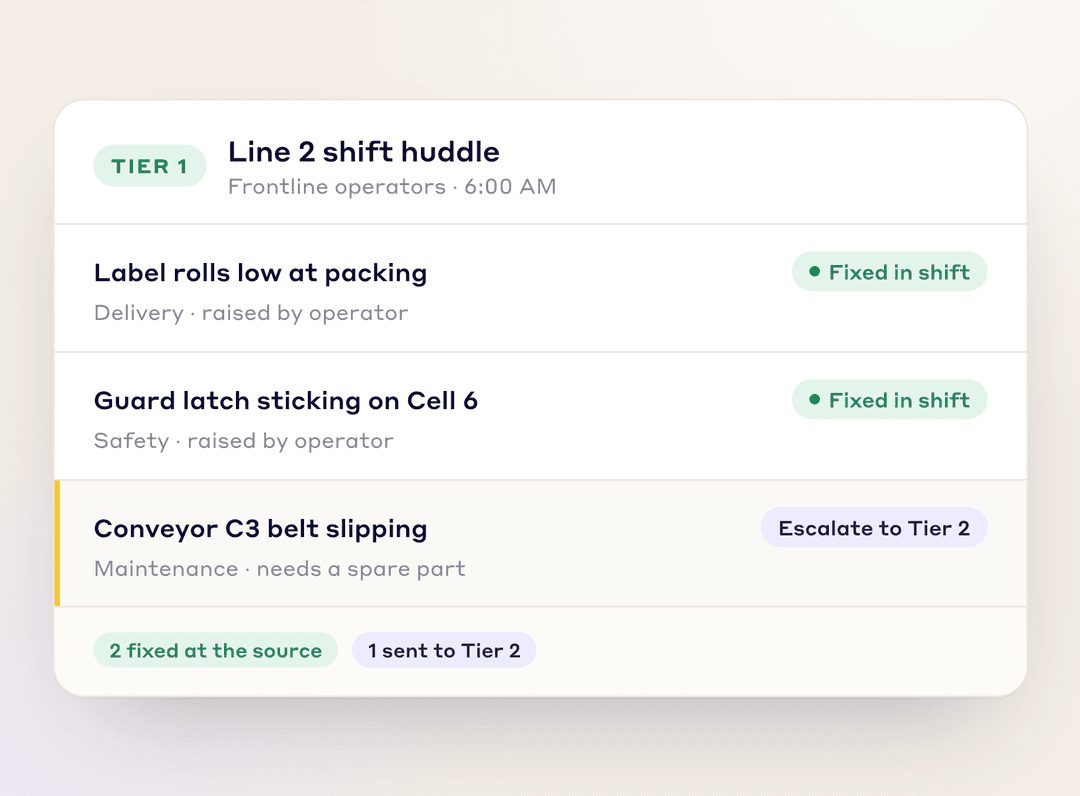
    Operators spot issues at the source and fix what they can on the spot. Bigger problems are logged and flagged for escalation.

    Tier 1 shift huddle board: two issues fixed in the shift, one conveyor issue escalated to Tier 2
  2. TIER 2

    Department Supervisor

    Value Stream Managers

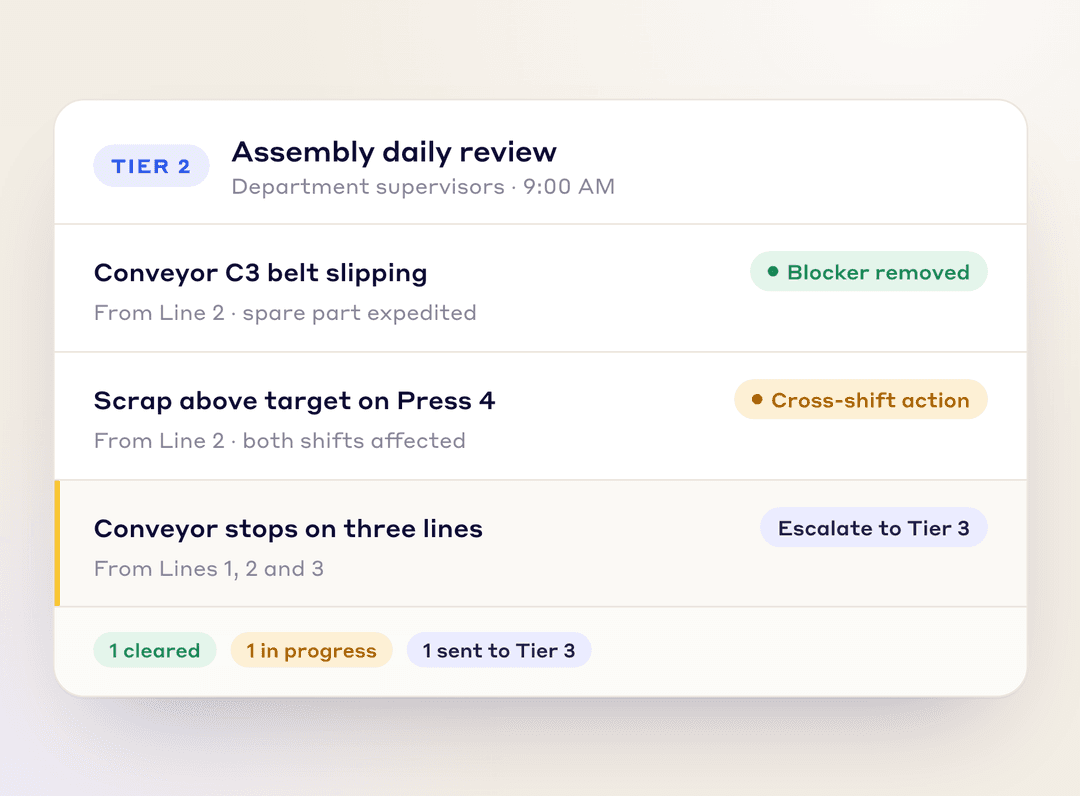
    Supervisors review unresolved issues, remove blockers, and drive cross-shift alignment before escalating bigger constraints.

    Tier 2 department review: a blocker removed, a cross-shift action, and a recurring problem escalated to Tier 3
  3. TIER 3

    Plant Leadership

    Site Managers

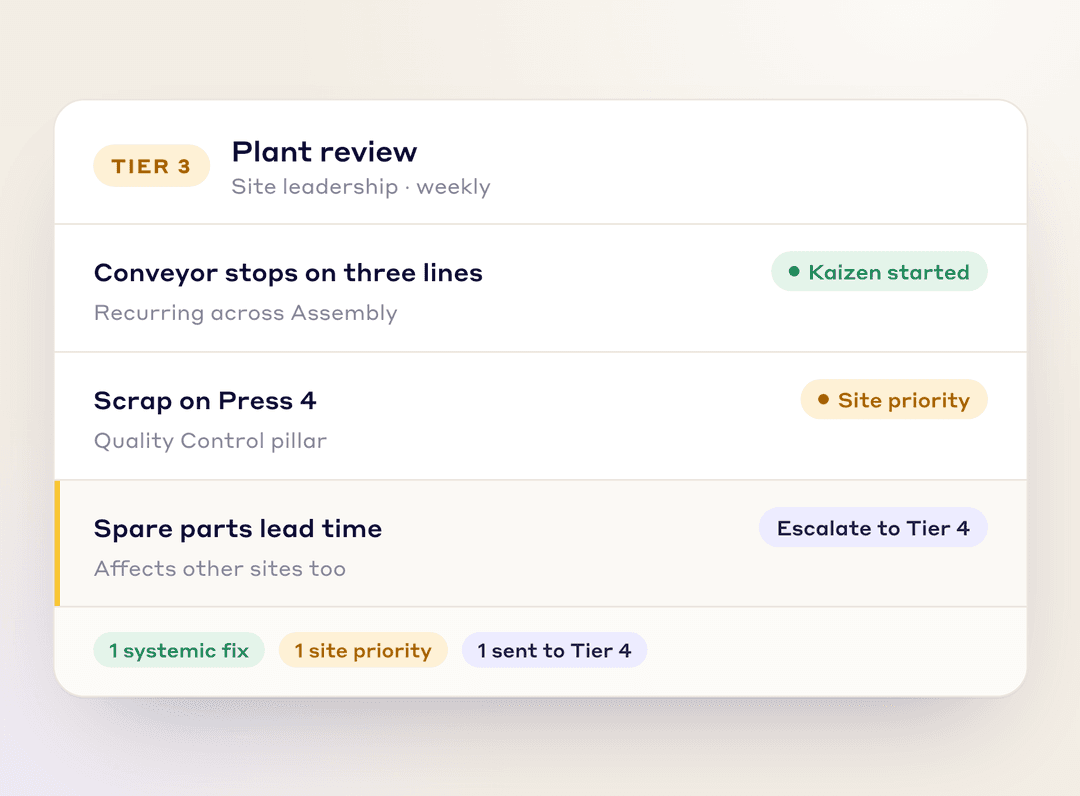
    Cross-functional analysis turns recurring issues into systemic improvements and site-wide priority actions.

    Tier 3 plant review: a Kaizen started on a recurring problem, a site priority, and one item escalated to Tier 4
  4. TIER 4

    Executive / Enterprise

    Global Leadership

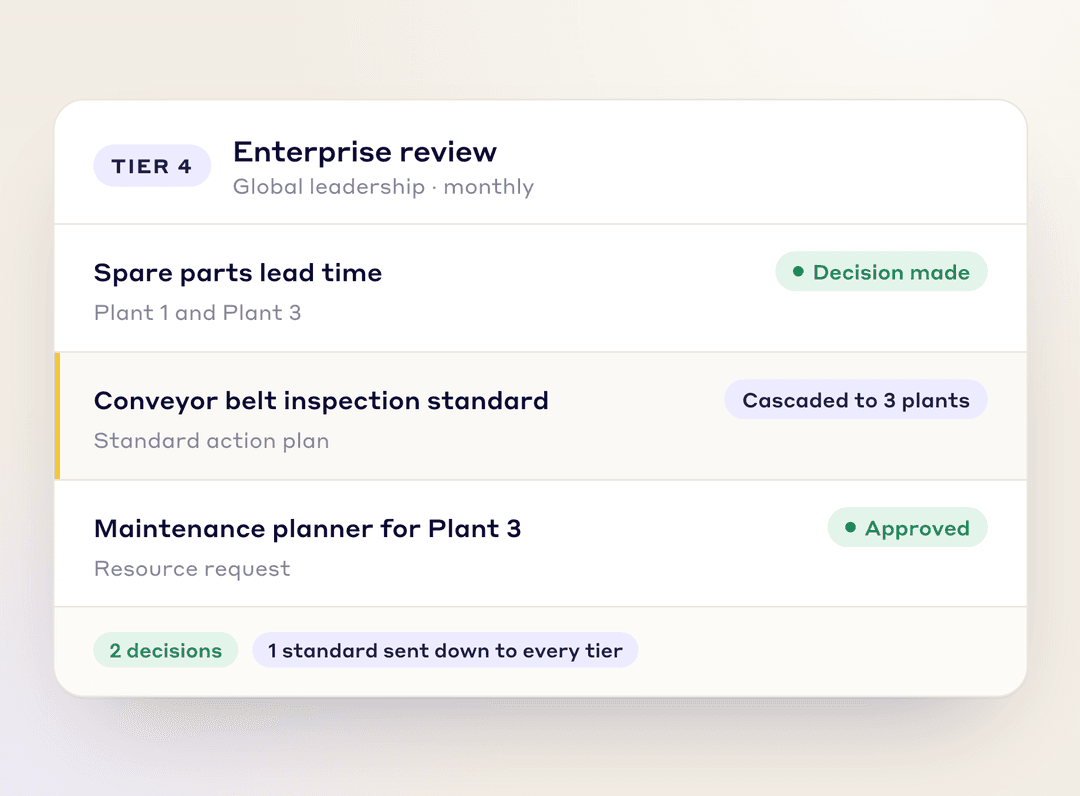
    Leaders make strategic calls with full visibility, then send standard action plans and resources back down the tiers.

    Tier 4 enterprise review: decisions made and a standard action plan cascaded to three plants

HOW IT WORKS

Three modules, one daily management system

Lean Studio runs the meeting. Issue Management escalates blockers. KPI Dashboards align every tier on what matters most.

Lean Studio
Issue Management
KPIs & Dashboards

Lean Studio

Live SQDCM Meeting Boards

Run huddles on live data

Run every tier, from the shift huddle to the plant review, in one place. SQDCM boards, a meeting timer and live notes keep each stand-up short.

  • Safety, Quality, Delivery, Cost and Morale metrics for every tier on one SQDCM board

  • A meeting timer keeps Tier 1 huddles within the 10–15 minute target

  • Live notes pinned to the board give the next shift or tier the context

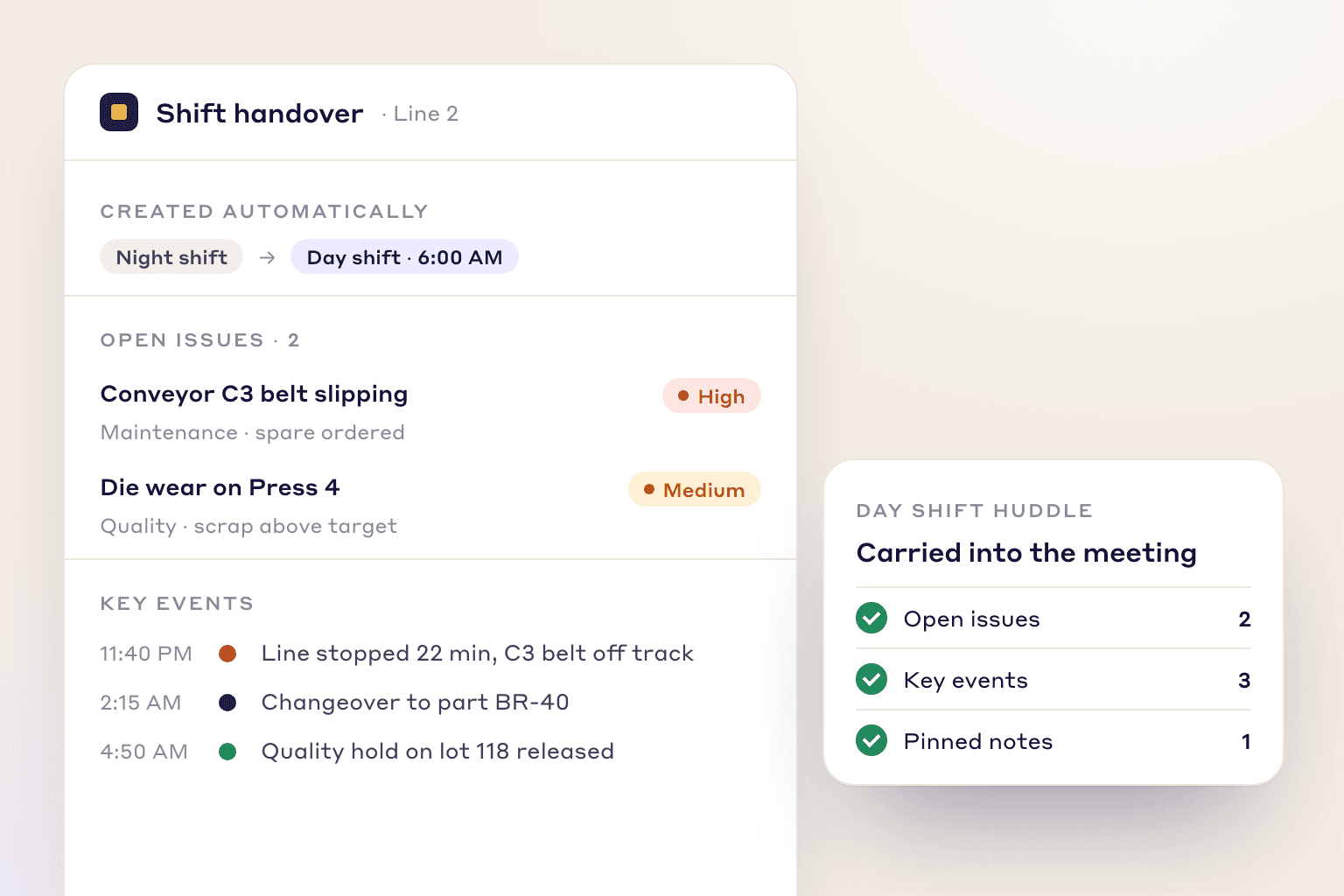
  • Automated shift handover surfaces open issues and key events from the previous shift

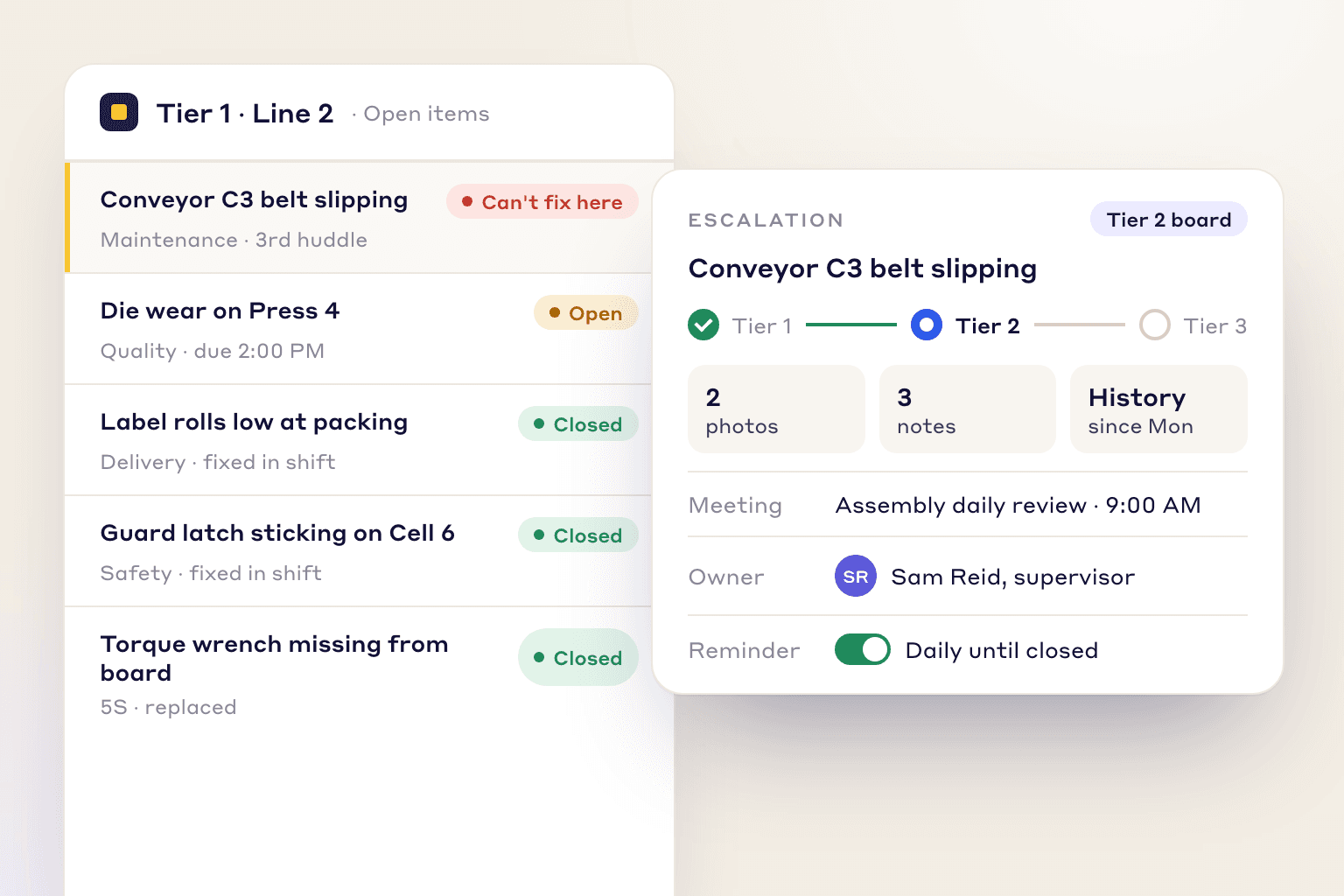
A conveyor issue escalated from the Tier 1 board to the Tier 2 review with its photos, notes, history, owner and reminder

Issue Management

Escalate & Track to Closure

One-click escalation to the next tier

If Tier 1 can't solve a problem, escalate it and it appears on the Tier 2 board for the next meeting. The answer can be sent back down, and owners, due dates and reminders follow it to closure.

  • Escalate unresolved issues to the next tier with photos, notes and history intact

  • Recurring downtime and red KPIs are flagged for supervisor review before the next tier

  • Assign action owners from the board during the huddle

  • Reminders keep escalated items from getting lost between meetings

KPIs & Dashboards

Cascaded Visibility

Align every tier on the same numbers

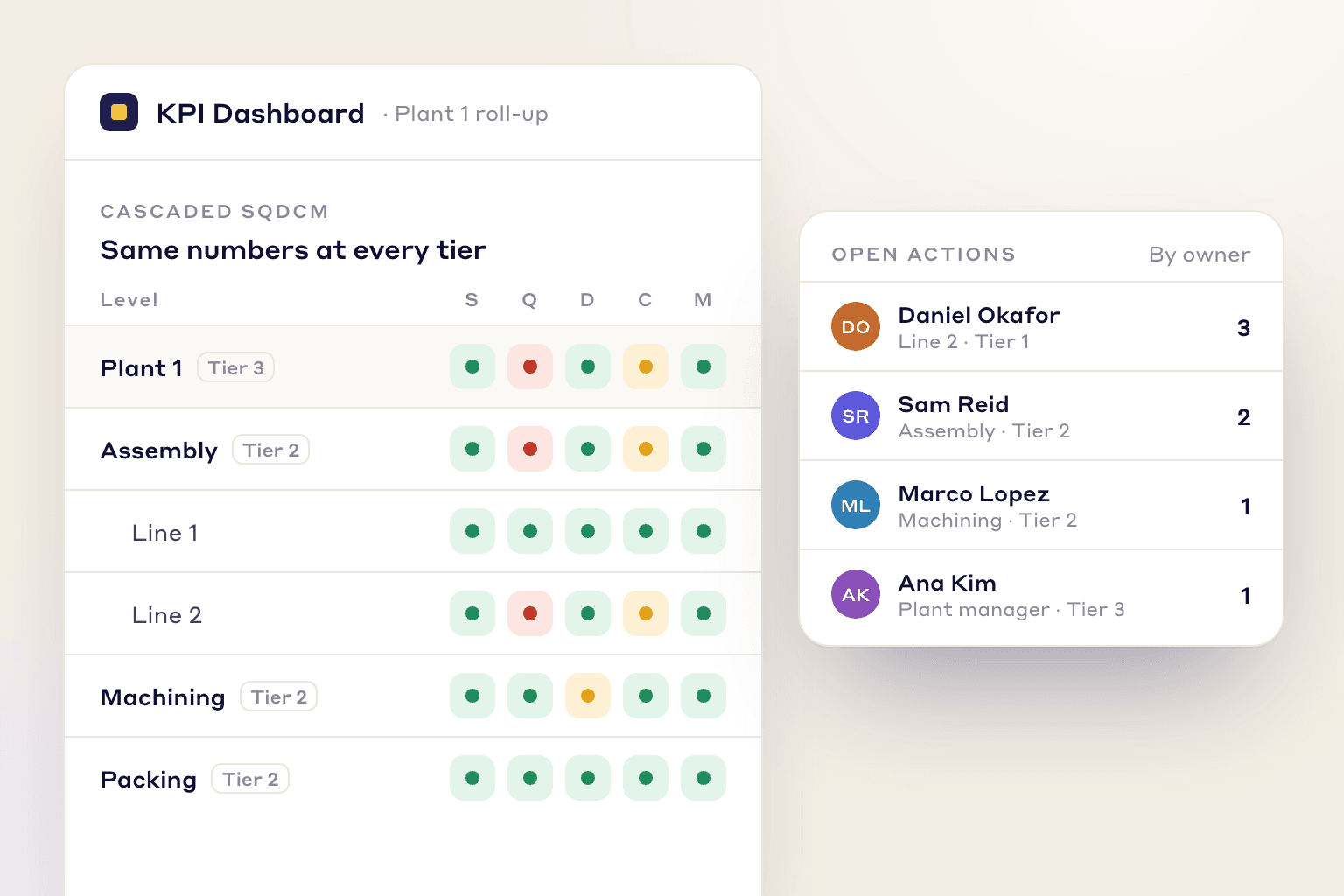
Boards connect to daily issue management and Kaizen, so every tier reviews the same live performance, open actions and escalations.

  • See who owns each action across Tier 1–4 reviews

  • Click a red KPI on the board to create a task without leaving the meeting

  • SQDCM roll-ups give plant and executive reviews the same numbers as the gemba

SQDCM status rolled up from lines to departments to the plant, next to open actions by owner and tier

LEAN STUDIO

What you can do on a Lean Studio board

Lean Studio builds live boards from your LeanSuite data for huddles and tier meetings.

  • Grid or freeform boards

    Build a fixed-layout KPI or tier board, or a freeform board with sticky notes, shapes and 30 ready-made lean board templates, from an SQCDP tier board to a fishbone.

    See Lean Studio about Grid or freeform boards
  • Actions, tags and @mentions

    Create action items, raise tags, comment and @mention people without leaving the board.

  • Escalate up, reply down

    Escalate an item to the next tier, and send the reply back down to the tier that raised it.

  • Copy boards to other plants

    Build a tier board once and copy it to your other facilities.

  • Huddles on the calendar

    Schedule each tier meeting on the calendar, linked to the board the team runs it from.

  • Standard work results on the board

    Show Daily Standard Work and audit results on the board, next to the KPIs.

Automatic night-to-day shift handover listing open issues and key events carried into the day shift huddle

Shop Floor Impact

Give the Frontline a Voice

Digital tiered meetings give operators a place to be heard and a clear view of how their line is doing.

Improved Communication

Operators raise issues and ideas in a set forum, and they see each one escalated and tracked on the board.

Faster Problem Solving

Live data shows problems as they happen, so teams act during the shift instead of at the end of it.

Enhanced Visibility

Operators see how their line is doing against target, which builds ownership and some healthy competition.

10–15

Min target huddle time

4

Tiers connected

Daily Management Excellence

Built for tiered accountability

LeanSuite puts the tiered rhythm online, with a standard meeting cadence, escalation paths and an audit trail from the gemba to the executive review.

  • SOC 2 Type 1 report

  • First module live in under a week

  • Unlimited users per facility

  • 99.5% monthly uptime commitment

FAQs

Frequently Asked Questions

  1. Tiered meetings are a cascade of short daily stand-ups, from frontline teams (tier 1) to area leaders (tier 2) and plant leadership (tier 3 and above). Each tier reviews performance and escalates what it cannot solve, while decisions flow back down, so each problem reaches the level that can fix it the same day.

  2. SQDCM stands for safety, quality, delivery, cost and morale, the five categories many plants use for daily performance boards and tiered meetings. In LeanSuite, every tier views the same live SQDCM data on cascaded boards.

  3. Lean Studio is LeanSuite's board builder for huddles and tier meetings. You build grid or freeform boards from charts, tables, KPIs and embedded Power BI or Looker Studio reports, and run the meeting from the board.

  4. The team opens its Lean Studio board, enters the day's KPI values, and creates actions, comments or tags for anything off target. Items the team can't solve are escalated to the next tier's board.

  5. Yes. Build a board for each tier, from Tier 1 shift huddles to weekly or monthly plant and executive reviews, each with its own SQDCM metrics.

  6. It is escalated to the next tier's board with its photos, notes and history, so nobody has to explain it again. The reply can be sent back down to Tier 1.

  7. No. Tier 1 huddles are for the frontline. KPI trees roll results up and escalated items reach the next tier's board, so leaders see plant-wide status without re-entering data.

  8. Lean Studio boards work with LeanSuite's Issue Management and Kaizen modules, so red metrics become tracked actions, escalations and improvement projects with a full audit trail.

FREE RESOURCES

Free templates and posters

Not ready for software yet? Start with these free resources.

Ready to align your entire factory?

Swap the whiteboard for live data. See how LeanSuite runs daily management from the shop floor to the top floor.