

Buyer's guide
Standardized work software: what it does and how to choose it
Short answer
Standardized work software helps a plant build the current best way to do each job, put it in front of the operator, keep it under version control and check that it is followed. It covers the three elements of standardized work (takt time, the work sequence and standard work in process), the documents that record them, such as the standard work sheet, the combination table and the work instruction, and the training and audits that keep the standard alive.
The Lean Enterprise Institute defines standardized work as precise procedures for each operator's work, built on three elements: takt time, the work sequence within takt, and the standard inventory needed to keep the process running. Engineers and supervisors use its forms to design the process, and operators use them to improve their own jobs.
No single product does every part of that well. Some tools are best at working out the standard (element times, takt and the line balance); others at keeping it current at the station and proving each operator follows the latest version. The best standardized work software comparison sorts seven tools by which job they do. This guide covers what any plant should look for.
What it does
The six jobs standardized work software covers
Standardized work is a cycle, not a document: work out the standard, write it down, control it, train it, check it and improve it. Here is each job, how plants run it on paper, and what software should add.
- 1
Work out the standard
Time each element of the job, work out takt from available time and demand, and balance the work so each operator's cycle sits at or under takt. Where machines are involved, the combination table shows manual, walk and machine time together.
- On paper
- A stopwatch, a time study sheet over ten cycles and a hand-drawn Yamazumi chart.
- What software should add
- Element times from video instead of a stopwatch, a takt line over the balance, and rebalancing tested on screen before anything moves on the floor.
- 2
Write it down for the station
Record the sequence, key points, quality checks, safety notes and standard WIP in a form the operator can follow at the station: a standard work sheet, a work instruction or an SOP.
- On paper
- A Word or Excel document, printed, laminated and pinned up, with photos taken on a phone and pasted in.
- What software should add
- Instructions drafted from a video of the job, with a picture or clip for each step and the current version on a tablet or behind a QR code.
- 3
Control versions and approvals
Every standard has an owner, a review date and an approval trail, and only the current version is in use. ISO 9001:2015 clause 7.5.3 asks for this kind of control of documented information.
- On paper
- A document register in a spreadsheet, wet signatures and someone walking the floor to swap printouts.
- What software should add
- Drafts kept private until approved, e-signatures from each function, every change versioned and routed for re-approval, and reminders before a review date.
- 4
Train and sign off each operator
Teach the standard, often with TWI Job Instruction, and record that each operator can do the job to the current version.
- On paper
- A training sign-off sheet and a skills matrix updated when someone remembers.
- What software should add
- Each operator opens and signs the current version, overdue sign-offs show in red, and the skills matrix updates from the sign-off.
- 5
Check that the standard is followed
Leaders observe the job against its standard on a schedule, through standard work audits, layered process audits and leader standard work, and sort each gap by cause.
- On paper
- An audit checklist on a clipboard, with findings that live in a binder.
- What software should add
- Audits scheduled to the right leaders, done on a phone with photos, and every failed check turned into an action with an owner.
- 6
Improve it and roll the change out
When a kaizen finds a better method, the standard changes, everyone is retrained on the new version and other lines or sites doing the same job pick it up.
- On paper
- A revised document, a reprint and a hope that the old copies come down.
- What software should add
- The approved change replaces the old version everywhere it is used, triggers new sign-offs, and can be shared with other sites.
Worked example
A worked example: takt, element times and one rebalance
A three-operator assembly cell. Takt comes first, then each operator's elements are stacked against it. This is the arithmetic standardized work software should do for you, and the free templates do on paper.
Available time
27,000 s
450 minutes per shift after breaks
Customer demand
900 units
per shift
Takt time
30 s
27,000 s divided by 900 units
Before: one operator over takt
After: Apply label moved from Operator B to Operator C
Total work content is 81 seconds. Divided by takt that is 2.7, so the cell needs 3 operators. Operator B was at 33 seconds, over takt, so the cell could only make about 818 units a shift instead of 900. Moving “Apply label” (8 s) to Operator C brings every operator under 30 seconds. That sequence, with its key points and standard work in process, is what goes on the standard work sheet.
How to choose
How to choose standardized work software: a 9-point checklist
Ask each vendor to show these on screen with one of your own jobs if possible. Mark which of the six jobs above the product actually does, and plan for the rest.
- 1
It builds the standard from the real job
A standard typed from memory describes how the job should go, not how the best operator does it.
In the demo: Give the vendor a video or a time study of one job. What does the tool produce from it?
LeanSuite: Film your best operator once and the AI drafts numbered steps with start and end times, the clearest frame for each step and callouts for PPE, torque tools, lockout points and inspections, in your own company template. With no video, it drafts from a paper or PDF procedure.
- 2
It shows element times against takt
Without takt, a written method says nothing about whether the line can meet demand.
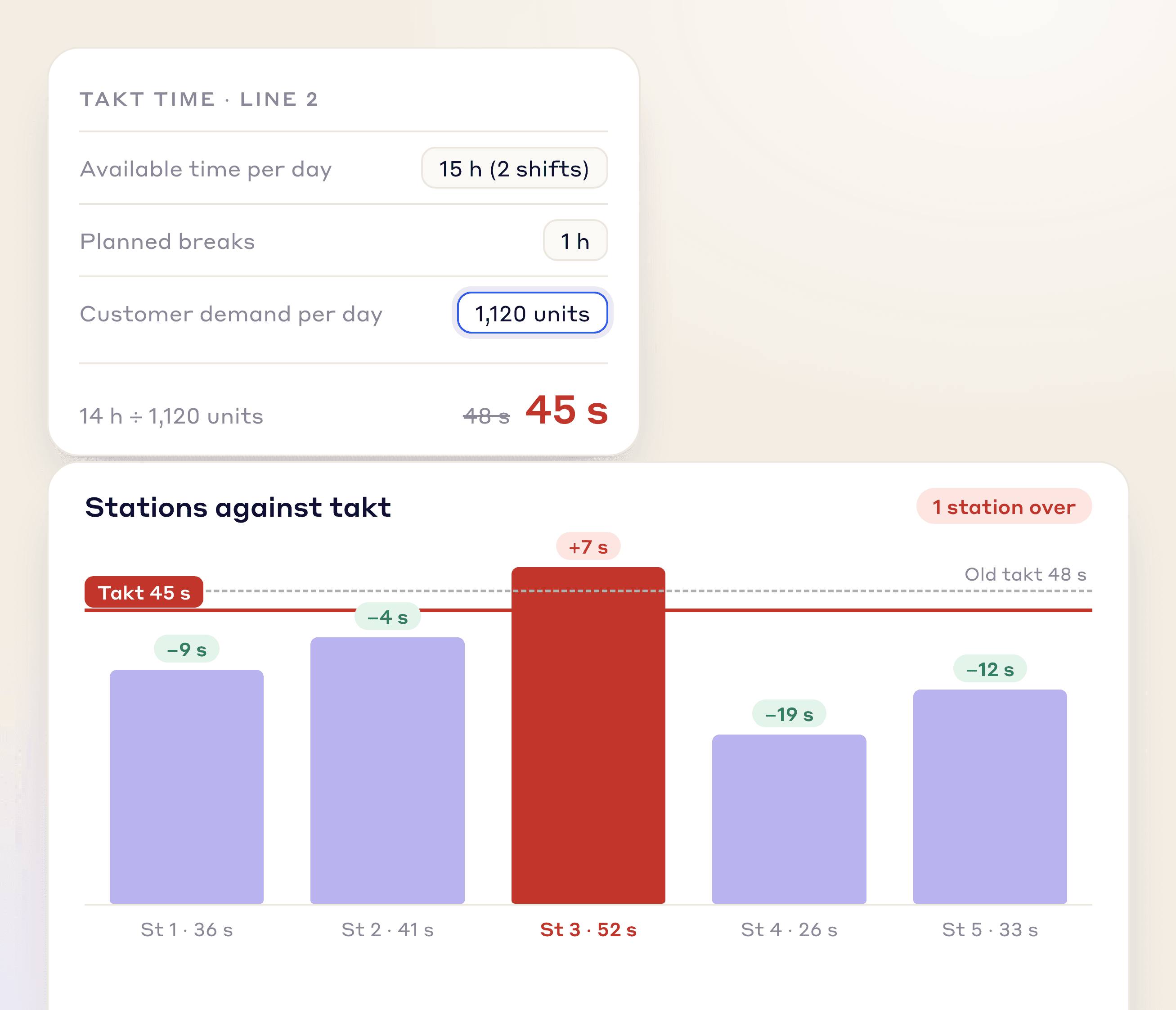
In the demo: Change daily demand and show how the takt line and each station's gap to takt move.
LeanSuite: Vision AI line balancing times each operator's elements from video and charts every station as a Yamazumi against takt, worked out from available time and daily demand. Vision AI is priced separately from the facility plan.
- 3
You can test a rebalance before moving work
Moving elements between operators on the floor to see what happens costs output.
In the demo: Move one element from the busiest station to a lighter one and compare the before and after.
LeanSuite: Drag an element to another operator or station and the balance redraws; each idea is saved as a scenario with the minutes and cost it saves, and elements can be locked to a station for safety, tooling or skill.
- 4
The operator sees the current version at the station
If the latest standard lives on a server and the old one is on the wall, the old one wins.
In the demo: Publish a change and show what the operator at the station sees, on a tablet and on paper.
LeanSuite: Instructions are assigned to people, a role or a workstation and opened on a phone or tablet. Each printed step carries a QR code that plays its clip.
- 5
Every change is versioned and approved
Customer and certification audits ask who changed a standard, when and who approved it.
In the demo: Show the revision history of one document and the approvals behind the latest change.
LeanSuite: Drafts stay private until published, go to engineering, EHS and quality for e-signature, and every change is versioned, traceable to the source video and routed for re-approval. Each document has an owner and a review date with reminders.
- 6
Each operator signs the current version
Training records that do not follow the version tell you nothing after the first change.
In the demo: Change a standard and show who now needs to sign it and where an overdue sign-off appears.
LeanSuite: Each operator opens and signs on a phone or tablet and overdue sign-offs show in red. The skills matrix levels update as people complete training and sign-offs.
- 7
Adherence is checked on a schedule
A standard nobody checks drifts. The audit is also how you find standards that no longer fit the job.
In the demo: Schedule a standard work audit for a supervisor, fail one check and show the action it creates.
LeanSuite: Standard work audits and layered process audits are done on a phone or tablet with photos where required, scheduled in Daily Standard Work, and a rule on an answer can raise a tag, an idea or a Kaizen.
- 8
It works in the operators' languages
An instruction the operator cannot read is not a standard.
In the demo: Translate one instruction and check that your part names and technical terms survive.
LeanSuite: Translation keeps your glossary locked, so your own terms are used in every language.
- 9
Operators can use it without a company email
The people who follow the standard are the people least likely to have an email account.
In the demo: How does an operator sign in on a shared tablet at the station?
LeanSuite: Frontline staff sign in with an employee ID, no company email needed.
Do you need software?
When Excel and paper are enough, and when software pays
A laminated standard work sheet at a stable station is still good standardized work. Software is worth it when change, variety or audit evidence outgrow a document register.
Paper is enough when
- A few stations with a stable product, where the standard changes a few times a year.
- One shift and one team leader who trains everyone, so sign-offs are easy to keep.
- No customer or certification audit asks you to prove which version each operator was trained on.
- You are writing your first standards. Do them on paper with the operators first: the thinking matters more than the tool.
Software pays when
- Standards change often because of engineering changes, new models or kaizen.
- High mix: many variants of the same job, each with its own steps.
- Several shifts or sites run the same job and drift apart.
- Turnover means you train new people every month.
- Audits ask for version control, approvals and training records per operator.
- Time studies and line balancing take an engineer days with a stopwatch.
How to
How to put standardized work in place, in 7 steps
- 1
Pick one line and work out takt
Choose a line with steady demand. Takt is available time divided by demand: use the takt time calculator.
- 2
Time the job, element by element
Observe ten cycles of each element and use the lowest repeatable time, the approach Mike Rother and Rick Harris describe in Creating Continuous Flow, rather than an average that includes problems. The time study sheet does the sums, or film the job and time it from video.
- 3
Balance the work to takt and set standard WIP
Stack each operator's elements against takt, move work until no one is over, and decide the inventory each station needs to keep running. The line balancing calculator and the standard work combination table help.
- 4
Write it down with the operators
Put the sequence, key points, quality checks and standard WIP on a standard work sheet at the station, and break each job down for training with a TWI job breakdown sheet.
- 5
Train it and record who can do it
Teach with TWI Job Instruction, have each operator sign off the current version, and update the skills matrix so cover planning reflects it.
- 6
Audit adherence in leader standard work
Put a short standard work observation in each team leader's and supervisor's routine. Use the standard work audit checklist and sort every gap by cause: the standard, the training or the conditions, before anyone acts.
- 7
Improve and re-issue
When a kaizen changes the method, update the standard, retrain and re-sign, and take the old version off the station the same day.
Common pitfalls
Engineers write it without operators
A standard the operators did not help write gets worked around. Build it at the station with the people who do the job.
An SOP is mistaken for standardized work
An SOP lists steps. Standardized work also ties those steps to takt and to the inventory the station needs, so it shows whether the line can meet demand.
Average times instead of repeatable ones
Averages include fumbles, waits and problems, which then get built into the standard. Use the lowest repeatable time and fix the causes of the rest.
Written once, filed forever
A standard that never changes is either perfect or ignored. Expect it to change with every improvement.
Audits used to blame
If a missed step leads to a reprimand, people hide deviations. Most gaps are a problem with the standard, the training or the conditions.
Old copies stay on the station
A new version is only live when the old printout is gone and every operator has been retrained on the change.
In LeanSuite
Where LeanSuite fits
LeanSuite covers most of the cycle in one platform: working out the standard with Vision AI, keeping it current with SOPs and work instructions, and training and auditing it. Here is what each part does, as its product page describes it, and what it does not do.
What it does not do
- The standard work sheet and the standard work combination table are free LeanSuite templates, not modules in the software.
- Vision AI, which does the time study and line balancing, is priced separately and is not part of the 90-day pilot.
- It is not an MES or ERP, so it does not run production orders, scheduling or inventory.
Work out the standard from video
Vision AI line balancing times each operator's elements from a video, charts them as a Yamazumi against takt, and lets you test rebalancing scenarios. It is priced separately from the facility plan.
Line BalancingSOPs and work instructions from one video
The AI drafts numbered steps with a frame and callouts for each, in your template; drafts go to engineering, EHS and quality for e-signature and every change is versioned.
AI SOPsSign-off and skills
Each operator signs the current version on a phone or tablet, overdue sign-offs show in red, and skills matrix levels update as people complete training and sign-offs.
Competency ManagementAdherence audits
Standard work audits and layered process audits on a phone or tablet, scheduled in Daily Standard Work, with failed checks turned into tracked actions.
Audit Management
Your path to a demo
- 1 · 3 to 5 minutesTry the audits and standard work pathRun an audit on a tablet, fail an item and add its photo, then sign off an SOP and watch the job cover update. Sample data, in your browser.Start the demo
- 2 · A call with our teamBook a demo on your own routineBring one job: a video of it if you have one, or the current work instruction. We will show the SOP LeanSuite drafts from it, the approval and sign-off flow, and the audit that checks it on the floor.Book a 45-minute demo
- 3 · 90 daysPilot it on one areaOur team sets it up on your lines, the first module is live in under a week, and you decide at day 90.See the 90-day pilot
Free resources
Free standard work templates and calculators
Everything you need to build standardized work on paper first: templates with filled-in examples, calculators that run in your browser and a Lean Studio board for the operator balance.
- TemplateStandard work sheet templateTakt time, each element's manual, machine and walk time on a time chart, key points and standard WIP.
- TemplateStandard work combination tableOne operator's manual, machine, walk and wait time on a time chart against takt, with machine cycles and a process capacity sheet.
- TemplateProcess capacity sheet templateEach machine in a part's routing with manual, auto and tool change time, its capacity per shift, and the step that limits the cell against demand.
- TemplateTime study sheetTime each element over 10 cycles and work out the average, lowest repeatable and standard time. Excel does the sums.
- Free toolTakt time calculatorThe pace a line must hit to meet customer demand, from shift time, breaks and daily demand.
- Free toolLine balancing calculatorLine efficiency, balance delay and the minimum number of stations from station times and takt.
- Lean Studio boardYamazumi Operator BalanceVisualize operator cycle-time stacks against takt time to spot overload and imbalance.
- TemplateTWI job breakdown sheetThe TWI Job Instruction breakdown of a job into important steps, key points and reasons, with a worked example and the four steps.
- TemplateStandard operating procedure (SOP) templateA full SOP in the hierarchical step format, from purpose and scope to the steps, records, revision history and approvals, with review checks and an SOP register.
- TemplateTraining sign-off sheetAn attendance and sign-off record where each person signs they understood, with a competence check and an Excel log.
- TemplateStandard work audit checklist24 checks of a job against its written standard, ten timed cycles, and each gap sorted by cause before anyone acts.
- TemplateLeader standard work templateA team leader's daily, weekly and monthly routine with a box per day, follow-ups and a weekly review.
Compare tools and read more
- Best standardized work software: 7 tools comparedAVIX, Augmentir, Azumuta, Dozuki, LeanSuite, Poka and Tulip, sorted by which job each does best.
- The three elements of standard workTakt time, work sequence and standard WIP, explained with examples.
- Standard work vs SOPs vs work instructionsWhere each document fits and how they work together.
- Standard work tools: combination sheet, chart and job breakdownHow to fill in each form.
- Leader standard work: examples and free templatesThe leader routines that check standard work is followed.
- Standard work and training topic guideAll our articles, templates and tools on standard work, SOPs and skills.
FAQ
Standardized work software: buyer questions
See it on your own floor's routine
Bring the routine you want to fix first, and we'll show how LeanSuite runs it and what a 90-day pilot covers.