Skip to content

SOP to training matrix: From video to SOP to training matrix

Film the job, let the AI draft the SOP, approve it, link it to the skill and see in the matrix who is signed off to do it.

Not ready for software? Start with the free training matrix template.

By clicking "Schedule Demo," you agree to the use of your data in accordance with LeanSuite's Privacy Notice, including for marketing purposes.

The short answer

Film the job once, let the AI draft the SOP from the video, edit and approve it, link it to a skill, and the training matrix shows who has read it, who has been signed off and who still needs training.

This page walks through that path on one sample job. If you only need one part of it, the AI SOP creation page covers the SOP, competency management covers the matrix, and the LMS for manufacturing covers courses.

Updated 14 October 2026

The gap

The SOP and the training record rarely meet

Most plants have both. They are written by different people, kept in different places and updated at different times.

Today in many plants

  • The SOP is typed after the fact

    Someone writes the steps from memory, and the document is out of date the first time the job changes.

  • The matrix is a spreadsheet

    Levels are typed in by hand, so nobody can tell what evidence is behind a cell.

  • Nobody can say who read the current version

    Signatures sit on paper, and the matrix does not know which procedure a skill depends on.
With the path connected

  • The SOP is drafted from the video

    One recording of the real job gives you a draft with a picture for each step.

  • The skill points at the SOP

    The skill holds the SOP, the course and the sign-off in one place.

  • The matrix follows the sign-offs

    Who has signed, and who has been signed off on the job, shows next to each person's level.

How it works

From recording to signed-off team in six steps

Each step is one thing to do, and each one is shown below with the same sample job.

Steps 1 and 2

Film the job and get a draft SOP

1. Film the job. Record the task start to finish on a phone, in one take. Narrating while you film helps, and the help guide gives 10 to 15 minutes as the best length.

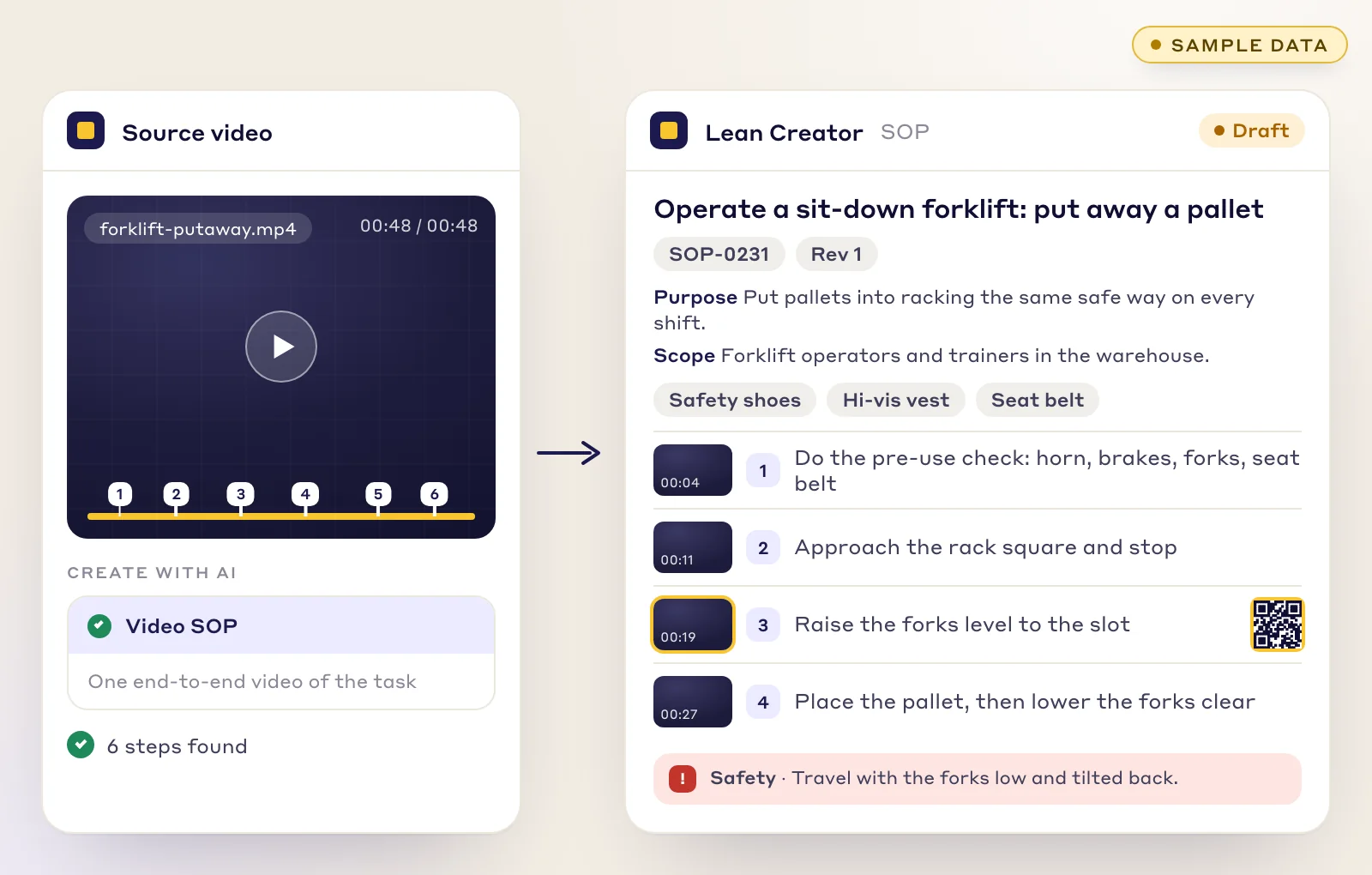
2. Let the AI draft the SOP. In Lean Creator, open Create with AI, choose Video SOP and upload the video. The draft has purpose, scope, PPE, tools, numbered steps with a frame from the video for each, and safety warnings. See AI SOP creation for the detail, or digital work instructions for station-level instructions.

A forklift put-away video with six steps marked, beside the draft SOP with purpose, scope, PPE and numbered steps
Sample data: a 48 second video of a forklift put-away, and the draft SOP the AI wrote from it.

Step 3

Edit it, approve it and print it with a QR code on every step

3. Edit and approve. Fix any step with the pencil, or ask the AI to reword a step or add a warning. Choose a better frame from the video for any picture. The SOP stays a private draft until you save and publish it, with revision control and e-signatures.

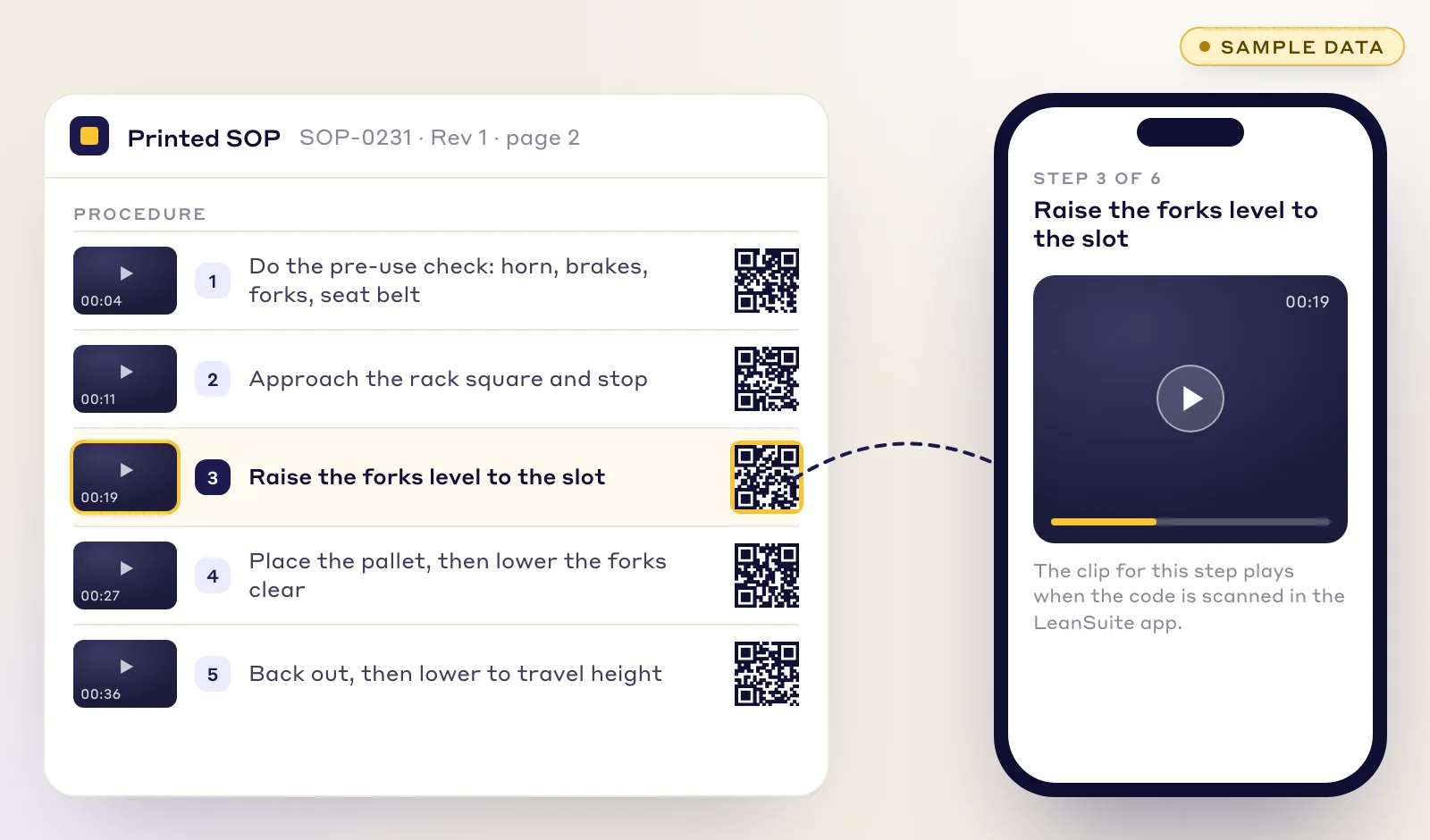
Each step gets a QR code. Scan it in the LeanSuite app and the clip for that step plays, so a new operator can see the move, not only read it. The viewer has to be signed in.

A printed SOP with a QR code on each step, and a phone playing the clip for step 3, raise the forks level to the slot
Sample data: each printed step carries a QR code. Scanned in the LeanSuite app, it plays that step's clip.

Step 5

Assign it and see who has signed

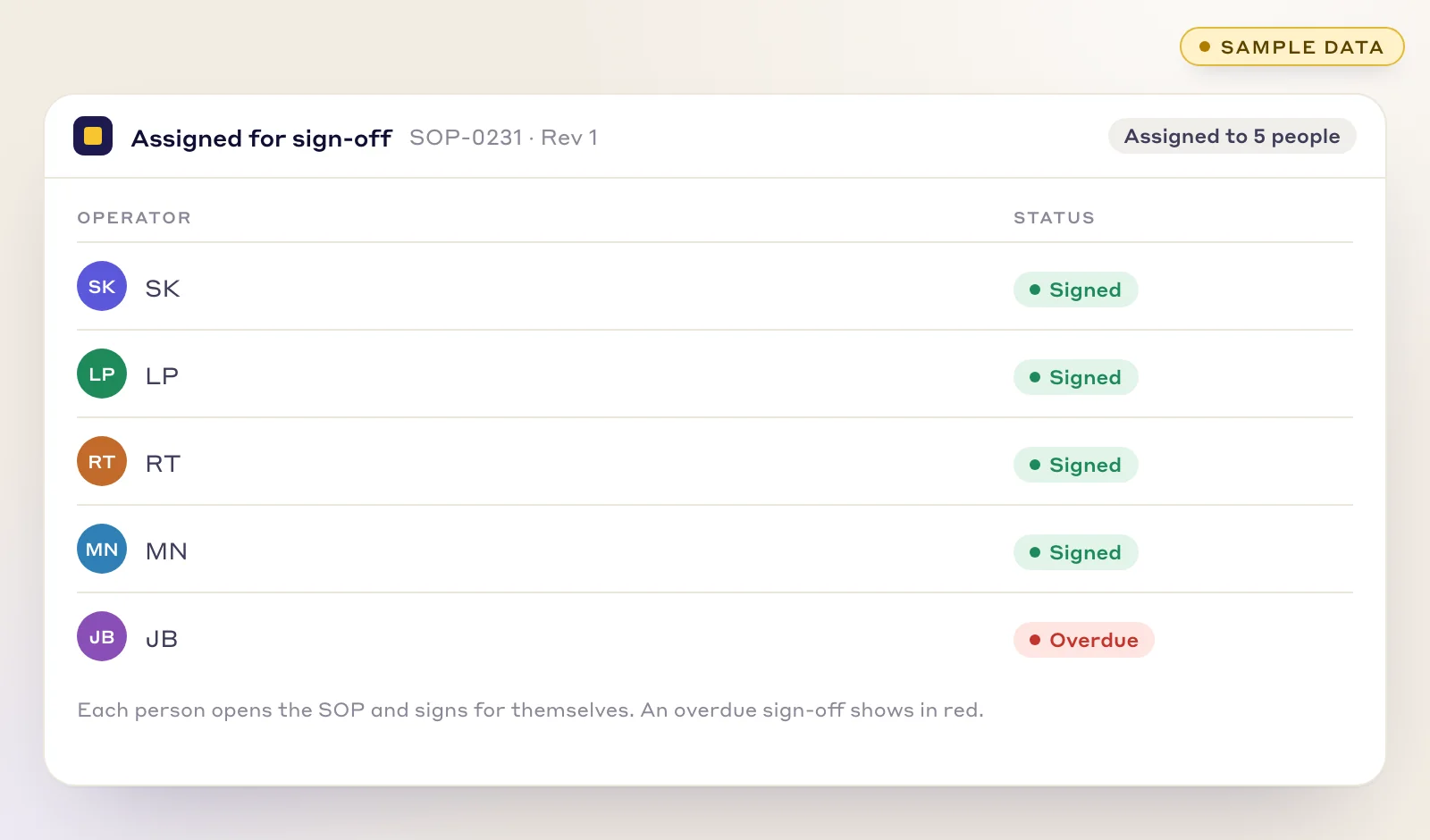
5. Assign it. Send the SOP to people, to a role or to an asset. Each person finds it on their dashboard, opens it and signs. Overdue sign-offs show in red, so the list of who is behind is the screen you already have open.

On-the-job practice is covered in on-the-job training, and the sign-off sheet is free as a training sign-off sheet.

An SOP assigned to five operators for sign-off: four have signed and one is overdue, shown in red
Sample data: the SOP assigned to five people. Each signs for themselves, and an overdue sign-off shows in red.

Step 6

Read the training matrix

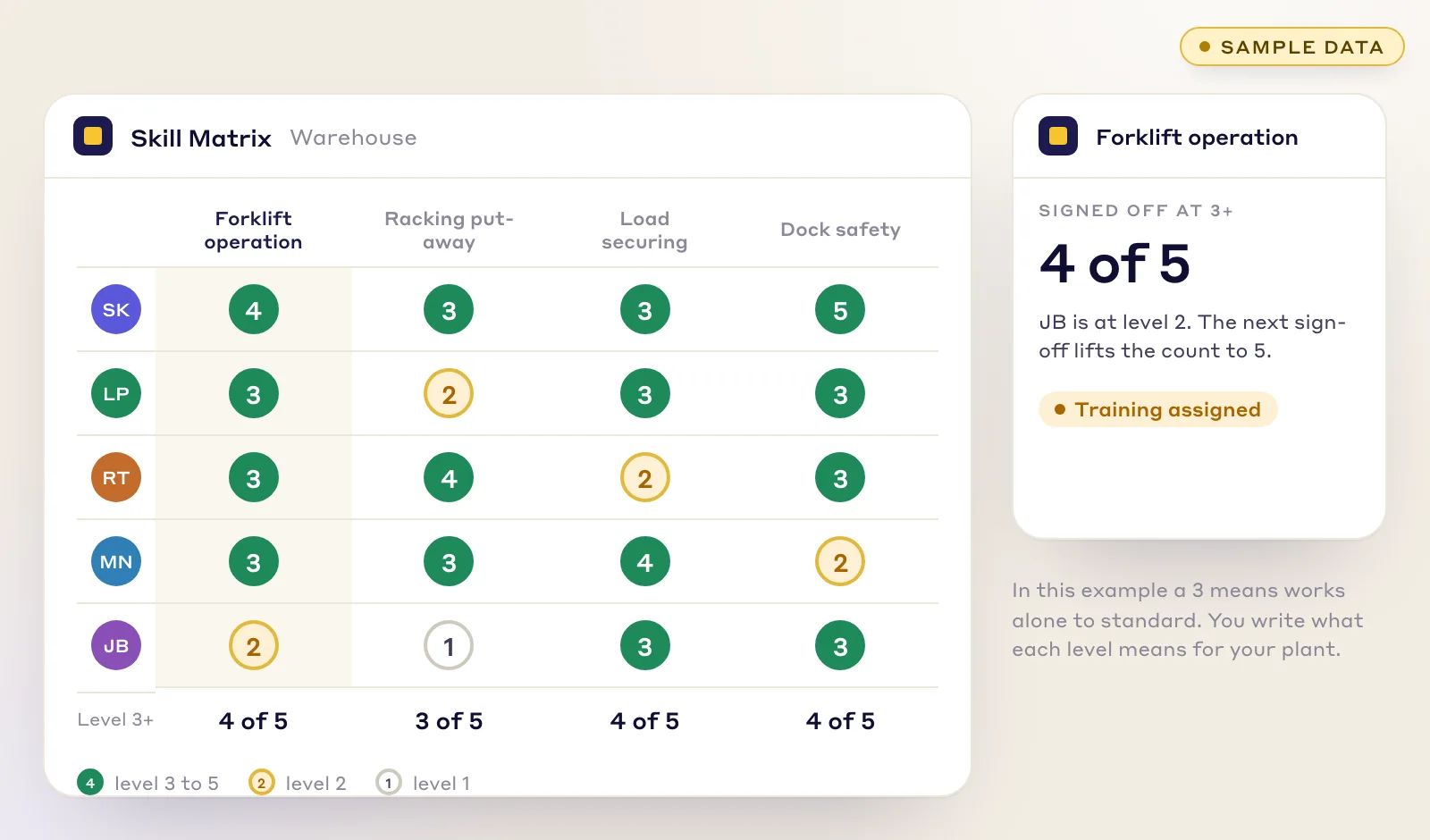
6. Read the matrix. The Skill Matrix shows each person against each skill at levels 1 to 5, with a count of how many are at the level the job needs. A skill with one qualified person stands out, which is the point of a job cover matrix and of cross-training.

You can also open the matrix as it stood on a past date, which is what an auditor asks for when they want to know who was qualified on a given day.

A skill matrix of five operators and four skills rated 1 to 5, with a count of who is at level 3 or more per skill
Sample data: levels 1 to 5 for five operators. The bottom row counts who is at level 3 or more for each skill.

Who it is for

People who train, sign off and answer for the work

  • Training coordinators

    Turn the procedure and the people who need it into one list, and see who is behind without chasing sheets.

  • Trainers and team leads

    Film the job once instead of writing it up, then sign people off at the machine on a tablet.

  • Shift supervisors

    Check who is qualified for a job before the shift starts, with the SOP one scan away.

  • Quality, EHS and HR

    Show which version of the SOP each person signed and who confirmed they could do the work.

What you get

One path instead of three documents

  • A draft in minutes

    The AI writes purpose, scope, PPE, tools, steps and warnings from the video, and you edit it.

  • A QR code on every step

    Scan a step on the printed SOP and its clip plays in the LeanSuite app, for anyone who is signed in.

  • One approved version

    Revision control and e-signatures, so the version people sign is the version in use.

  • A matrix that follows the evidence

    Levels move when a course is passed or a sign-off is made, not when someone remembers to edit a cell.

Worked example, sample data

One forklift job, from video to signed-off team

Sample data throughout. A warehouse has five forklift operators, and the job is putting a pallet into racking. The plant wants every operator at level 3 on forklift operation, where 3 means works alone to standard. That is this example's choice: you write what each level means for your plant.

Sample data: one forklift job from video to signed-off team
StepWhat happensWhat the matrix shows
1. FilmA trainer films one put-away from the pre-use check to parking the truck, narrating as they go. The video is 48 seconds.Nothing yet. Forklift operation has no linked SOP.
2. DraftLean AI finds six steps and drafts SOP-0231 with purpose, scope, PPE, a frame for each step and a safety warning.No change.
3. ApproveThe trainer rewords step 5 and the warning, then the SOP is approved as Rev 1 and published.No change.
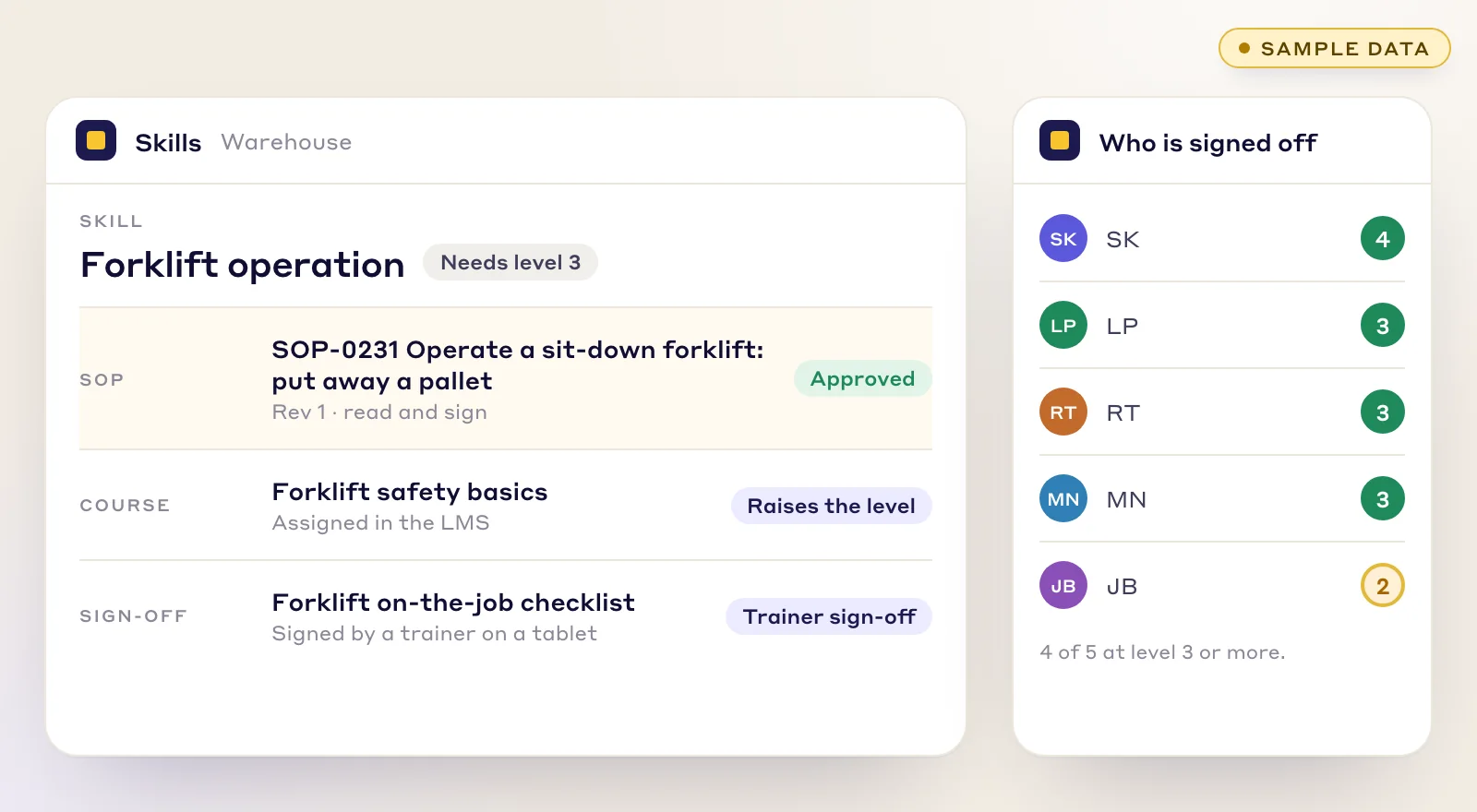
4. LinkSOP-0231 is linked to the Forklift operation skill, which needs level 3.The skill now holds the SOP, a course and a trainer sign-off.
5. AssignThe SOP goes to all five operators, and the trainer evaluates each one on a tablet.Four have signed. One is overdue and shows in red.
6. Read the matrixFour operators are signed off at level 3 or more. The fifth is at level 2 with training assigned.Forklift operation: 4 of 5 at level 3 or more.

Sample data: the job, the SOP number, the initials and the counts are made up for this page. They are not a customer's results.

Why a forklift job

In the United States, OSHA's powered industrial truck standard (29 CFR 1910.178) says trainees may operate a truck only under the direct supervision of someone qualified to train and evaluate them, wants each operator's performance evaluated at least once every three years, and wants the employer to certify the training with the operator's name, the training date, the evaluation date and who did the training or evaluation. So the question a supervisor asks is not who read the SOP but who has been evaluated, by whom and when.

A LeanSuite sign-off is stored with the person who made it and the time, and the matrix shows the result next to the SOP it relates to. Whether that record satisfies your own compliance duties is for you to check against the standard that applies to your plant. For the method behind the levels, see the free training matrix template and the competency management guide.

Honest limits

What this does not do

Know these before you start, so the first job goes well.

  • The AI drafts, a person approves

    Every SOP opens as a draft. Someone who knows the job checks each step, the warnings and the part, tool and chemical names against the real process before it is approved.

  • It sees and hears only what is filmed

    A step that is hidden from the camera, or never said aloud, can be missing or vague in the draft. Film from where the work can be seen and fix gaps in the editor.

  • Reading is not the same as being able to do the job

    A signature shows someone opened and acknowledged the SOP. For levels that mean works alone, set a trainer's on-the-job sign-off as the evidence.

  • You still define the levels

    The matrix shows levels 1 to 5. What each level means, and what moves someone up, is set by you for each skill.

  • Role assignments count once

    If you assign an SOP to a role, it is complete when any one member signs. Assign people individually when everyone has to sign.

FAQs

From video to SOP to training matrix: questions

  1. Yes. You upload the video in Lean Creator under Create with AI and choose Video SOP. The AI drafts the SOP with purpose, scope, PPE, tools, numbered steps with a picture each, and safety warnings. The draft stays private until you edit it, approve it and publish it.

  2. Record the task from start to finish in one take. LeanSuite's help guide says 10 to 15 minutes gives the best result. Narrating while you film improves accuracy, and a silent video still works because the AI follows the operator's hand movements. Large files are compressed automatically.

  3. You link the approved SOP to a skill. People then read and sign it, take any course linked to the skill, and a trainer signs them off on the job. Each of those can raise a person's level, and the Skill Matrix shows the level for every person and skill, from 1 to 5.

  4. Only if you decide it should. You set what raises each level. Most plants want an on-the-job sign-off by a trainer for any level that means works alone, because reading a procedure does not prove someone can do the job. A signed SOP is evidence of reading, and the sign-off is evidence of doing.

  5. You assign the SOP to people, to a role or to an asset. Each person must open the document before signing. A role assignment counts as done when any one member signs, so assign people individually when everyone must sign. Sign-offs show up in the Skill Matrix, and overdue ones are shown in red.

  6. Yes, and it is the best way to start. Pick one job in one area, film it and take it through the steps above. The 90-day pilot is $3,000 per facility, set up by our team, with the first module live in under a week. At day 90 you decide with your own results.

Bring one job and see it become a signed-off team

Bring one process video and we will show it becoming an SOP, a linked skill and a row in the matrix.