

A record you update
The matrix is a file you open when HR asks for it, so the repeat write-ups at that station look like a process problem. You rewrite the work instruction again and the same thing comes back.
The skills spreadsheet
The matrix in the shared drive was last touched whenever someone had time, so the hole in coverage only shows up on the shift it hurts. Skills gap analysis software keeps the matrix current from the work people already do.
By clicking "Schedule Demo," you agree to the use of your data in accordance with LeanSuite's Privacy Notice, including for marketing purposes.
TRUSTED BY INNOVATIVE LEADERS
Two ways to read it
The matrix is a file you open when HR asks for it, so the repeat write-ups at that station look like a process problem. You rewrite the work instruction again and the same thing comes back.
Read the matrix live next to the tags from that area and you see one trained operator on the station that keeps getting written up. You train the second operator instead of reworking an SOP that was never the cause.
Sound familiar?
Somebody calls out and you open the spreadsheet on the shared drive. There are three tabs, two versions, and the last update was whenever a supervisor had a quiet hour. So you walk out and ask who has actually run that station lately. By the time you have an answer, the line has been sitting.
Updated when someone has time
The matrix shows last quarter, not last shift.
One person holds a station
You learn how thin the cover is on the day they are off.
Training booked by guess
Everyone sits through the same course whether they need it or not.
Gaps by level, facility wide
There's a connected gap planning module that tells you within your facility where you have the maximum gaps, and it'll tell you for level one to two where there's a gap.
Courses assigned in one click
If there are any courses available to cover that gap, you can assign that course right away and put people on that training with a due date, and it shows up on their dashboard.
Levels update themselves
Based on the rules that are built in each course, if they pass that course their skills will be upgraded automatically, and if the criteria is built that once they've used the tool one time it moves them to level three or level four, the system will actually take care of that.
Signs on your floor
None of these need an audit to spot. You will know within a shift.
If three of these are true on your floor, you have a visibility problem, not a training problem.
How it works
Everything is interlinked with each other when you need them to be, but if you want to use them individually, they can be used individually too.
Step 1
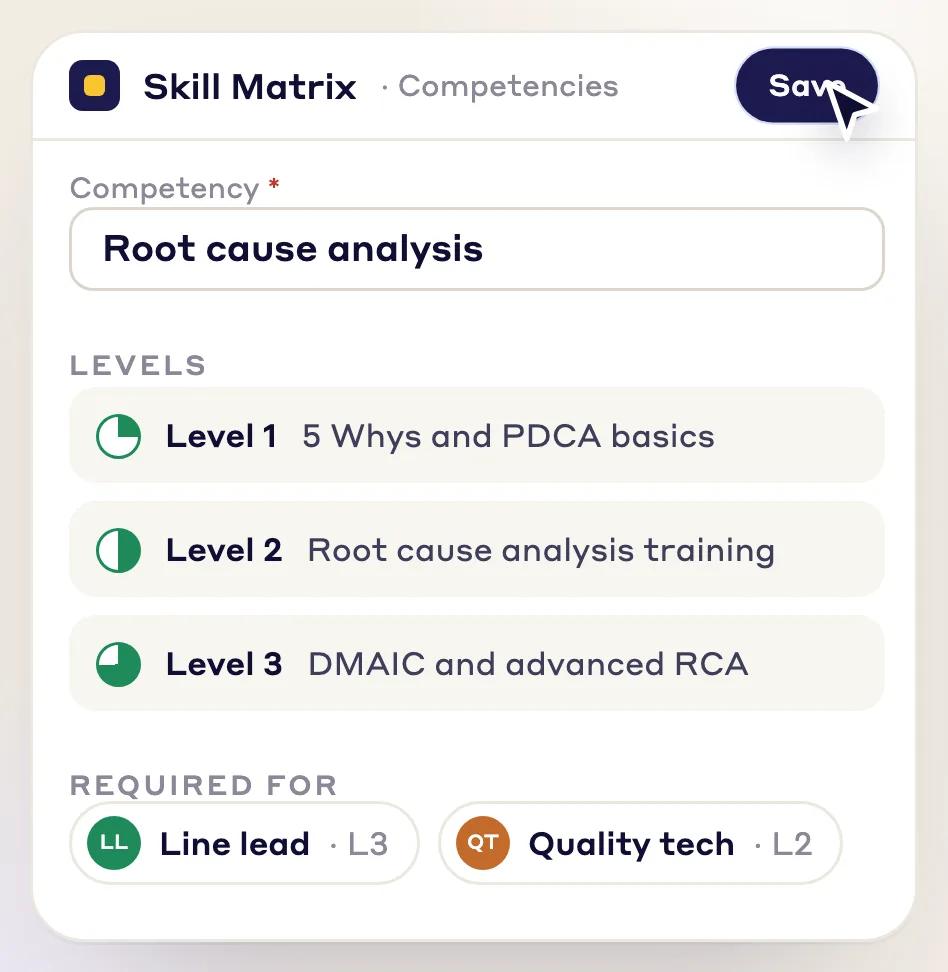
You define what your plant looks like, your areas, lines and workstations, and you could define what is the criteria or the level needed for that area and build the skills matrix for that area. Certain tools can be added to each loss type, so when you are doing that project, those skills will get added automatically.
Step 2
You could quickly identify the gaps and then assign the right training for that gap. If there are any courses available to cover that gap, you can assign that course right away and put people on that training with a due date. It would show up on their dashboard, and if they pass that course, their skills will be upgraded automatically.
Step 3
The job cover matrix plans shifts by skill and availability, so coverage does not depend on one supervisor remembering who is qualified for what.
Step 4
Let's say you're assembling a team for your project. You would assemble the team based on two major things, the skills that you would require for that particular project and the availability of people, and the system actually tells you the right people to be working on those projects based on the skill set and also the availability that they have.
Who feels it
A stale matrix costs different things to different people on the same shift.
You were shown a job once and nothing anywhere records that you can do it.
With LeanSuiteIf you pass the course, your skills will be upgraded automatically, and if you've used the tool one time in a project, the system will actually take care of that too. Any training assigned to you would show up on your dashboard with the due dates.
You carry coverage in your head and find the hole when somebody calls out.
With LeanSuiteYou plan the shift against skill and availability instead of memory.
You book generic training for a whole department because you cannot see which gap sits where.
With LeanSuiteYou could do the gap assessment and assign them, whether it's a training itself that they need to take to upskill themselves or projects that they can work on, and if there are any courses available to cover that gap, you can assign that course right away and put people on that training with a due date.

From our co-founder
“You can build a multi level workforce, so if one operator leaves you are not at risk that all your knowledge is going away.”
Where to look next
The same gap shows up three ways: no live picture of skills, no plan for the stations only one person can run, and no fast answer when someone calls out. These pages cover each one.
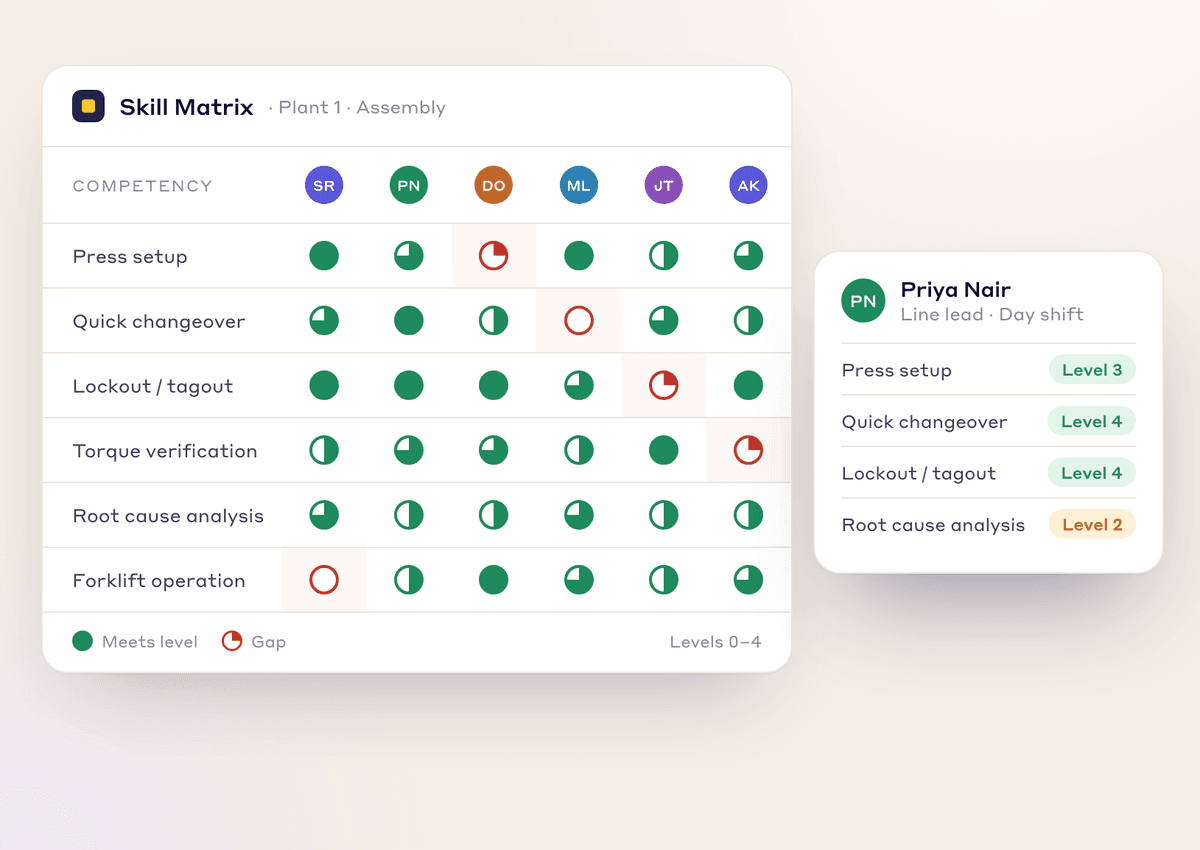
A live, visual skills matrix instead of tabs and versions on the shared drive. Use it to close gaps and deploy the right people to the right station.
See how it works →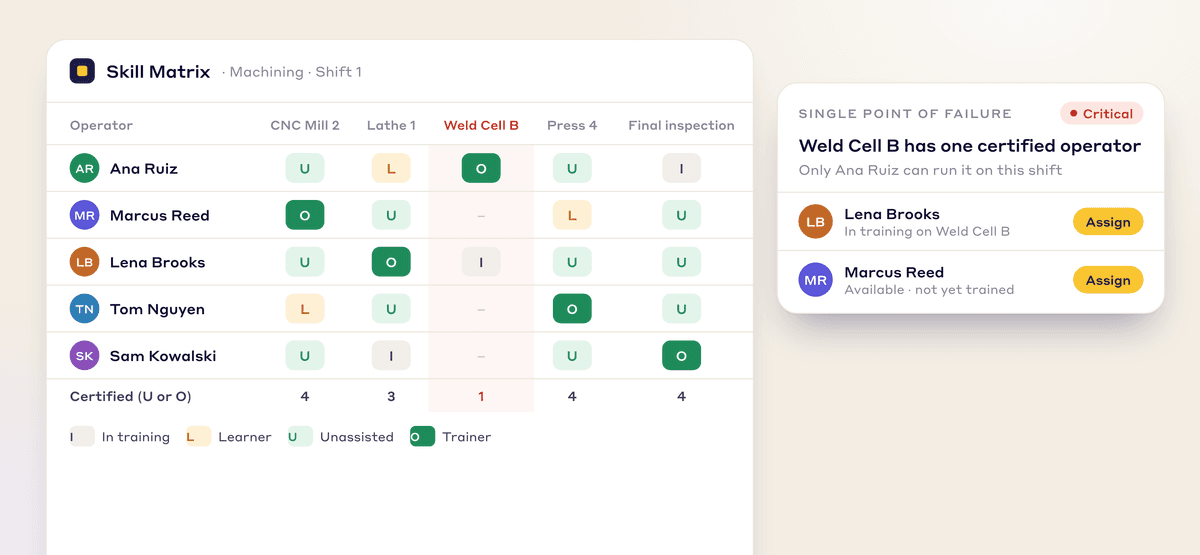
The Skills Matrix shows which machines only one person can run, so you know where the risk is before the callout happens. Cross-training gets automated so one absence does not stop a critical machine.
See how it works →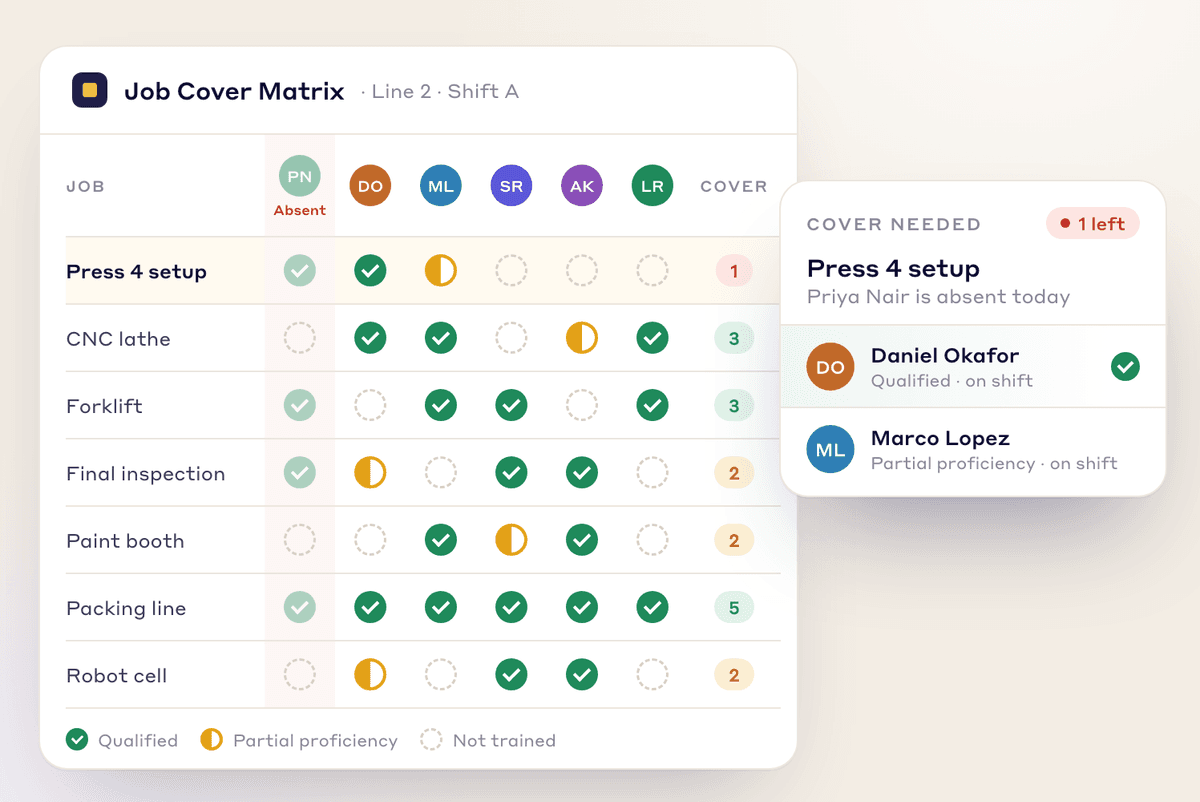
For the moment someone calls out, a live visual tool that fills the staffing gap in seconds. No walking the floor asking who has run it lately.
See how it works →There's a connected gap planning module that tells you within your facility where you have the maximum gaps, and it'll tell you for level one to two where there's a gap. If there are any courses available to cover that gap, you can assign that course right away and put people on that training with a due date. Based on the rules that are built in each course, if they pass that course, their skills will be upgraded automatically as well. So all those things are not necessarily tracked by one individual, but by a system, and you're saving all the admin work on that side as well.
No. We are not an MES, so we do not collect downtime or machine signals. What you get is the coverage picture before the shift, so a missing qualified operator is visible while you can still do something about it.
If it's turned off, then that module in itself is also complete. For instance, if we look at skills, skills in itself can be used to track just the skills of people by department, by operator, how the skills matrix looks. But let's say you also have the LMS and all those skills are captured in different courses within the LMS. Based on the rules that are built in each course, if they pass that course, their skills will be upgraded automatically as well. Same thing with Kaizen: if they complete a project with certain skills and the criteria is built that once they've used the tool one time, move them to level three or level four, the system will actually take care of that.
Yes. People can be given access with their employee ID instead of an email address, and licensing is per facility with no user limit, so everyone in the plant can be on it. Access runs on web, Android and iOS, so a shared tablet is enough.
Bring one line and its stations, and we will show the gaps by level, the courses that cover them and who could cover a shift tomorrow.