

Free template
Skills matrix template
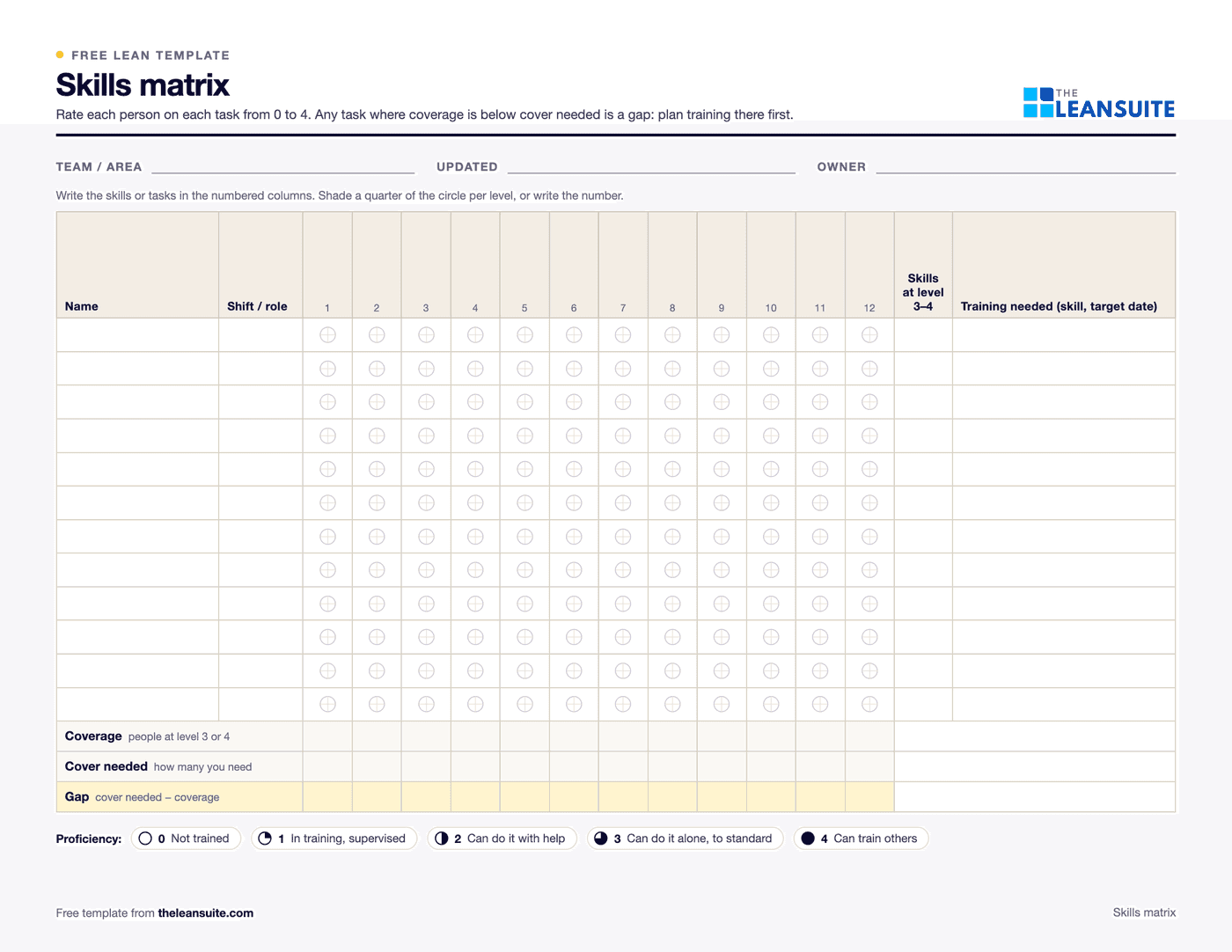
A skills matrix template is a grid with your people down the side and the skills or tasks of the area across the top, where each cell shows how well that person can do that task. This one uses a common 0 to 4 scale, from 0 (not trained) to 4 (can train others), has a column for the training each person needs next, and a coverage row at the bottom that counts how many people can do each task on their own, so single points of failure stand out.
Free to use: print it, copy it and edit it for your team. Enter your name and work email once to download.
When to use it
When to use a skills matrix
- To plan cross-training so every critical task has enough trained people on every shift.
- When covering absences or building the shift plan: who can run this station today?
- Before a quality audit or customer visit that asks for evidence of training and competence.
- When a new product, line or machine arrives and you need to know who to train first.
How to fill it in
- 1
List the skills across the top
Use the stations, machines and procedures the area really needs, not job titles. Up to 12 fit on the printed sheet.
- 2
List the people down the side
Add each person's shift or role so you can check coverage shift by shift.
- 3
Rate each person on each skill
Use the 0 to 4 scale in the legend and rate against a written standard, with the team leader or trainer confirming the level rather than self-assessment alone.
- 4
Enter the cover you need
In the cover needed row, write how many people should be able to do each task on their own (level 3 or 4).
- 5
Read the coverage and gap rows
Any skill where coverage is below cover needed is a gap. The Excel version counts coverage and highlights the gaps for you.
- 6
Plan training for the biggest gaps first
Write each person's next training and target date in the training needed column.
- 7
Review it on a fixed cycle
For example monthly, and whenever someone finishes training, joins or leaves.
A filled-in example
Illustrative, not a benchmarkA ten-person assembly team with eight tasks.
- The coverage row shows only one person at level 3 or above on the torque check station, against a cover needed of two.
- Two operators are at level 2 on the torque check, so the training needed column lists them for sign-off within a month.
- Every other task has three or more people at level 3 or 4, so no training is planned there for now.
One absence would stop the torque check. Two sign-offs close the gap, and the matrix shows it before it becomes a problem on the line.
Common mistakes
Listing job titles or vague skills
“Quality” cannot be observed or signed off. “First-piece inspection on press 2” can.
Self-rating with no standard
Without written criteria and a sign-off, levels drift upwards and the matrix stops meaning anything.
Building it once for an audit
An out-of-date matrix is worse than none, because people trust it when they plan cover.
Counting everyone as cover
People at level 1 or 2 cannot run the task alone. Count only levels 3 and 4.
Training whoever is free
Plan training against the gaps in the coverage row, not against who happens to be available.
In LeanSuite
Use this as a Lean Studio board
The same method is one of the 30 ready-made board templates in Lean Studio, LeanSuite's whiteboard: Skills Matrix, visualize team skill coverage and training gaps across key operations using I/L/U/O levels.
- Start from the Skills Matrix template: a Table widget with people down the side and operations across the top.
- Enter each person's level per operation as I, L, U or O, and colour the cell by level.
- Add a sticky per training gap with the plan and the date, and update the level when the person signs off.
Worked example · sample data
The sample matrix covers three people across five operations. A. Kaur can teach setup, works alone on weld and pack, is learning inspection and is in training on the forklift. J. Lind can teach weld and forklift, works alone on inspect and pack, and is learning setup. M. Osei can teach inspection, works alone on weld, is learning pack, is in training on setup and has no forklift level at all, shown in red. The qualified row counts U or O per column: one for setup, three for weld, two each for inspect and pack, one for forklift. Setup and forklift each rest on one person. The team leader booked J. Lind's setup sign-off with A. Kaur as trainer first, since a setter off sick stops the shift, and put M. Osei on the next forklift course.
Open this board in LeanSuite
Skills Matrix is one of the 30 ready-made boards in Lean Studio, LeanSuite's whiteboard. Try LeanSuite in your browser, or run it on your own lines for 90 days.
What Lean Studio isHow to run a Skills Matrix session
- 1List the operations for the area across the top and the people down the side. Agree in writing what each level means: I in training, L learning, U works alone, O can teach.
- 2Fill it in with the team leader and each person, not from records alone. A person often knows they are no longer current on an operation.
- 3Read the columns: any operation with fewer than two people at U or O is a single point of failure.
- 4Plan training against the gaps: who, on what, with which trainer, by when. Put it on a sticky beside the matrix.
- 5Update levels only when a trainer signs off, and review the matrix monthly at the tier 2 meeting and whenever someone joins or leaves.
Common mistakes
- Levels from memory, or from a course certificate years old.
- No written definition of the levels, so O means something different on each shift.
- Reading only the rows. The columns show the risk.
- A matrix nobody updates, so the cover plan on a bad Monday is wrong.
- Training the willing instead of training the gaps.
Where it goes next in LeanSuite
- Competency Management keeps the matrix live: job profiles set the required skills and levels, trainers sign off on a tablet, levels rise from courses and sign-offs, and the Job Cover Matrix shows single points of failure and who to cross-train first. Competency Management
- The training that closes a gap is assigned from the gap view, and passing a course linked to a skill raises the level on the matrix automatically. Trainings (LMS)
- The Kaizen team builder suggests people by skill and workload, and a shadow can be added to a project to build a skill. Kaizen & Projects
Download the template
Free to use: print it, copy it and edit it for your team. Enter your name and work email once to download.
Do this in LeanSuite
LeanSuite gives you a live skills matrix: proficiency levels update as employees complete tasks and training in LeanSuite, and you can bulk-assign training to close the gaps it shows.
See Competency ManagementIn the lean glossary
Free tools
FAQ
Skills matrix template: common questions
More free templates
All templates- 5S audit checklist template25 checks, five per S, scored 1 to 5, with a score summary and a chart of the five S's.
- Gemba walk checklistA walk plan and route, 30 prompts in six groups and a findings table with owners and due dates.
- A3 problem solving templateThe standard seven-box A3 on one landscape sheet, from background to follow-up.
- PDCA templateOne improvement cycle on one landscape page: plan, do, check against the goal, then standardize or adjust.
- 5 Whys templateA problem statement, five why rows with evidence, the root cause and the countermeasure.
- 8D report templateD0 to D8 on three pages: team, is/is not, containment, occurrence and escape causes, actions and closure.
- Standard work sheet templateTakt time, each element's manual, machine and walk time on a time chart, key points and standard WIP.
- SMED changeover worksheetChangeover steps with times, internal or external, what can move, ideas and before/after totals.
- Kaizen event charter templateScope, team and roles, baseline and target metrics, a five-day schedule, risks and sign-off.