

Buyer's guide
Kaizen software: what it does and how to choose it
Short answer
Kaizen software runs a plant's improvement work from first idea to verified result: it collects ideas and problems from the floor, routes each to a reviewer who answers it, gives approved work an owner and a date, runs the event or project, checks the savings and shares the fix with other lines. It replaces the suggestion box and the improvement spreadsheet, and it is different from a project tool because the people raising the ideas are operators, not project managers.
Last updated:
Kaizen means change for the better, made by the people who do the work. In a plant that is three different activities that get lumped together: a daily idea from an operator, a quick fix made on the spot, and a kaizen event where a team spends days on one process. Each needs different things from a tool, which is why a generic project tracker handles one of them badly and the other two not at all.
Kaizen software is one part of the wider continuous improvement software category, which also covers projects run with A3, DMAIC or PDCA. If you already have a shortlist, our best kaizen software comparison puts five tools side by side.
What it does
The jobs kaizen software does
Each job below is something most plants already do with a suggestion box, a whiteboard or a spreadsheet. For each one: what it is for, how it runs on paper, and what software should add.
- 1
Capture ideas and problems from the floor
Anyone who spots a waste or a better way can say so in under a minute, at the machine, without a company email.
- On paper
- A suggestion box or a form that waits for someone to read it, so good ideas sit for weeks.
- What software should add
- Submission from a phone, a shared tablet or a QR code, with a photo, and sign-in with an employee ID instead of an email address.
- 2
Route each idea to a reviewer who answers it
Every idea gets a decision: approve, approve with feedback, or reject with a reason. The person who raised it hears the answer.
- On paper
- One manager reads every slip. Answers arrive late or never, and people stop submitting.
- What software should add
- Routing by role, reminders to reviewers, a visible response time, and the employee seeing the outcome.
- 3
Give approved work an owner and a date
An approved idea becomes a task with one name and one due date, or, if it is bigger, a quick kaizen or a project.
- On paper
- A list on a whiteboard or a spreadsheet that one person keeps up to date.
- What software should add
- An implementor and due date on the idea, reminders, and a single click to start a kaizen from it with the link to the original idea kept.
- 4
Run the kaizen event or project
A team works one process for days or weeks: a charter, a team, dates, actions, results and a follow-up. The method may be PDCA, A3, DMAIC, 8D or the company's own.
- On paper
- A slide deck and a spreadsheet per event, so nobody can see all the events at once.
- What software should add
- One record per event with the charter, team, status, actions and results, and the method of your choice, so every event is visible in one portfolio.
- 5
Verify the savings
Separate hard savings from soft savings, and have someone outside the team confirm the number before it is reported.
- On paper
- Savings quoted on the closing slide and never checked, so the CFO discounts every figure.
- What software should add
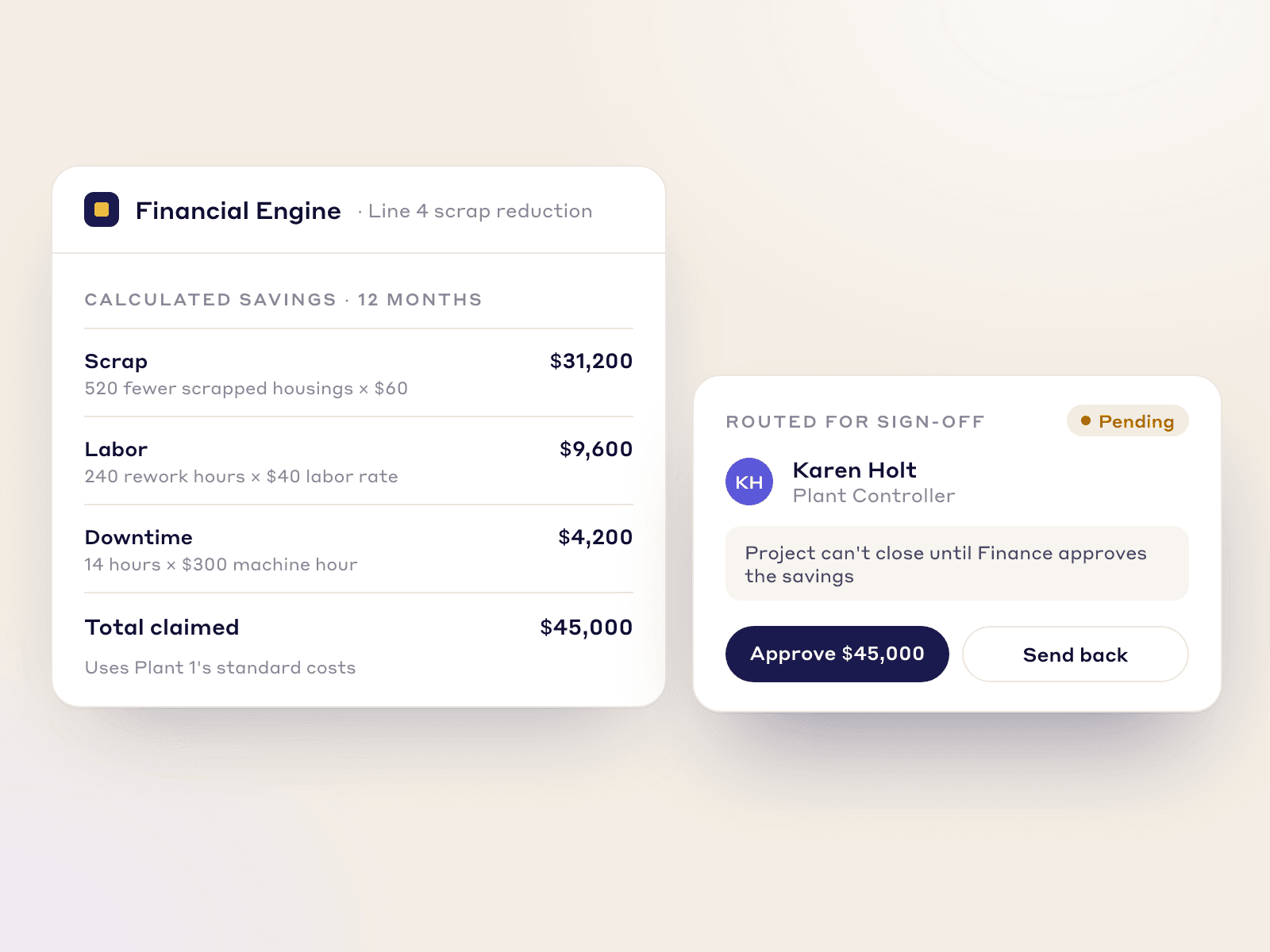
- Savings entered with a basis, Finance sign-off before a project closes, and a roll-up against the plant target.
- 6
Share the fix with other lines and plants
A fix that worked on one line is copied to the others that have the same problem. Lean calls this yokoten.
- On paper
- A kaizen newspaper on one wall, or an email that most plants never read.
- What software should add
- A finished kaizen published as a standard, sent to the other sites, and each site marking it as applicable, done or not applicable, with a reason.
Worked example
Three kinds of kaizen, and what each needs from the software
Most buyers' lists treat kaizen as one flow. In a plant it is three, and a tool should be tested on all three before you buy.
| Kind | Who starts it | How long it runs | What must be recorded | What closes it |
|---|---|---|---|---|
| Daily idea (teian) | Any employee, from the floor | Minutes to review, days to a few weeks to implement | The idea, a photo, the reviewer's answer, the implementor and the date | The employee hears the answer and, if approved, the change is done |
| Quick kaizen | The team at the machine or a supervisor | Hours to a few days | What was wrong, what changed, a before and after photo, who did it | The change is made and checked; it can be shared to other lines |
| Kaizen event | A sponsor, with a charter and a cross-functional team | Several days, with follow-up actions after | Charter, team, dates, current and target state, actions, results, savings | Actions are done, results hold, and the savings are verified |
How to choose
How to choose kaizen software: a 9-point checklist
Demos tend to look alike. Take this list into each one and ask the vendor to show you on screen, rather than tell you.
- 1
An operator can submit an idea in under a minute
If submitting is a chore, the program only hears from the people who already like paperwork.
In the demo: Submit an idea from a phone with a photo, as an operator with no company email. Time it.
LeanSuite: Employees submit ideas from the app or a shared tablet, open the form from a QR code, sign in with an employee ID and can speak their idea instead of typing it.
- 2
Every idea gets an answer and the reviewer's response time is visible
The reply gap is what kills suggestion programs. People stop submitting when nothing comes back.
In the demo: Submit an idea, then show where the reviewer is reminded and where management sees how long ideas wait.
LeanSuite: Ideas are routed to reviewers by role, for example safety ideas to the EHS manager. A reviewer approves, approves with feedback, rejects with a reason or marks the item as not a suggestion, and the dashboard shows the time to implement.
- 3
It supports every method, not one built-in flow
Plants run PDCA, A3, DMAIC, 8D and their own steps. A tool that forces one flow gets worked around.
In the demo: Start one kaizen with A3 and another with your own steps. What had to be configured?
LeanSuite: Kaizen & Projects runs A3, DMAIC, PDCA, 8D or your own method, and any project type, including CapEx stage-gate and non-manufacturing projects.
- 4
Kaizen events carry the fields you actually need
An event that has no charter, team or dates cannot be compared with the next one.
In the demo: Create an event and show the charter, the team, the dates, the actions and the results on one record.
LeanSuite: Each Kaizen is one record from charter to closure, with its team, actions and results, and all of them appear in one portfolio view.
- 5
Savings are checked by someone outside the team
Savings that nobody verified are the first number a CFO discounts.
In the demo: Close a kaizen with a savings claim. Who has to approve it before it counts?
LeanSuite: Finance verifies the savings of every Kaizen, a DMAIC project cannot close until Finance does, and sign-off steps can be set by savings amount. Hard and soft savings are tracked separately and the savings glide path plots progress against the plant target.
- 6
A good fix can be copied to another line or plant
The same problem is usually waiting on the next line. Copying the fix is cheaper than rediscovering it.
In the demo: Publish a finished kaizen and send it to two other sites. Where does each site say whether it applies?
LeanSuite: A successful Kaizen or employee idea becomes a best practice that is shared with other plants. Each plant marks it applicable, implemented or not applicable with a reason, and adoption reports show the result.
- 7
Recurring problems turn into kaizens
Daily issues and kaizen should be one system, or the same problem is raised again each week.
In the demo: Take an issue that keeps coming back and start a kaizen from it. What is carried over?
LeanSuite: A recurring issue becomes a Kaizen in one click, where the AI RCA Agent drafts the 5 Whys.
- 8
IT can approve it quickly
Security review is usually the longest wait before go-live.
In the demo: Ask for the security report, single sign-on providers and the uptime commitment in writing.
LeanSuite: LeanSuite is SOC 2 Type 1 compliant, supports single sign-on through SAML 2.0 or OAuth with Microsoft Entra ID and Okta, and commits to 99.5% monthly uptime.
- 9
Pricing does not ration seats
Per-user pricing pushes plants to leave operators out, and operators have most of the ideas.
In the demo: What does it cost when every operator, team leader and manager in the facility can submit and view?
LeanSuite: One price per facility with unlimited users, as a custom quote. Idea management is free for teams of 25 or fewer on the Starter plan.
Do you need software?
When a suggestion box or spreadsheet is enough, and when software pays
A small team can run kaizen well with very little. Software earns its place when ideas, events and savings outgrow what one person can keep straight.
Paper is enough when
- One team of a few dozen people, where one manager reads every idea and answers it within the week.
- A few kaizen events a year, small enough that nobody needs a portfolio view.
- Savings are small and nobody outside the team asks for proof.
- The habit is new. Start with a whiteboard and the free templates below, and move to software when the board is full.
Software pays when
- Ideas wait weeks for an answer and the people who raised them stop submitting.
- Nobody can say how many kaizens are open across the plant, or who owns them.
- Savings are reported but Finance does not trust the numbers.
- The same fix is invented again on the next line, or at the next plant.
- Several sites run kaizen and leadership wants one view of all of them.
- Operators have no company email, so a form that needs one is never used.
How to
How to put kaizen software in, in 6 steps
- 1
Start with the three kinds of kaizen on paper
Decide who can start a daily idea, a quick kaizen and an event, and who answers each. The idea suggestion form and the quick kaizen template are a start.
- 2
Name a reviewer for every idea and set a reply time
The reply gap is the main reason programs fade. Set a reply time, say a week, and measure it from the first day.
- 3
Run one kaizen event the structured way
Use a written charter and a tracker so the event has a team, dates and a measure of success. The kaizen event charter and kaizen event tracker are free.
- 4
Agree how savings are counted before the first one is claimed
Decide what is hard and what is soft, who verifies, and what the baseline is. The kaizen savings calculator shows a worked example.
- 5
Move one area onto the software
Pick a model area and run ideas, quick kaizens and one event through the tool for 90 days. This is the 1-1-90 method: one area, one pain point, 90 days, then expand. The Kaizen Kickstart pilot is built around it.
- 6
Share what worked, then expand
Review ideas answered on time, kaizens closed and savings verified. Publish the best fixes to other lines, then add the next area.
Common pitfalls
Counting ideas instead of results
A high idea count with a low implementation rate is a complaint box with a dashboard. Track ideas answered on time and ideas implemented.
No reply
An idea that gets no answer teaches the floor not to bother. The reply matters more than the reward.
Every kaizen forced into one method
A quick kaizen does not need an A3. A big event does need a charter. Let the size decide the method.
Savings nobody verified
A number from the team's closing slide is a claim. Have someone outside the team confirm it before it is reported.
Fixes that stay on one line
If the result is not shared, the plant pays for the same lesson again. Publish it and ask each site whether it applies.
In LeanSuite
Where LeanSuite fits
LeanSuite covers the three kinds of kaizen with connected modules. Here is what each part does, as its product page describes it, and what it does not do.
What it does not do
- LeanSuite does not read machines, so it cannot confirm by itself that an improvement changed a machine's output. Results are entered or come from the data sources you connect.
- The Whirlpool figures are for improvement projects and the Global Kaizen Power Pitch across 14 plants. They are not a promise of what a single line will save.
- If your program is only a suggestion box for a small team, the free Idea Management plan or the templates below may be all you need.
Ideas in Idea Management
Anyone submits from a phone, tablet or QR code. Each idea goes to a reviewer, who approves, approves with feedback or rejects with a reason, and approved ideas get an implementor or become a Kaizen with the link kept. Teams of 25 or fewer can use it free.
Idea ManagementEvents and projects in Kaizen & Projects
Each Kaizen runs from charter to closure with A3, DMAIC, PDCA, 8D or your own method, and a recurring issue becomes a Kaizen in one click.
Continuous improvement softwareVerified savings in the CI portfolio
Finance verifies the savings from every Kaizen. Hard and soft savings are tracked separately and a glide path tracks them against the target.
CI portfolioSharing in Best Practice Management
A finished kaizen is shared with other sites, and each marks it applicable, implemented or not applicable with a reason.
Best practice managementWhirlpool's Global Kaizen Power Pitch
Whirlpool ran its Global Kaizen Power Pitch on LeanSuite across 14 plants: 84 Kaizen battles, 150 Kaizen presented, 612 project team members and 191 committee members, with 14.8 million dollars in hard savings and 17.6 million in soft savings. Gilberto Aguilera Iruegas, Focused Improvement Lead at Whirlpool, calls LeanSuite a strong weapon for kaizen management and development.
Whirlpool case study
Your path to a demo
- 1 · 3 to 5 minutesTry the ideas and kaizen pathApprove an operator's suggestion, turn it into a Kaizen with PDCA, A3 or DMAIC, watch the savings roll up, then share a finished Kaizen with two plants. Sample data, in your browser.Start the demo
- 2 · A call with our teamBook a demo on your own routineBring your current idea list or kaizen tracker. We will load a few of your items into LeanSuite on the call and take one from idea through review, kaizen and savings sign-off.Book a 45-minute demo
- 3 · 90 daysPilot it on one areaOur team sets it up on your lines, the first module is live in under a week, and you decide at day 90.See the 90-day pilot
Free resources
Free templates and a calculator for kaizen
Start with these before you buy anything. Each template page has a filled-in example.
- Free toolKaizen savings calculatorYearly savings, payback in months and first-year ROI of an improvement, from time saved, scrap avoided and its costs.
- TemplateKaizen event charter templateProblem, goal, scope in and out, boundaries, metrics from baseline to target, team and roles, and sign-off before day one.
- TemplateKaizen event trackerEvery kaizen event on one sheet: status, roles, the metric against target, open actions and the 30, 60 and 90 day checks.
- TemplateKaizen event preparation checklistEverything that has to be ready before a kaizen event and done after it: 44 items with owners and due dates from 6 weeks before day 1 to 30 days after, five go or no-go gates and a day-by-day agenda.
- TemplateQuick kaizen templateOne page for a small improvement: before and after, the cause, the countermeasure, the results and whether the standard changed.
- Lean Studio boardKaizen Action TrackerTrack kaizen actions with owners, due dates and live status.
- TemplateIdea suggestion formA one-page idea form with the supervisor's answer and points, and an idea log that tracks days to answer.
- TemplateDaily kaizen routine boardA team's 10 to 15 minute daily routine at the board: one problem from each person, small fixes with one owner, counted every week.
- TemplateJust Do It (JDI) card templateSix Just Do It cards per sheet for quick fixes, with the rules for what counts and a log of every card.
- Lean Studio boardImpact / Effort MatrixPrioritize improvement ideas by impact and effort into Implement, Challenge, Possible, Kill.
Compare tools and read more
- Best kaizen software (2026): 5 tools comparediObeya, KaiNexus, LeanSuite, Rever and Tervene side by side, from each vendor's public pages.
- Idea ManagementCapture, review and implement employee ideas. Free for teams of 25 or fewer.
- CI portfolio and ROI managementEvery improvement project and its verified savings in one place.
- Continuous improvement softwareThe wider category: projects, A3, DMAIC and PDCA.
- Kaizen KickstartThe 90-day pilot for ideas, kaizens and verified savings.
- Kaizen ideasKaizen ideas for the plant floor, with examples.
- Kaizen event tracking: status, roles and process managementWhat to record for each kaizen event.
- What is a kaizen event?How an event runs, step by step.
FAQ
Kaizen software: buyer questions
Kaizen software runs a plant's improvement work from idea to verified result: it collects ideas and problems from the floor, routes each to a reviewer who answers it, gives approved work an owner and a date, runs the kaizen event or project, checks the savings and shares the fix with other lines.
A suggestion system collects and answers ideas. Kaizen software does that and also runs what comes next: quick kaizens, structured events and projects, savings verification and sharing across sites. Many plants start with the suggestion side and add the rest as the program grows.
Keep one record per event with its charter, team, dates, current and target state, actions, results and savings. A good tool also shows every event in one portfolio, so you can see what is open, late or closed and compare one event with the next.
Separate hard savings, which show up in the accounts, from soft savings, which do not yet, and record the baseline and the basis for each. Then have Finance or the plant controller verify the number before it is reported. Our kaizen savings calculator shows a worked example.
A daily idea from an employee, a quick kaizen made on the spot by the team, and a kaizen event where a cross-functional team spends days on one process. They differ in who starts them, how long they run and what must be recorded, so a tool should be tested on all three.
Yes. Teams of 25 or fewer can use the Idea Management System free on LeanSuite's Starter plan, and the kaizen event charter, tracker, quick kaizen and idea suggestion templates are free to download. Larger sites move to the facility plan: one flat price per facility with unlimited users.
In LeanSuite, yes. Frontline staff sign in with an employee ID, and ideas can be submitted from the app, a shared tablet or a QR code. If a tool needs a company email address, most operators will never use it.
No. Kaizen software tracks the idea, the decision, the owner and the savings. Some vendors also pull machine data to confirm results. LeanSuite does not connect to machines on its own; results come from data you enter or connect.
With LeanSuite the first module is live in under a week, with the setup done by our team. The habit takes longer: plan on one area for about 90 days before expanding.
See it on your own floor's routine
Bring the routine you want to fix first, and we'll show how LeanSuite runs it and what a 90-day pilot covers.