

Buyer's guide
Daily management system software: what it does and how to choose it
Short answer
Daily management system software is the software a plant uses to run its daily management system (DMS): the tier meetings, SQDCM boards, action lists, escalation, leader standard work and gemba walks that decide what happens on each shift. It puts the numbers each tier reviews, the actions that come out of every red and the leaders' own routines in one place, so a problem raised at the line is fixed there or moves up until someone who can fix it does.
Last updated:
A daily management system is the set of routines that makes a plant look at its own performance every day and act on it. David Mann's book Creating a Lean Culture breaks it into four elements: leader standard work, visual controls, a daily accountability process and the discipline to keep them going. DMS software carries the first three. The fourth is still up to the leaders, although good software makes it obvious when the discipline slips.
Daily management system software and lean management software are the same system under two names. Some plants say lean management, others say DMS, and this guide uses the DMS label. It sits inside the wider lean manufacturing software category. If you already have a shortlist, our best lean management software and best tiered meeting software comparisons put the tools side by side.
Do not confuse it with machine monitoring. A DMS records what people decided and who owns the follow-up. It does not read machines, and it works alongside your MES, ERP and OEE systems rather than replacing them.
What it does
The jobs daily management system software does
Each job below is a routine most plants already run on whiteboards, clipboards and spreadsheets. For each one: what it is for, how it runs on paper, and what software should add.
- 1
Tier meetings
A short stand-up at each level, every day, at a set time. The team meets at the line, then the supervisor with team leaders, then the plant manager with department heads. Each tier reviews yesterday against target and decides what happens today.
- On paper
- A whiteboard filled in by hand before the meeting, so the numbers are a shift old and each tier copies them again.
- What software should add
- The numbers are on the board before the meeting starts, every tier sees the same data, and a timer keeps the tier 1 huddle short.
- 2
SQDCM boards and the numbers behind them
A few measures per board, usually safety, quality, delivery, cost and morale (or people), each with a target, so anyone walking past can tell whether the area is winning or losing today.
- On paper
- Charts redrawn by hand, often weekly, from numbers someone typed out of another system.
- What software should add
- Values pulled on a schedule from where the data already lives, red and green limits set once, and the same measure rolled up from line to department to plant.
- 3
From a red number to a closed action
Every red and every problem raised in a meeting leaves with an owner and a date, and the next meeting checks it. This is Mann's daily accountability process.
- On paper
- An action list on the board that gets erased, or a spreadsheet only one person updates.
- What software should add
- An action created in the meeting in seconds, with owner, due date, reminders and a history that survives the next shift.
- 4
Escalate up, answer down
A problem the team cannot fix goes up a tier the same day, and the decision comes back down to the people who raised it.
- On paper
- A phone call or an email after the meeting. The answer rarely reaches the line.
- What software should add
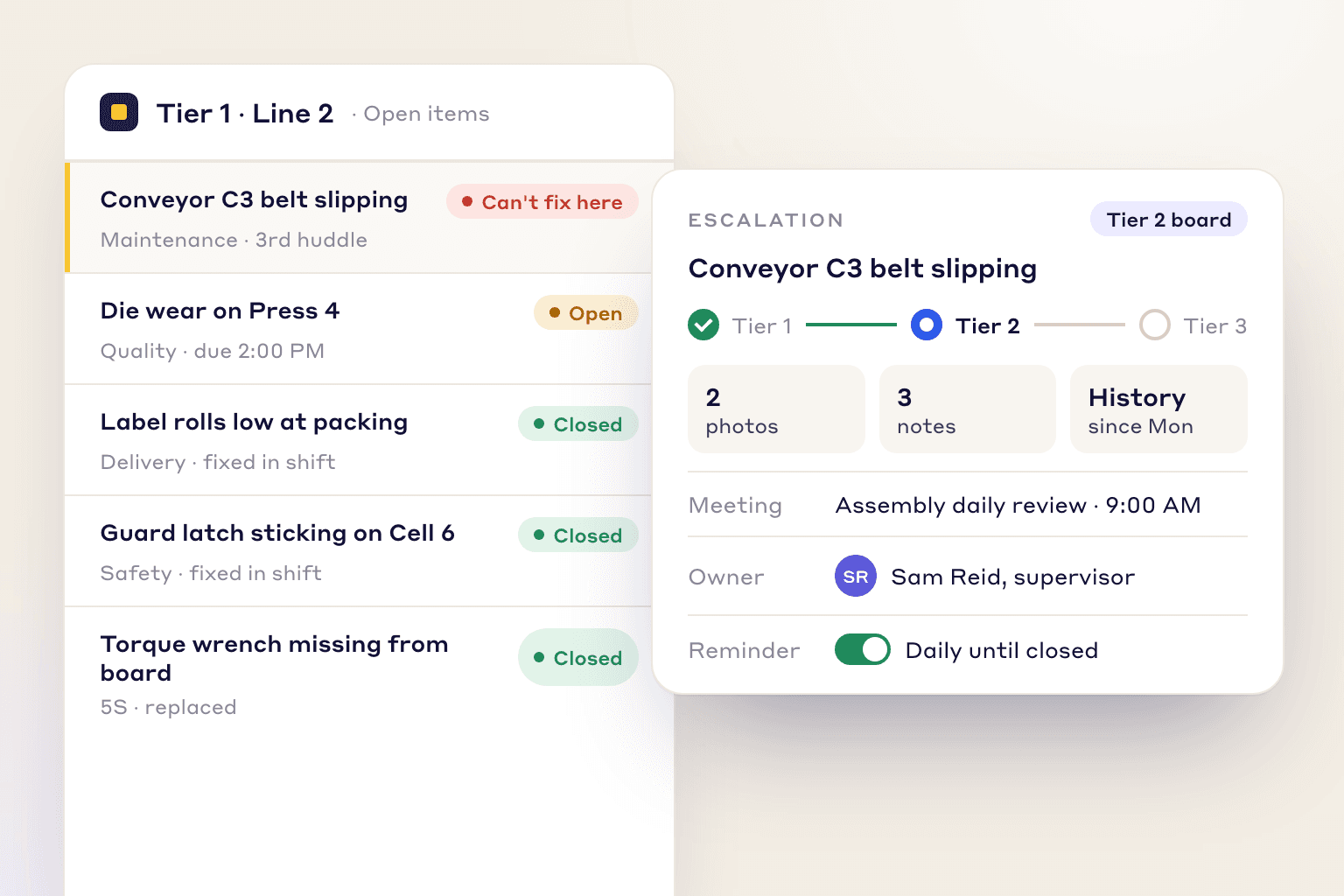
- The item moves to the next tier's board with its photos, notes and history, and the reply is sent back to the tier that raised it.
- 5
Leader standard work and gemba walks
Each leader's written routine of daily, weekly and monthly checks: the right meetings, a walk of the area, a look at the boards, and a check that operators follow their standard work.
- On paper
- A sheet on a clipboard, ticked off and reviewed with the next leader up once a week. Findings from the walk go in a notebook.
- What software should add
- Routines scheduled to a person or a role on a repeat rule, missed checks shown in red, and every failed item on a walk turned into an action with an owner.
- 6
Shift handover and recurring problems
What the next shift needs to know reaches them, and a problem that keeps coming back gets a proper root cause instead of another quick fix.
- On paper
- A handover logbook, and memory for spotting that the same jam happened three times this week.
- What software should add
- Open issues carried into the next huddle automatically, and a recurring issue turned into an improvement project without retyping it.
Worked example
The three tiers, and one scrap problem followed through them
A common three-tier cascade: when each tier meets, who is there and what it reviews. Beside it, one problem followed from the line to the plant review and back. The software's job is to make each step happen without anyone retyping anything.
The cascade, top tier first
- Tier 3Daily or several times a week, 20 minutes
Plant manager and department heads
Plant SQDCM, escalations from tier 2, and decisions that need money or another department.
- Tier 2After tier 1, 15 minutes
Supervisor, team leaders, maintenance and quality
What tier 1 could not fix, with an owner and a date for each, and help between lines. Escalates what needs budget or another department.
- Tier 1Start of shift, 10 minutes
Team leader and operators, at the line board
Yesterday's SQDCM against target, today's plan, problems from the last shift. Escalates anything the team cannot fix within the shift.
Problems a tier cannot fix are escalated to the tier above; the decision, owner and date go back down to the tier that raised them.
One problem, followed through
Shift start
Line 4 is red on quality: scrap on the stamped bracket is above target for the third day. The team cannot fix it because the die needs regrinding, so the issue goes up with photos of the burrs.
Tier 2
The quality supervisor and the toolroom lead take it, with a date to regrind the die and a check on the first parts after the change.
Tier 3
The plant review sees Line 4 red with the action open and approves a spare die so the line is never waiting on a regrind again.
Next shift start
The decision is on the tier 1 board before the huddle starts, so the team knows when the new die arrives and what to check until then.
The four elements of a lean management system, and what software does for each
- Leader standard workEach leader's routine scheduled, with missed checks visible
- Visual controlsLive boards with targets, so red and green are current
- Daily accountabilityActions with an owner and a date, checked at the next meeting
- DisciplineStill the leaders' job; software shows where it slipped
How to choose
How to choose daily management system software: a 10-point checklist
Demos tend to look alike. Take this list into each one and ask the vendor to show you on screen, rather than tell you.
- 1
Every tier sees the same live numbers
If each tier copies numbers by hand, the plant review argues about the data instead of acting on it.
In the demo: Show a tier 1 board and the plant review side by side, with the same measure rolled up. Where does each number come from?
LeanSuite: Lean Studio runs every tier on cascaded SQDCM boards, and SQDCM roll-ups give plant and executive reviews the same numbers as the line. KPI values can be pulled on a schedule from Excel on SharePoint or OneDrive and Google Sheets, uploaded as CSV, or shown from embedded Power BI or Looker Studio reports.
- 2
A red becomes an action during the meeting
Most huddles discuss problems. Fewer leave each one with an owner and a date.
In the demo: Click a red measure and create an action with an owner and due date while the meeting is running. How long did it take?
LeanSuite: On a Lean Studio board you click a red KPI to create a task without leaving the meeting, and assign owners and due dates from the board.
- 3
Escalation keeps the history and sends the answer back
An escalation that loses its photos and notes gets re-investigated. One with no reply teaches the line to stop raising things.
In the demo: Escalate an item from tier 1 to tier 2, answer it at tier 2, and show where the tier 1 team sees the answer.
LeanSuite: Items escalate to the next tier with photos, notes and history intact, appear on that tier's board for its next meeting, and the reply can be sent back down. Reminders follow escalated items until they close.
- 4
Leader routines are scheduled and missed ones show
Leader standard work fades on busy days unless someone can see what was skipped.
In the demo: Schedule a weekly gemba walk for a role, skip it, and show where the miss appears and who sees it.
LeanSuite: Daily Standard Work schedules checklists to a person, a role or a machine on a repeat rule, from every shift to monthly. Missed checks show in red and a live dashboard shows completion across the plant. LeanSuite has no module called leader standard work; leaders' routines run here.
- 5
Walks and audits end in actions, not notes
A finding with no owner is a note. The point of the walk is what changes afterwards.
In the demo: Fail an item on a gemba walk checklist on a phone, add a photo, and show the action it creates.
LeanSuite: Gemba walk checklists, layered process audits and standard work audits are done on a phone or tablet, with photos where required. A rule on an answer can raise a tag, an idea or a Kaizen.
- 6
Operators can take part without a company email
A DMS starts at tier 1. If operators cannot sign in, the bottom of the cascade stays on paper.
In the demo: How does an operator with no email sign in on a shared tablet or the line TV?
LeanSuite: Frontline staff sign in with an employee ID, no company email needed, in the web, iOS or Android app.
- 7
Recurring problems turn into improvement work
Daily management should feed problem solving, or the same red comes back every week.
In the demo: Take an issue that has recurred and turn it into a structured improvement project. What gets carried over?
LeanSuite: A recurring issue becomes a Kaizen in one click, where the AI RCA Agent drafts the 5 Whys. Kaizen & Projects runs A3, DMAIC, PDCA or your own method.
- 8
One board design rolls out to other lines and plants
A cascade only compares well when every area runs the same board.
In the demo: Build a tier board once and copy it to another area or facility. What has to be set up again?
LeanSuite: In Lean Studio you build a tier board once and copy it to your other facilities. It comes with 30 ready-made lean board templates, from an SQCDP tier board to a fishbone.
- 9
IT can approve it quickly
Security review is usually the longest wait before go-live.
In the demo: Ask for the security report, single sign-on providers and the uptime commitment in writing.
LeanSuite: LeanSuite is SOC 2 Type 1 compliant, supports single sign-on through SAML 2.0 or OAuth with Microsoft Entra ID and Okta, and commits to 99.5% monthly uptime.
- 10
Pricing does not ration seats
Per-user pricing pushes plants to leave operators out, and they are tier 1.
In the demo: What does it cost when every operator, team leader and manager in the facility uses it?
LeanSuite: One price per facility with unlimited users. A 90-day pilot costs $3,000 per facility, with the setup done by LeanSuite's team.
Do you need software?
Whiteboard, spreadsheet or software?
Plenty of good daily management runs on whiteboards. Software earns its place when the routine has outgrown what one person can keep current by hand.
Paper is enough when
- One team on one shift, with one board and one meeting, where the team leader can update the numbers in a few minutes.
- Actions are few and usually closed within the week, so nobody needs their history.
- There is no second tier to escalate to, or the supervisor stands in the same huddle.
- The routine is new. Run it on a whiteboard first: software will not rescue a meeting that does not happen.
Software pays when
- Three or more tiers, or several shifts, need the same numbers and the same open actions.
- Someone spends longer copying numbers onto boards than the meeting lasts.
- The same reds come back every week because actions get erased or lost between meetings.
- Escalations go up by phone or email and the answer never reaches the line.
- Managers cannot tell whether leader standard work and gemba walks actually happen.
- Several lines or plants should run the same board and you want to compare them.
How to
How to roll out a DMS in 90 days, in 6 steps
- 1
Pick one model area and run it on paper first
Choose one line or cell and run its tier 1 huddle on a whiteboard for two or three weeks. You learn which measures people use, how long the meeting really takes and what gets escalated. The daily huddle agenda is a starting point.
- 2
Choose four to six measures per board
One per SQDCM letter is enough. Give each a target, an owner and a source, and drop any measure nobody has acted on in a month.
- 3
Write down the cascade
Set the time, length and attendees of each tier, and the rule for what goes up: for example, anything the team cannot fix within the shift, or any safety issue. An escalation matrix makes the rule visible.
- 4
Give each leader a written routine
Leader standard work should name the meetings each leader attends, the walks they do and the boards they check. The leader standard work guide has an example routine for each level.
- 5
Move the model area onto the software
Connect the data sources, build the tier boards, and train team leaders at the board, during a real huddle, not in a classroom.
- 6
Review after 30 days, then copy
Check how many actions closed on time, how many escalations got an answer and how long the meetings ran. Fix what is not working, then copy the same boards to the next area. This is the 1-1-90 method: one area, one pain point, 90 days, then expand.
Pitfalls that kill a daily management system
Boards as wallpaper
A board full of measures nobody acts on teaches people to stop looking. Fewer measures, each with an owner, beat a complete dashboard.
Problem solving inside the huddle
Tier 1 decides who owns a problem and by when. Working out the root cause happens afterwards, or the 10-minute huddle becomes 40 minutes.
Escalation with no way back
If the line never hears what happened to the problem it raised, it stops raising them. Count the escalations that got an answer as well as the ones raised.
Digitising a broken routine
Software makes a working routine faster. It does not make people attend a meeting that has no purpose.
Measuring attendance instead of closure
A full meeting with an action list that only grows is not working. Track actions closed on time and repeat reds.
In LeanSuite
Where LeanSuite fits
LeanSuite runs the daily management system with ready-made modules rather than a blank board builder. Here is what each part does, as its product page describes it, and what it does not do.
What it does not do
- There is no module called leader standard work: leaders' routines run as Daily Standard Work checklists.
- It is not an MES, ERP or machine-monitoring system, so it does not run production orders, scheduling or inventory, and it does not read numbers from machines on its own. It shows data from the systems you already have.
- If your program centres on digital Obeya rooms, tools built around those may suit you better.
- No DMS result figure is published for LeanSuite on this page: the verified customer results on the site are about improvement projects, not daily management.
Tier meetings in Lean Studio
Live SQDCM boards for every tier from the shift huddle to the plant review, a meeting timer, live notes and automated shift handover that surfaces open issues from the previous shift.
Tiered meetingsIssues, actions and escalation
Anyone raises an issue from a QR code with a photo; rules send it to an owner with a due date set by priority, and it escalates from tier 1 to tier 2 or 3 with its history.
Daily Issue ManagementKPIs on the boards
LeanSuite forms, ERP, MES or Excel data in one view, with formula KPIs and red, amber and green limits, shown on the tier boards next to open actions.
KPI DashboardsLeader routines and audits
Daily Standard Work schedules each leader's checks with missed ones in red; Audit Management runs gemba walks, layered process audits and 5S, and the results can sit on the tier board.
Audit Management
Your path to a demo
- 1 · 3 to 5 minutesTry the daily issues and escalation pathRaise an issue, escalate it to tier 2, run the huddle on the tier board, send the reply back down and close it with a fix. Sample data, in your browser.Start the demo
- 2 · A call with our teamBook a demo on your own routineBring a photo of your tier board or your current action list. We will rebuild one tier of it in LeanSuite on the call and show how an escalation reaches the next tier and comes back.Book a 45-minute demo
- 3 · 90 daysPilot it on one areaOur team sets it up on your lines, the first module is live in under a week, and you decide at day 90.See the 90-day pilot
Free resources
Free templates for a daily management system
Start on paper with these, or use them to design the boards before you build them in software. Each template page has a filled-in example.
- Lean Studio boardSQCDP Tier BoardDaily tier-meeting board tracking Safety, Quality, Cost, Delivery and People.
- Lean Studio boardDaily Huddle BoardStand-up board for daily team huddles: attendance, KPIs, yesterday's wins, today's plan.
- TemplateDaily huddle agendaA 15-minute start-of-shift stand-up in six timed blocks, with yesterday's SQCDP results, today's plan, actions and escalations.
- TemplateTier 2 meeting agenda and escalation sheetA 15-minute tier 2 agenda in ten timed blocks, fixed roles and rules, escalation triggers with time limits, and a log that ages every escalation and sends the answer back down.
- TemplateEscalation matrix templateWho is called for each type of issue and after how long, with severity rules, contacts and an escalation log.
- TemplateLeader standard work templateA team leader's daily, weekly and monthly routine with a box per day, follow-ups and a weekly review.
- TemplateHour-by-hour production boardHourly plan against actual with running totals and the reason for each miss, plus a shift summary by reason.
- TemplateShift handover templateSafety, production against plan, holds, downtime events, materials and people, and the open actions the next shift takes over.
- TemplateGemba walk checklistA walk plan and route, 30 prompts in six groups and a findings table with owners and due dates.
- Lean Studio boardKamishibai Audit BoardTrack recurring audit T-cards on a daily/weekly/monthly cadence.
- Free toolLean maturity self-assessmentScore 24 statements across eight dimensions and get a result band for each, an overall band and where to start.
- Free toolDowntime cost calculatorWhat an hour, an event and a year of unplanned downtime cost, from lost output, idle labour, scrap and overtime.
Compare tools and read more
- Best lean management software: 6 tools comparedLeanSuite, Fabriq, iObeya, KaiNexus, Rever and Tervene side by side, from each vendor's public pages.
- Best tiered meeting softwareTools compared for the tier meeting itself.
- Lean management software: a buyer's guideThe same system under its other name, with the full list of jobs and a lean management checklist.
- Lean StudioThe live boards the tiers run on.
- Leader standard work: examples and free templatesThe routine at each level, from team leader to plant manager.
- Tier boards: cascading daily management explainedHow tier meetings connect from the team to the plant.
- Daily management system for manufacturing plantsWhy an issue list that only grows breaks the daily meeting, and what replaces it.
- iObeya alternativesFor plants whose program centres on digital Obeya rooms.
- Tervene alternativesHow LeanSuite compares with another daily management platform.
FAQ
Daily management system software: buyer questions
Daily management system software runs a plant's daily management system (DMS): tier meetings, SQDCM boards, action lists, escalation, leader standard work and gemba walks. It puts the numbers each tier reviews, the actions from every red and the leaders' routines in one place, so a problem raised at the line is fixed there or moves up until someone who can fix it does.
A DMS is the set of routines that makes a plant review its performance every day and act on it. David Mann's book Creating a Lean Culture names four elements: leader standard work, visual controls, a daily accountability process and leadership discipline. Tier meetings, gemba walks and action tracking are how those elements show up on the floor.
Team leaders run the tier 1 huddle on it, supervisors and area managers take escalations at tier 2, and plant leaders review the roll-up at tier 3. Operators use it to raise problems and see the answer. Continuous improvement and operational excellence teams use it to see which reds keep coming back.
Tiered meetings are one part of a DMS. The DMS also covers the boards and measures behind the meetings, the actions and escalations that come out of them, and the leader standard work and gemba walks that keep the routine going.
Four to six measures, usually one for each of safety, quality, delivery, cost and morale (SQDCM), each with a target and an owner, plus the open actions for the area. Drop any measure nobody has acted on in a month.
Run the routine on a whiteboard first, for a few weeks in one model area. Then move that area onto the software and train team leaders at the board during a real huddle. Software makes a working routine faster; it does not fix a meeting that nobody attends.
Yes, in practice. Plants say lean management, daily management or DMS for the same routines: tier meetings, boards, actions, escalation and leader standard work. Lean manufacturing software is the wider category that also covers improvement projects, maintenance checks, skills and industrial engineering studies.
No. An MES records production and an OEE system measures machine time. DMS software runs the review, the actions and the escalation around those numbers. LeanSuite is not an MES, ERP or machine-monitoring system and shows data from the systems you already use.
With LeanSuite the first module is live in under a week, with the setup done by our team. The habit takes longer: plan on a model area for about 90 days before copying the boards to the rest of the plant.
LeanSuite is priced per facility with unlimited users, so adding operators does not change the price. A 90-day pilot costs $3,000 per facility. Ask for a quote on the pricing page.
See it on your own floor's routine
Bring the routine you want to fix first, and we'll show how LeanSuite runs it and what a 90-day pilot covers.