

Buyer's guide
TPM software: what it should do for each pillar
Short answer
TPM software supports total productive maintenance, the plant-wide program in which operators, maintenance and management share responsibility for keeping equipment in good condition. It splits into two jobs: the maintenance system (a CMMS), which plans and records maintenance work, and the operator and improvement side, which runs the cleaning and inspection routines, abnormality tags, improvement projects and training that the eight TPM pillars call for. LeanSuite is the second kind and works alongside your CMMS.
Last updated:
Searches for TPM software also return computer security results about trusted platform modules. This guide is about total productive maintenance, the equipment reliability program that came out of Japanese manufacturing, and the software that supports it in a plant.
Vendors sell very different things under this name. Some are CMMS products with OEE reports. Some are machine-monitoring systems that count downtime automatically. LeanSuite is neither: it is operator-side TPM, the part that decides whether the checks are done, whether an abnormality reaches maintenance and whether the improvement actually happens. It sits inside the wider lean manufacturing software category. If you are comparing tools, our best autonomous maintenance software comparison is the closest match.
What it does
The jobs TPM software does
Six routines make up the operator-led side of TPM. For each one: what it is for, how it runs on paper, and what software should add. Planned maintenance records are the CMMS's job and are covered under the pillars below.
- 1
Cleaning, inspection, lubrication and retightening (CILR)
Operators clean the machine, look for abnormalities, lubricate and retighten the points they are trained on, at a set frequency. This is the core of autonomous maintenance.
- On paper
- A laminated checklist ticked in bulk at the end of the shift, with no way to tell whether the check was done.
- What software should add
- Step-by-step routines on a tablet, a required photo on the steps that matter, the time each check took, and checks assigned to a machine so whoever runs it sees them.
- 2
Abnormality tags
Anything the operator finds that is not right gets a tag, and the tag stays open until the abnormality is fixed.
- On paper
- A paper tag on the machine and a board of tags that no one counts.
- What software should add
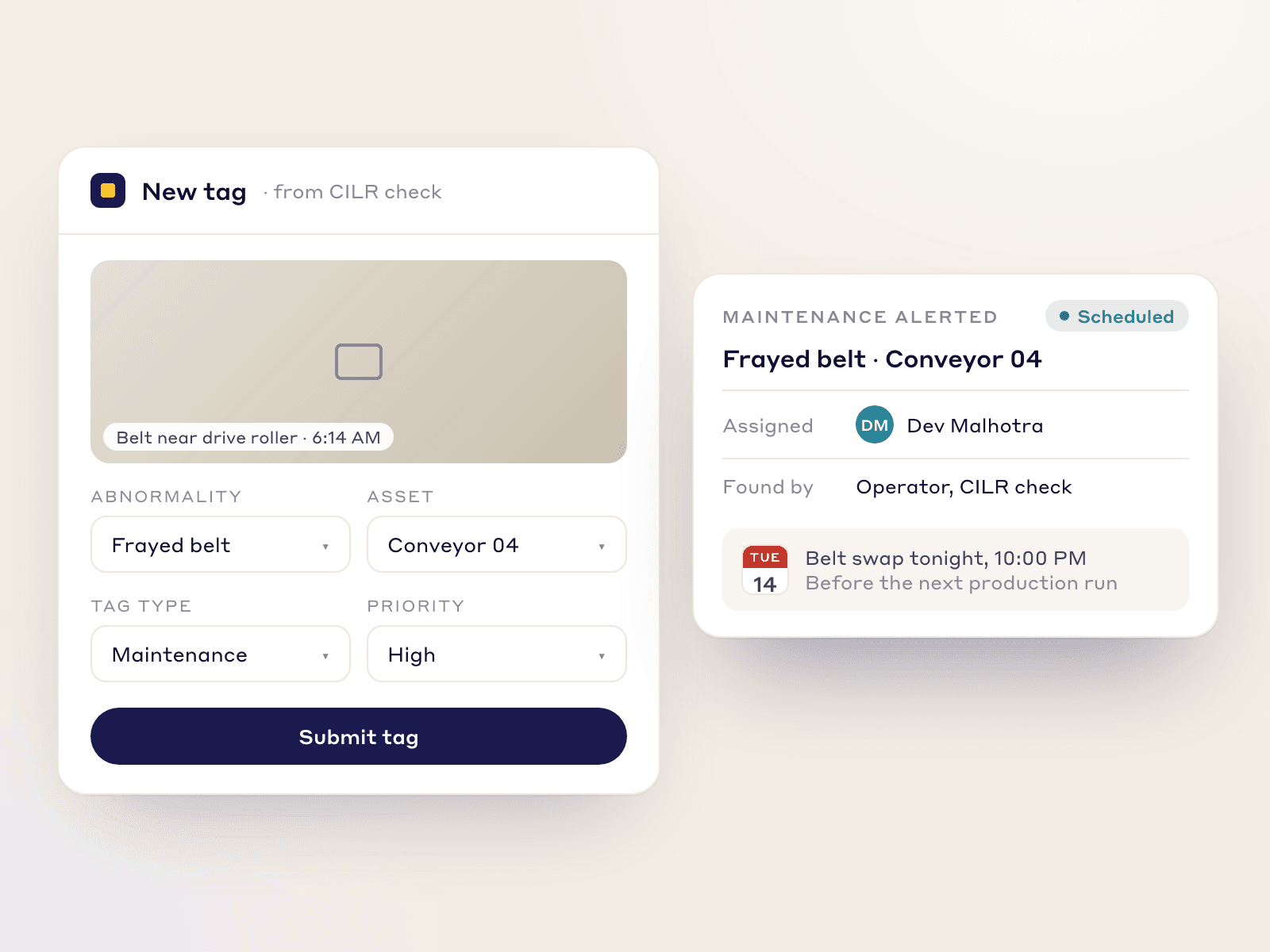
- A tag raised from the check with a photo, routed to maintenance, with an owner, a due date and a count of open tags by area.
- 3
Standard procedures for maintenance work
The way a lubrication, a changeover or a repair is done is written down once, and everyone follows it.
- On paper
- A binder, or knowledge in one technician's head.
- What software should add
- A step-by-step procedure with photos, revision control and sign-off, so the current version is the one on the tablet.
- 4
Loss tracking and micro-stops
Count the losses that stop a machine or slow it down, by reason, so the biggest ones are fixed first. TPM calls these the six big losses.
- On paper
- A downtime sheet at the end of the shift, with a good guess at the reason.
- What software should add
- Operators log a stop in one tap with a reason, and the losses are added up and costed. LeanSuite does not read the machine, so what is logged is what operators enter.
- 5
Focused improvement
A cross-functional team attacks one loss on one machine with a structured method until it is gone.
- On paper
- Slides and a spreadsheet, with no link to the downtime data that started it.
- What software should add
- A project or kaizen started from the loss, running A3, PDCA, DMAIC or your own method, with the savings checked by Finance.
- 6
Training and skill control
An operator only takes on a maintenance task after being trained and signed off for it.
- On paper
- A training file and a manager's memory of who may grease what.
- What software should add
- A skills matrix that blocks a task for an operator who is not yet certified, and a short course to certify them.
Worked example
The eight pillars of TPM and what software must do for each
TPM is organised into eight pillars. Software supports some of them directly and others only through plans and checklists. The last column says which is which for LeanSuite.
| Pillar | The job | What to look for in software | LeanSuite coverage |
|---|---|---|---|
| Autonomous maintenance | Operators own basic care: clean, inspect, lubricate, retighten. | Photo-guided routines, checks assigned to a machine, tags routed to maintenance. | Covered: CILR routines, abnormality tags, skills matrix. 90-day plan template available. |
| Planned maintenance | Maintenance work is scheduled, done and recorded by the maintenance team. | A CMMS: asset records, work orders, parts, preventive schedules, history. | Not a CMMS. LeanSuite works alongside yours and routes a work order to maintenance. Planned maintenance 90-day plan template available. |
| Focused improvement | Teams remove specific losses on specific equipment. | A loss list by reason, a project method, verified savings. | Covered: micro-stop and loss tracking entered by operators, Kaizen & Projects, Finance-verified savings. |
| Early equipment management | Lessons from running equipment feed the design and start-up of new equipment. | A way to hold lessons learned and run a start-up project with gates. | No dedicated module. Project tracking and a 90-day plan template cover the planning. |
| Quality maintenance | Equipment conditions that cause defects are found and controlled. | Checks tied to quality, with failures that raise an action. | Partly: audits and checklists with photos, and failed lines become actions. Quality pillar plan template available. |
| Training and education | People have the skills their tasks need. | A skills matrix, certification, a record of who may do what. | Covered: Skills Matrix and LMS, which block a task until the operator is certified. |
| Safety, health and environment | Hazards on equipment are found and removed. | A fast route from a hazard to the right person. | Partly: a safety hazard tag sends a notification to the EHS manager and shift supervisor. Safety and environment plan templates available. |
| TPM in administration | TPM thinking applied to offices and support processes. | Checklists and audits that work outside the plant floor. | Partly: checklists and audits run anywhere, including an office 5S audit template. No dedicated module. |
How to choose
How to choose TPM software: a 9-point checklist
TPM software means different things to different vendors. Start by deciding which half you are buying, then take this list into each demo.
- 1
It says which half of TPM it covers
A CMMS and an operator-side tool answer different questions. Buying one and expecting the other leaves a gap.
In the demo: Ask the vendor which pillars the product supports directly and which it leaves to other systems.
LeanSuite: LeanSuite handles the operator side of maintenance and works alongside your CMMS rather than replacing it. It is not an MES, ERP or CMMS.
- 2
Checks are proven, not only ticked
Pencil-whipped checks are the main way autonomous maintenance fails.
In the demo: Complete a CILR routine. Show how the tool tells a real check from a rushed one.
LeanSuite: Photo capture can be made mandatory for specific steps, and the time taken for each check is logged, so checks completed suspiciously fast are flagged.
- 3
A routine can belong to a machine
Operators change. The machine does not.
In the demo: Assign a checklist to a machine and show who sees it on each shift.
LeanSuite: In Daily Standard Work you can assign a checklist to an asset, a role or a person, with a repeat rule, and missed checks show in red.
- 4
An abnormality reaches maintenance without a phone call
If a tag sits on the machine, the abnormality sits on the machine.
In the demo: Tag a frayed belt with a photo. Who is alerted, and how do you see the open tags by area?
LeanSuite: An operator tags an abnormality straight from the CILR check, maintenance is alerted, and the tag is tracked until it is closed. When a scheduled preventive task comes due, LeanSuite creates the work order and routes it to the maintenance team.
- 5
Operators are only given tasks they are certified for
Handing an uncertified operator a lubrication or tensioning task is a safety and quality risk.
In the demo: Show a task blocked for an operator who is still in training.
LeanSuite: The LMS certifies operators on basic tasks, and the Skills Matrix keeps uncertified operators off critical tasks.
- 6
Losses are counted by reason, and the limits are stated
OEE and the six big losses are only as good as how stops are captured.
In the demo: Ask how micro-stops are recorded and what is missed if entry is manual.
LeanSuite: Operators log a stop in one tap and the stops are added up and costed. LeanSuite does not capture machine data automatically, so micro-stops are recorded only when operators enter them.
- 7
A recurring loss becomes an improvement project
Measuring a loss without a fix is a report, not TPM.
In the demo: Take a loss that recurs and start an improvement project from it. What is carried over?
LeanSuite: A recurring issue becomes a Kaizen in one click, and Kaizen & Projects runs A3, DMAIC, PDCA or your own method with savings verified by Finance.
- 8
IT can approve it quickly
Security review is usually the longest wait before go-live.
In the demo: Ask for the security report, single sign-on providers and the uptime commitment in writing.
LeanSuite: LeanSuite is SOC 2 Type 1 compliant, supports single sign-on through SAML 2.0 or OAuth with Microsoft Entra ID and Okta, and commits to 99.5% monthly uptime.
- 9
Operators can use it without a company email, at no per-seat price
Autonomous maintenance happens at the machine. Per-user pricing and email sign-in keep operators out.
In the demo: How does an operator with no email sign in, and what does it cost when every operator uses it?
LeanSuite: Frontline staff sign in with an employee ID, and the price is one flat price per facility with unlimited users, as a custom quote.
Do you need software?
CMMS, OEE tool or TPM software?
Plants often buy the wrong half first. This is the plain version of which tool answers which question, and when paper is still enough.
Paper is enough when
- One or two machines, a few operators, and a checklist that one supervisor reviews every week.
- The routine is new. Run the checks on paper for a month so you learn which steps matter before you build them in software.
- Breakdowns are rare and the downtime log fits on one page.
- A CMMS answers it: if the question is which work order is open on which asset, or what spare parts are in stock, that is maintenance management, not operator-led TPM.
Software pays when
- Checks are ticked in bulk at the end of the shift and nobody can tell which were done.
- Abnormality tags pile up on machines and maintenance does not know about them.
- The same loss comes back every month and no project is started.
- Operators do tasks they have not been trained for, or tasks are held back because no one knows who is certified.
- Several machines or plants should follow the same standards and you want to compare them.
- Leaders cannot see which routines are late across the plant.
How to
How to start TPM software on one machine, in 6 steps
- 1
Pick one machine and one loss
Choose a machine that stops often and a loss you can name, such as small stops at one station. The six big losses worksheet helps you choose.
- 2
Write the CILR routine with the operators
List the points to clean, inspect, lubricate and retighten, with a photo of the standard condition. The autonomous maintenance checklist is a starting point.
- 3
Decide how tags are raised and closed
Agree who sees a tag, how fast maintenance responds and who closes it. The TPM tag log shows the fields.
- 4
Move the routine onto the software
Build the routine, assign it to the machine and run it for a month. Check which steps are skipped or rushed and fix the routine, not the people.
- 5
Measure the loss you chose
Log stops by reason and calculate OEE, MTBF and MTTR with the OEE calculator and the MTBF and MTTR calculator. Say how each number was collected.
- 6
Run an improvement project, then copy
Start a project from the biggest loss, check the result, and then copy the routine to the next machine. The autonomous maintenance 90-day plan lays out the order. This is the 1-1-90 method: one area, one pain point, 90 days, then expand.
Common pitfalls
Handing over tasks before training
Operators should start with cleaning and visual checks and take on harder tasks only after they are certified.
Checks that nobody reviews
A checklist that no one reads becomes a ritual. Review the photos and the times, and talk about misses without blame.
Counting tags raised instead of tags closed
A growing pile of open tags means maintenance cannot keep up or does not see them. Track age and closure, not only volume.
Trusting a manual OEE number as if a sensor measured it
If operators enter the stops, the OEE is as good as the entry. Say so, and do not compare it with a machine-monitored figure.
Skipping the pillars that software does not cover
Planned maintenance, early equipment management and quality maintenance need their own owners and plans, whichever tool you choose.
In LeanSuite
Where LeanSuite fits
LeanSuite is operator-side TPM. Here is what each part does, as its product page describes it, and what it does not do.
What it does not do
- LeanSuite is not a CMMS. It works alongside yours and routes work orders to maintenance; asset records, parts and the maintenance history stay in your maintenance system.
- It does not connect to machines or capture OEE automatically. Micro-stops and downtime are what operators enter, so a machine-monitoring tool is the better fit if you need sensor data.
- There is no dedicated module for early equipment management or TPM in administration. Plans and checklists cover them.
- No TPM customer result is published for LeanSuite, so this page makes no claim about downtime or OEE improvement.
Autonomous maintenance
Visual CILR routines on a tablet, abnormality tags routed to maintenance, and a skills matrix that keeps uncertified operators off critical tasks.
Autonomous maintenanceCILR checklists
Routines assigned to a machine, with required photos, the time taken for each check and missed checks shown in red.
Digital CILR checklistsMicro-stops and loss costing
Operators log micro-stops in one tap; they are added up and costed against the six big losses.
Micro-stopsLoss and cost management
A loss tree and a loss-cost matrix show which losses cost the most, so focused improvement starts where it pays.
Loss and cost management
Your path to a demo
- 1 · 3 to 5 minutesTry the daily issues and escalation pathRaise a tag, escalate it, run the huddle on the tier board, send the reply back down and close it with a fix. Sample data, in your browser.Start the demo
- 2 · A call with our teamBook a demo on your own routineBring your CILR checklist or tag log for one machine. We will rebuild it in LeanSuite on the call and show how an abnormality reaches maintenance.Book a 45-minute demo
- 3 · 90 daysPilot it on one areaOur team sets it up on your lines, the first module is live in under a week, and you decide at day 90.See the 90-day pilot
Free resources
Free TPM checklists, plans and calculators
Start on paper with these. The pillar plans are 90-day templates, one per pillar, and each page has a filled-in example.
- TemplateAutonomous maintenance (CILR) checklist20 clean, inspect, lubricate and retighten checks with a box per day, an abnormality log and sign-off.
- TemplateAutonomous maintenance 90-day model area planAM steps 0 to 3 on one model machine in 13 weeks, a KPI board, the day-90 gate and expansion waves for months 4 to 12.
- TemplateTPM tag logEvery abnormality tag with type, who fixes it, priority and dates, with days open and counts by type and week.
- TemplateSix big losses worksheetWhere a machine's planned time goes: the six big losses in minutes, ranked, with A, P, Q and OEE worked out.
- TemplatePreventive maintenance checklist templateA PM checklist per machine with readings and sign-off, and a PM schedule that works out the next due date.
- TemplateEquipment criticality analysisAssets scored 1 to 5 on six criteria with your own weights, ranked and sorted into classes A, B and C with a safety override and a suggested maintenance strategy.
- TemplateProfessional maintenance (PM) 90-day model area planThirteen weeks from breakdown analysis to a running PM calendar on one model machine, a KPI board, the day-90 gate and expansion waves.
- TemplateFocused improvement 90-day model area planThirteen weeks from the loss Pareto to standardized fixes on one model line, a KPI board, the day-90 gate and expansion waves.
- TemplateEarly equipment management 90-day model area planThirteen weeks from lessons on current machines to a tracked start-up on one model equipment project, a KPI board, the day-90 gate and expansion waves.
- TemplateQuality control pillar 90-day model area planThirteen weeks from the QA matrix to the QM matrix on one model area, a KPI board, the day-90 gate and expansion waves.
- TemplatePeople development pillar 90-day model area planThirteen weeks from the skills matrix to trained cover on critical tasks in one model area, a KPI board, the day-90 gate and expansion waves.
- TemplateSafety pillar 90-day model area planThirteen weeks from the incident pyramid to safety standards on one model area, a KPI board, the day-90 gate and expansion waves.
- Free toolOEE calculatorOverall equipment effectiveness from shift time, downtime, ideal cycle time and part counts.
- Free toolMTBF and MTTR calculatorMean time between failures, mean time to repair and availability from operating time, failures and repair time.
- Free toolMaintenance strategy selectorAnswer the RCM questions for one failure mode and get the maintenance strategy, the reasoning and the check or test interval.
- Free toolDowntime cost calculatorWhat an hour, an event and a year of unplanned downtime cost, from lost output, idle labour, scrap and overtime.
Compare tools and read more
- Best autonomous maintenance softwareTools compared for the operator side of TPM.
- Autonomous maintenanceThe first pillar: CILR routines, tags and skills.
- Digital CILR checklistsCleaning, inspection, lubrication and retightening routines on a tablet.
- Micro-stopsLogging and costing small stops.
- Loss and cost managementThe six big losses as a loss tree.
- Standard maintenance proceduresWritten, signed-off ways of doing maintenance tasks.
- The 8 pillars of TPMA manufacturing guide to each pillar.
- TPM launch: year oneDeployment and pillar development in the first year.
- How to reduce machine downtimeA method guide for downtime.
- MaintainX alternativesIf your need is a maintenance system.
FAQ
TPM software: buyer questions
TPM software supports total productive maintenance, the program in which operators, maintenance and management share responsibility for keeping equipment in good condition. It splits into two jobs: the maintenance system (a CMMS) that plans and records maintenance work, and the operator and improvement side that runs cleaning and inspection routines, abnormality tags, improvement projects and training.
No. A CMMS plans and records maintenance work: assets, work orders, parts and history. Operator-led TPM needs checklists, tags and improvement tracking. LeanSuite is the second kind and works alongside your CMMS, creating the work order and routing it to maintenance.
Autonomous maintenance, planned maintenance, focused improvement, early equipment management, quality maintenance, training and education, safety, health and environment, and TPM in administration. Software supports autonomous maintenance, focused improvement and training most directly; planned maintenance sits in a CMMS; the rest are supported through plans, checklists and audits.
Build the cleaning, inspection, lubrication and retightening routine for each machine, assign it to the machine, require photos on key steps and log the time each check takes. Operators tag abnormalities from the check and the tags go to maintenance. Missed checks should show in red.
OEE, MTBF and MTTR, and the six big losses: breakdowns, setup and adjustment, small stops, reduced speed, process defects and start-up losses. Ask how each is captured. If operators enter the stops, the numbers depend on the entry.
Machine-monitoring systems do, by reading the machine. LeanSuite does not connect to machines, so downtime and micro-stops are what operators log. It tracks OEE as a KPI next to downtime by reason, and runs the fix once you know the cause.
Yes. Start with cleaning and visual checks, and give harder tasks such as greasing or changing filters only after training and sign-off. A skills matrix that blocks a task until the operator is certified keeps this honest.
With LeanSuite the first module is live in under a week, with the setup done by our team. A sensible first step is one machine and one loss for about 90 days before copying the routine to the next machine.
LeanSuite is priced per facility with unlimited users, so adding operators does not change the price. Ask for a quote on the pricing page.
See it on your own floor's routine
Bring the routine you want to fix first, and we'll show how LeanSuite runs it and what a 90-day pilot covers.