

Free template
Gemba walk checklist
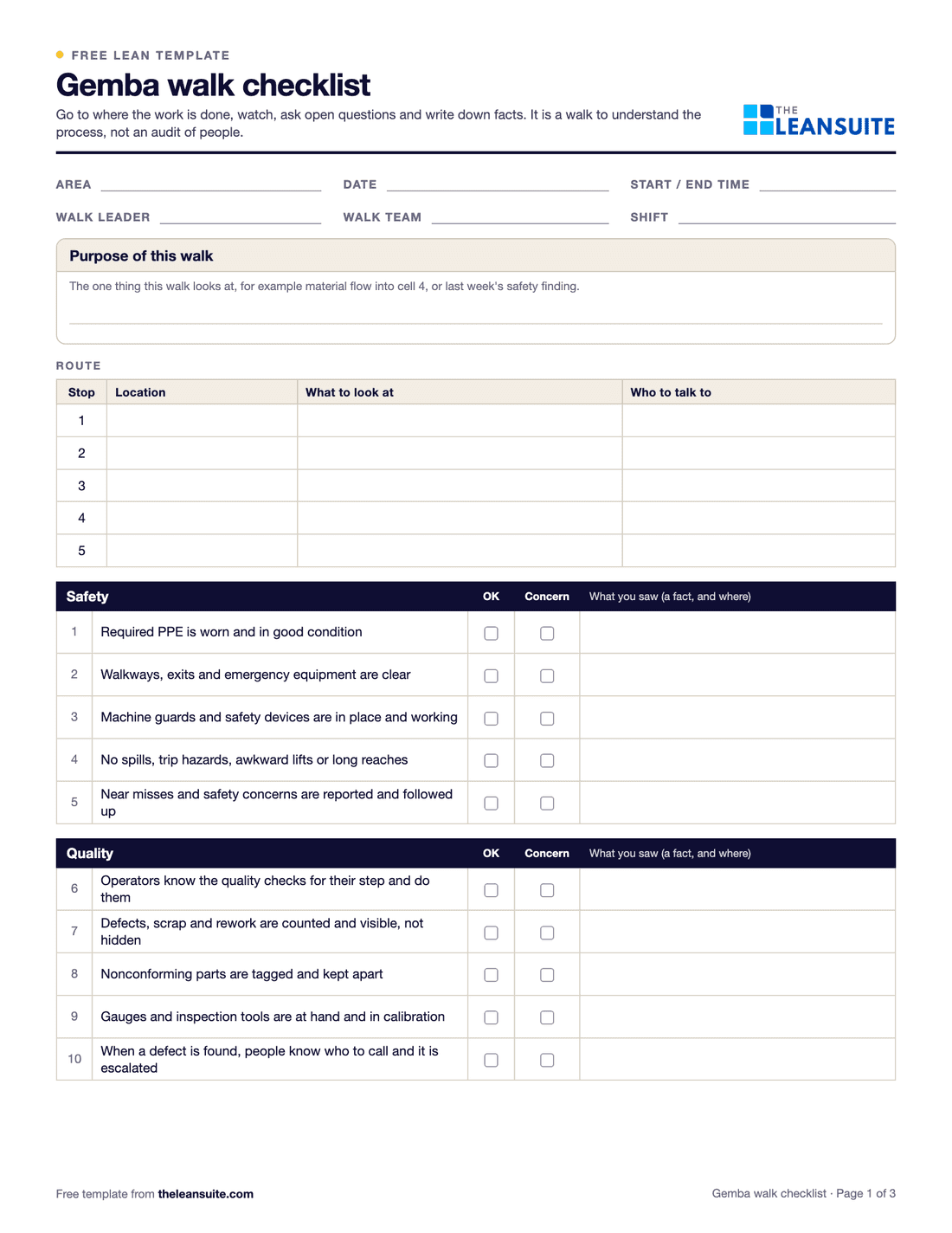
A gemba walk checklist is the sheet a leader takes on a planned walk to the gemba, the place where the work is done, to watch the process, ask the people doing the work about it and note what needs follow-up. This one has a walk plan with the purpose and route, 30 observation prompts grouped under safety, quality, flow and waste, standard work, 5S and visual management, and people, and a findings table where each follow-up gets an owner and a due date. The prompts direct attention; a gemba walk is for understanding the process, not for auditing people.
Free to use: print it, copy it and edit it for your team. Enter your name and work email once to download.
When to use it
When to use a gemba walk checklist
- On a regular leader walk, for example as part of leader standard work, so each walk looks at the process the same way.
- When a leader or engineer is new to an area and needs to learn how the work really runs.
- With a single focus, such as following up a safety finding or watching material flow into one cell: write the purpose and use the matching group of prompts.
- Before a kaizen event or an A3, to see the current condition with your own eyes.
How to fill it in
- 1
Set the purpose and route
Write the one thing this walk is for, then plan the stops: where, what to look at and who to talk to at each.
- 2
Go while the work is running
Tell the area the walk is to learn and help, not to catch people out, and walk it during normal production.
- 3
Watch before you ask
At each stop, watch a few cycles of the work. Tick OK or concern for the prompts that apply and skip the rest.
- 4
Ask open questions
What, why and show me. Ask the people doing the work what gets in their way, and write down what they tell you.
- 5
Write facts, not opinions
For every concern, note what you saw and where: three boxes of parts waiting at station 4, not poor flow.
- 6
Agree the follow-ups
Copy each concern that needs action into the findings table with an owner and a due date. The Excel version counts open and overdue actions.
- 7
Close the loop
Tell the area what happens next, check the actions on the next walk and record when each one is done.
A filled-in example
Illustrative, not a benchmarkA weekly walk by a plant manager through a packing area, with the purpose of checking material flow.
- Flow and waste: WIP above the marked maximum before the case sealer, and a packer walking to the end of the line to fetch cartons.
- Standard work: the work instruction at the palletizer shows an old pallet pattern.
- People: operators say cartons arrive in one large delivery at the start of the shift.
- Findings: three follow-ups with owners and dates: smaller, more frequent carton deliveries, an updated palletizer instruction, and a look at why WIP builds up before the case sealer.
Four observations and three follow-ups, all facts someone can act on. The next walk starts by checking them.
Common mistakes
Turning the walk into an audit
Scoring people or handing out blame teaches the area to hide problems. Watch the process and ask about it.
Walking without a purpose
A walk with no focus becomes a tour. Pick one thing to understand each time.
Talking more than watching
Watch several cycles of the work before you ask questions or suggest anything.
Solving problems for people
Fixing it yourself teaches less than questions that help the team see the problem. Safety hazards are the exception: deal with them at once.
No follow-up
If nothing happens after a walk, people stop telling you things. Every concern needs an owner, a date and an answer.
In LeanSuite
Use this as a Lean Studio board
The same method is one of the 30 ready-made board templates in Lean Studio, LeanSuite's whiteboard: Gemba Walk Board, plan a gemba walk, capture observations at the workplace, and turn them into follow-ups.
- Start from the Gemba Walk Board template: plan, observations and follow-ups as three columns.
- Add an observation sticky per finding during or straight after the walk, colour-coded by safety, quality, flow or 5S.
- Turn each observation that needs action into a follow-up sticky with an owner, and review them at the next walk.
Worked example · sample data
The sample walk went from receiving through weld cell 3 to packing, with flow and waiting as the theme and the plant manager and the CI lead walking. Three observations went up: pallets waiting two days at receiving, the welder walking to the tool room twice per shift, and a pallet blocking the fire door, the last in pink as a safety item. Each became a follow-up with an owner: a daily release rule at receiving for J. Lind, a tool kit kept at weld cell 3 for R. Patel, and a marked pallet bay, to be done today, for M. Osei. The fire door was cleared before the walkers left the area. The next walk, two weeks later, started at weld cell 3 to see whether the tool kit had stopped the walking.
Open this board in LeanSuite
Gemba Walk Board is one of the 30 ready-made boards in Lean Studio, LeanSuite's whiteboard. Try LeanSuite in your browser, or run it on your own lines for 90 days.
What Lean Studio isHow to run a Gemba Walk Board session
- 1Plan the walk: a route, a theme (flow, safety, 5S, standard work) and who walks. Two or three walkers, typically 30 to 45 minutes.
- 2Walk the route and watch the work for several minutes at each stop before asking anything. Ask what makes the job hard today; do not offer fixes.
- 3Record each observation on its own sticky, colour-coded by theme, during or straight after the walk.
- 4Back at the board, turn the observations that need action into follow-ups with an owner and a date. Leave the rest as observations.
- 5Start the next walk by reviewing the last walk's follow-ups with the people who raised the issues.
Common mistakes
- Walking to inspect people rather than to see the process.
- Solving on the spot. Observe, ask, record; fix later with the team.
- Observations that never become follow-ups, so the floor stops telling walkers anything.
- Walking the same route with the same theme every time.
- No review of the last walk's actions at the start of this one.
Where it goes next in LeanSuite
- A gemba walk checklist is built in Lean Creator, scheduled to a person or role in Daily Standard Work and completed on a phone or tablet with photos and comments; findings become tags, actions or Kaizens. Audit Management
- A safety observation becomes a tag with an owner and a due date in Daily Issue Management, shown on the live floor plan. Daily Issue Management
- A follow-up that needs a project becomes a Kaizen with owners, due dates and tracked savings. Kaizen & Projects
Download the template
Free to use: print it, copy it and edit it for your team. Enter your name and work email once to download.
Do this in LeanSuite
In LeanSuite you build a gemba walk checklist in Lean Creator, complete it on a phone or tablet with photos and comments, and turn anything you find into an issue tag, a corrective action or a Kaizen project.
See Audit ManagementIn the lean glossary
Free tools
FAQ
Gemba walk checklist: common questions
More free templates
All templates- 5S audit checklist template25 checks, five per S, scored 1 to 5, with a score summary and a chart of the five S's.
- A3 problem solving templateThe standard seven-box A3 on one landscape sheet, from background to follow-up.
- PDCA templateOne improvement cycle on one landscape page: plan, do, check against the goal, then standardize or adjust.
- 5 Whys templateA problem statement, five why rows with evidence, the root cause and the countermeasure.
- 8D report templateD0 to D8 on three pages: team, is/is not, containment, occurrence and escape causes, actions and closure.
- Skills matrix templatePeople by skills, a 0 to 4 scale, a training column and a coverage row that shows the gaps.
- Standard work sheet templateTakt time, each element's manual, machine and walk time on a time chart, key points and standard WIP.
- SMED changeover worksheetChangeover steps with times, internal or external, what can move, ideas and before/after totals.
- Kaizen event charter templateScope, team and roles, baseline and target metrics, a five-day schedule, risks and sign-off.