

Free template
5S audit checklist template
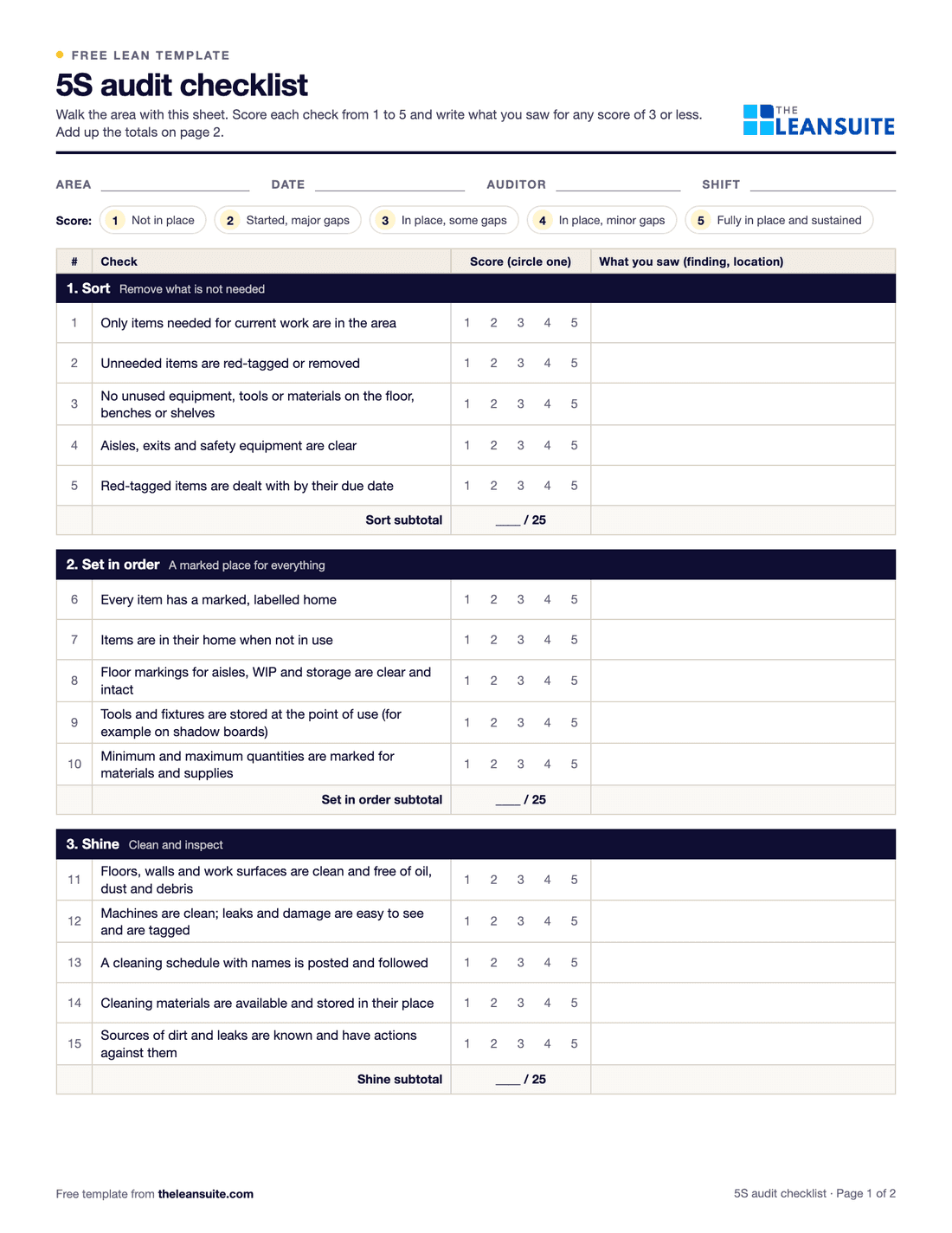
A 5S audit checklist is a scored list of checks for each of the five S's (sort, set in order, shine, standardize and sustain) that an auditor works through in one work area. Each check gets a score from 1 to 5, the scores add up to a total out of 125, and the lowest-scoring S shows where the area needs work first. This template has 25 checks, five per S, with fields for the area, date, auditor and shift, a score summary, and space for the actions that follow.
Free to use: print it, copy it and edit it for your team. Enter your name and work email once to download.
When to use it
When to use a 5S audit checklist
- On a fixed schedule in every area that has a 5S standard, for example weekly by the area team and monthly by someone from outside it.
- Right after a 5S event, to set a baseline, and again in the weeks after to check the area holds.
- When conditions slip, to see which of the five S's is falling back.
- To compare areas with the same checks, as long as every auditor scores the same way.
How to fill it in
- 1
Fill in the header
Area, date, auditor and shift. Audit the same area boundary every time so the scores can be compared.
- 2
Walk the area with the sheet
Score each check on the floor, not from memory: 1 is not in place, 5 is fully in place and sustained. The scoring guide is printed on the sheet.
- 3
Write down what you saw
For any score of 3 or less, note the finding and where it is. A low score without a finding cannot be acted on.
- 4
Add up the scores
Each S is out of 25 and the total is out of 125. The Excel version adds them up, works out the percentages, names the lowest S and draws the chart for you.
- 5
Agree the actions
Pick the lowest scores, agree an action with the area team, and give each one an owner and a due date. Check them at the next audit.
- 6
Post the result and keep the trend
Put the score up in the area. The direction of the score from audit to audit tells you more than any single number.
A filled-in example
Illustrative, not a benchmarkA monthly audit of an assembly cell.
- Sort 21 of 25: a few unused fixtures under a bench, red-tagged during the audit.
- Set in order 16 of 25: three tools missing from the shadow board and worn floor markings at the WIP location.
- Shine 19 of 25.
- Standardize 14 of 25: no posted photo standard, so operators disagree on what a clean, organized cell looks like.
- Sustain 15 of 25: two actions from last month's audit are still open.
Total 85 of 125 (68%). The weakest S is Standardize, so the first action is a posted photo standard for the cell, then replacing the missing tools, repainting the WIP markings and closing last month's actions.
Common mistakes
Scoring from the office
An audit done from memory measures what people remember, not the area. Walk it every time.
Every auditor scoring differently
Use the written scale, and now and then have two auditors score the same area together to agree how strict to be.
Scores with no findings or actions
A low score should always come with what was seen and who will fix it by when, or the audit changes nothing.
Treating the score as the goal
Teams judged only on the number learn to tidy up before audit day. Track closed actions as well as the score.
Rewriting the checklist every month
Keep the checks stable long enough to see a trend. Add checks for your area rather than replacing the core ones.
In LeanSuite
Use this as a Lean Studio board
The same method is one of the 30 ready-made board templates in Lean Studio, LeanSuite's whiteboard: 5S Audit Board, score and track workplace organization across the five S disciplines.
- Start from the 5S Audit Board template: a scoring table for the five S's and a chart of the score over time.
- Enter each audit's scores; the chart shows the trend and the lowest S.
- Add a sticky per finding with an owner and clear it at the next audit.
Worked example · sample data
The sample board covers four weekly audits, weeks 34 to 37, of one cell. Sort has held between 21 and 23 out of 25 throughout. Set in order climbed from 16 to 21 after the finding that three tools were missing from the shadow board was closed. Shine moved from 19 to 20. Standardize rose from 14 to 19 but is still amber, with the finding that no photo standard is posted. Sustain rose from 15 to 19, held back by two actions still open. The total moved from 85 to 102 out of 125 in four weeks. At the week 37 review the team leader took the photo standard as the one action for the coming week, since it was the lowest S and the finding was already known.
Open this board in LeanSuite
5S Audit Board is one of the 30 ready-made boards in Lean Studio, LeanSuite's whiteboard. Try LeanSuite in your browser, or run it on your own lines for 90 days.
What Lean Studio isHow to run a 5S Audit Board session
- 1Agree the scoring sheet: five checks per S, scored 1 to 5, so each S is out of 25 and the area out of 125. Post a copy of it at the area.
- 2Audit weekly at first, with someone from outside the area alongside the team leader, 15 to 20 minutes on the floor.
- 3Score what you see, not what is explained. Take a photo of anything under 3 and write it as a finding with an owner.
- 4Enter the scores so the chart shows the trend and the lowest S. Discuss the lowest S at the next huddle.
- 5Move to fortnightly, then monthly, once the score holds above the agreed level for a quarter. Never stop; sustain is the fifth S.
Common mistakes
- Scoring generously for your own area. Audit in pairs with an outsider.
- Auditing without findings. A score without a list of what to fix changes nothing.
- Stopping the audits when the score is good. The score falls within months.
- Twenty checks nobody agreed. Post the sheet and keep it stable so the trend means something.
- Fixing findings for the audit rather than for the shift.
Where it goes next in LeanSuite
- The 5S checklist is built in Lean Creator with points per answer and a pass mark, scheduled in Daily Standard Work to a person or role, and completed on a phone or tablet with photo evidence; each report shows its score and pass or fail. Audit Management
- A finding can raise an issue tag with an owner and a due date for the maintenance or support team. Daily Issue Management
- The audit score can be a KPI with a target and RAG ranges, so the trend sits on the tier board. KPI Dashboards
Download the template
Free to use: print it, copy it and edit it for your team. Enter your name and work email once to download.
Do this in LeanSuite
In LeanSuite you build any audit checklist, schedule it, complete it on a phone or tablet with photos as evidence, and turn every non-conformance into a tracked action with an owner.
See Audit ManagementIn the lean glossary
Free tools
FAQ
5S audit checklist template: common questions
More free templates
All templates- Gemba walk checklistA walk plan and route, 30 prompts in six groups and a findings table with owners and due dates.
- A3 problem solving templateThe standard seven-box A3 on one landscape sheet, from background to follow-up.
- PDCA templateOne improvement cycle on one landscape page: plan, do, check against the goal, then standardize or adjust.
- 5 Whys templateA problem statement, five why rows with evidence, the root cause and the countermeasure.
- 8D report templateD0 to D8 on three pages: team, is/is not, containment, occurrence and escape causes, actions and closure.
- Skills matrix templatePeople by skills, a 0 to 4 scale, a training column and a coverage row that shows the gaps.
- Standard work sheet templateTakt time, each element's manual, machine and walk time on a time chart, key points and standard WIP.
- SMED changeover worksheetChangeover steps with times, internal or external, what can move, ideas and before/after totals.
- Kaizen event charter templateScope, team and roles, baseline and target metrics, a five-day schedule, risks and sign-off.