

Free template
SMED changeover worksheet
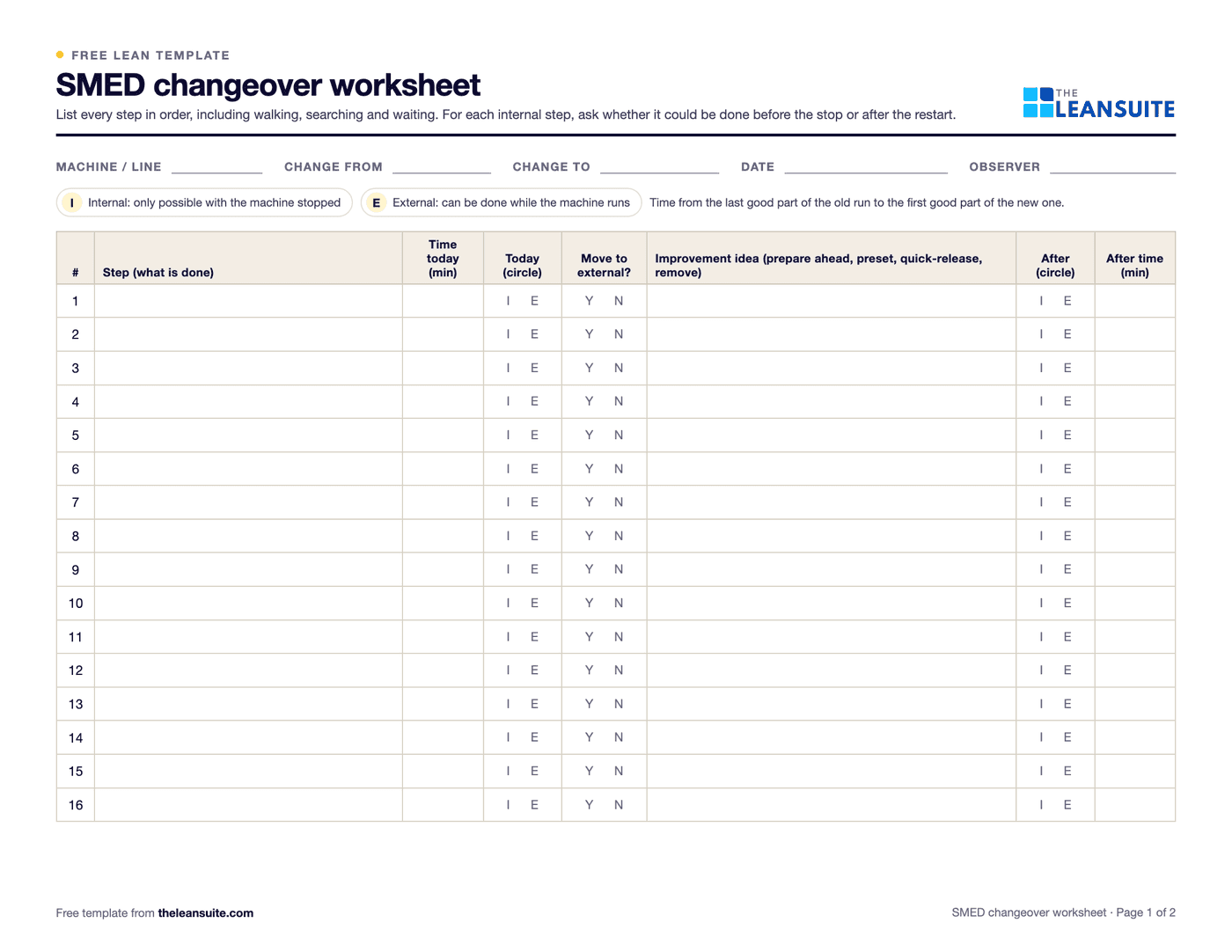
A SMED changeover worksheet is the form you use to break one changeover into its steps, time each one and mark it internal (only possible with the machine stopped) or external (possible while it runs). This one adds a column for whether each internal step could move to external, one for the improvement idea, and before and after totals, so you can see how much shorter the changeover could be. Changeover time is the internal total, measured from the last good part of one run to the first good part of the next.
Free to use: print it, copy it and edit it for your team. Enter your name and work email once to download.
When to use it
When to use a SMED worksheet
- Before a SMED workshop, to record today's changeover as the baseline.
- On the bottleneck machine, or any machine where long changeovers force large batches.
- After improvements, to compare the new changeover with the old one and write the new standard.
How to fill it in
- 1
Fill in the header
The machine or line, the product you are changing from and to, the date and the observer.
- 2
Observe or film one changeover
Time it from the last good part of the old run to the first good part of the new one. Filming makes it much easier to split into steps afterwards.
- 3
List every step with its time
Write the steps in order with their time in minutes. Include walking, searching and waiting: they are steps too.
- 4
Mark each step internal or external
I if the machine must be stopped, E if it could be done while it runs, based on what happens today.
- 5
Ask whether each internal step can move
Could it be done before the stop or after the restart? Mark Y or N in the move to external column.
- 6
Write an improvement idea
For each step you can move, shorten or remove: prepare tools and material in advance, preset settings, use quick-release clamps, standardize heights.
- 7
Fill in the after columns and compare
Enter the new classification and expected time. The Excel version defaults moved steps to external, adds up internal and external time before and after, and shows the time saved.
A filled-in example
Illustrative, not a benchmarkA press changeover with 90 minutes of internal work and 20 minutes of external work.
- Six internal steps, 30 minutes in all, could move to external: fetching the next die, finding clamps, preheating and preparing first-off paperwork.
- A quick-release clamp idea could cut die fixing from 12 minutes to 4.
- After: internal time 90 − 30 − 8 = 52 minutes, external time 20 + 30 = 50 minutes.
The changeover drops from 90 to 52 minutes, 42% shorter. To turn the minutes saved into capacity or smaller batches, use the SMED changeover calculator.
Common mistakes
Timing from memory or the schedule
Observe or film a real changeover. Estimates miss the waiting and searching.
Leaving out walking, searching and waiting
They are often the easiest minutes to remove.
Marking steps as they should be
Record what happens today in the first columns. The after columns are for what should happen.
Buying hardware before moving work
Move internal work to external first. It usually costs little compared with new tooling.
Not writing down the new sequence
Without a standard, the next shift goes back to the old way.
Download the template
Free to use: print it, copy it and edit it for your team. Enter your name and work email once to download.
Do this in LeanSuite
LeanSuite watches a video of your changeover, separates internal and external tasks, and recommends a leaner sequence with the projected time saved.
See AI SMED Changeover AnalysisIn the lean glossary
FAQ
SMED changeover worksheet: common questions
More free templates
All templates- 5S audit checklist template25 checks, five per S, scored 1 to 5, with a score summary and a chart of the five S's.
- Gemba walk checklistA walk plan and route, 30 prompts in six groups and a findings table with owners and due dates.
- A3 problem solving templateThe standard seven-box A3 on one landscape sheet, from background to follow-up.
- PDCA templateOne improvement cycle on one landscape page: plan, do, check against the goal, then standardize or adjust.
- 5 Whys templateA problem statement, five why rows with evidence, the root cause and the countermeasure.
- 8D report templateD0 to D8 on three pages: team, is/is not, containment, occurrence and escape causes, actions and closure.
- Skills matrix templatePeople by skills, a 0 to 4 scale, a training column and a coverage row that shows the gaps.
- Standard work sheet templateTakt time, each element's manual, machine and walk time on a time chart, key points and standard WIP.
- Kaizen event charter templateScope, team and roles, baseline and target metrics, a five-day schedule, risks and sign-off.