

Free template
A3 problem solving template
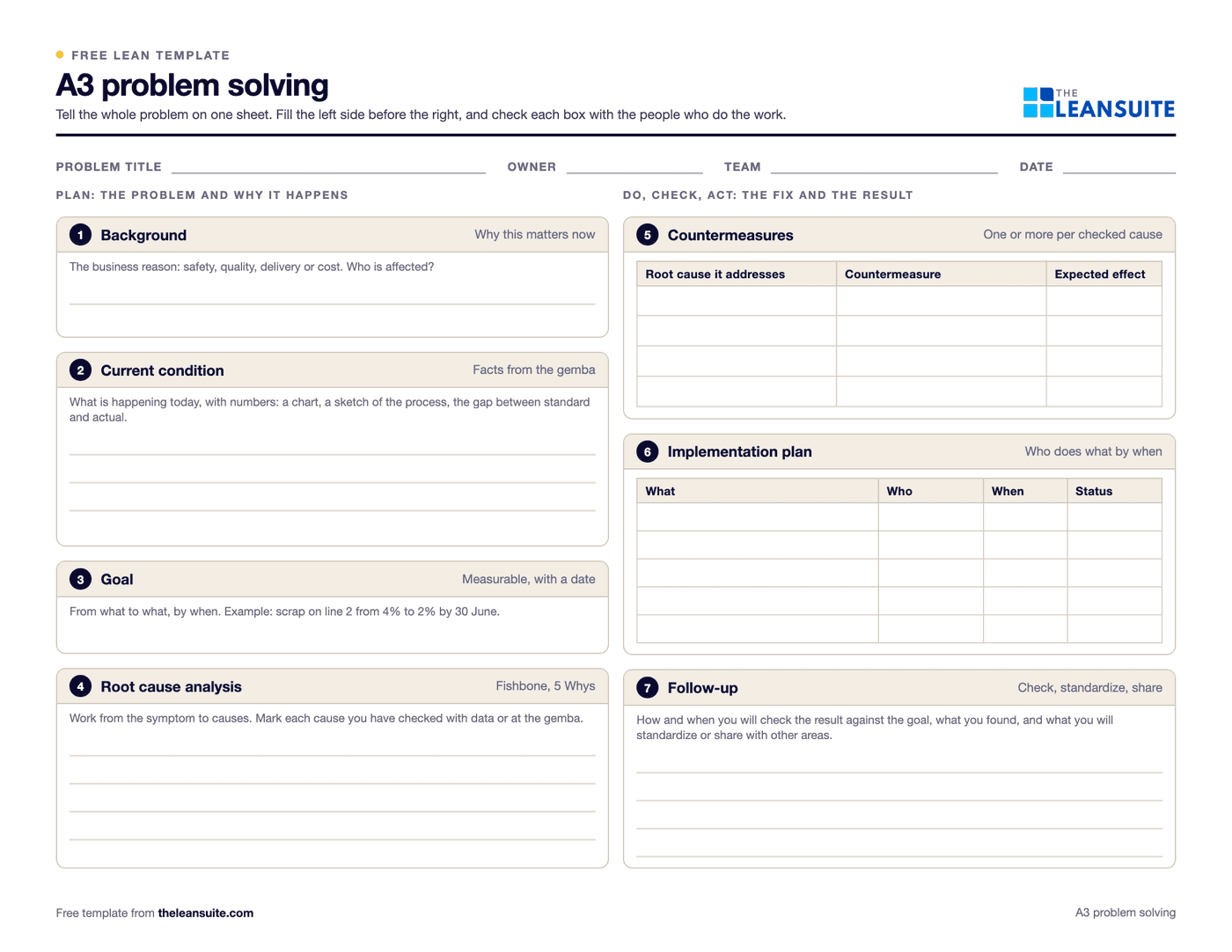
An A3 problem solving template is a single sheet, named after the A3 paper size (297 × 420 mm, close to 11 × 17 inches), that takes one problem from background to follow-up in seven boxes: background, current condition, goal, root cause analysis, countermeasures, implementation plan and follow-up. The left side describes the problem and why it happens; the right side says what you will do about it and how you will know it worked. It follows the plan-do-check-act (PDCA) cycle.
Free to use: print it, copy it and edit it for your team. Enter your name and work email once to download.
When to use it
When to use an A3
- A problem that keeps coming back, costs real money, or needs more than one department to fix.
- When you need agreement from a manager or another team before you act: the A3 is the document you discuss.
- To coach someone through problem solving, because thin boxes show where the thinking is thin.
- Not for a quick fix you can make today. Use an action list, or a 5 Whys if you need to find the cause first.
How to fill it in
- 1
Title, owner and date
Name the problem in a few words, not the solution. Add the owner, the team and the date.
- 2
Background
Why this problem matters now, in business terms: safety, quality, delivery or cost, and who is affected.
- 3
Current condition
What is happening today, with facts from the gemba: a chart, a sketch of the process, the gap between the standard and what actually happens.
- 4
Goal
A measurable target with a date, for example cut scrap on line 2 from 4% to 2% by the end of June.
- 5
Root cause analysis
Use a fishbone diagram or the 5 Whys to get from the symptom to its causes, and mark each cause you have checked with data or on the floor.
- 6
Countermeasures
One or more for each checked root cause, with the cause it addresses and the effect you expect.
- 7
Implementation plan
Who does what by when, and the status of each action.
- 8
Follow-up
How and when you will check the result against the goal, what you found, and what you will standardize or share with other areas if it worked.
A filled-in example
Illustrative, not a benchmarkAn A3 on scrap from a stamping press.
- Background: scrap on press 4 is the plant's biggest quality cost this quarter.
- Current condition: 3.8% scrap over six weeks, most of it burrs on one part number.
- Goal: below 1.5% on that part by the end of next quarter.
- Root cause: a 5 Whys on the burrs traced them to a die sharpening interval set by the calendar instead of by stroke count.
- Countermeasures: sharpen by stroke count, and add a burr check to the first-piece inspection.
- Plan and follow-up: an owner and date for each action; scrap reviewed weekly for eight weeks, then the maintenance standard updated.
One sheet tells the whole story: anyone reviewing it can see the problem, the evidence, the cause, the fix and how the team will know it worked.
Common mistakes
Writing the solution in the title
Start from the problem. The countermeasure comes after the analysis, not before it.
A current condition with no numbers
Without a baseline you cannot set a goal or tell whether the countermeasure worked.
Root causes nobody checked
Each cause should be confirmed with data or at the gemba, not agreed around a table.
Filling it in alone at a desk
An A3 is meant to be discussed with the people who do the work and the people who must agree to the plan.
Stopping at implementation
The follow-up box is where you find out whether the problem is actually solved.
In LeanSuite
Use this as a Lean Studio board
The same method is one of the 30 ready-made board templates in Lean Studio, LeanSuite's whiteboard: A3 Problem Solving, single-page structured problem-solving report following the Toyota A3 method.
- Start from the A3 Problem Solving template: the seven A3 boxes laid out on one landscape board.
- Write in the text boxes, add stickies for countermeasures and draw the current condition with shapes and arrows.
- Drop a Column Graph or Line Graph widget into the current condition box so the numbers stay live.
Worked example · sample data
The sample A3 is about late deliveries on the North route, which rose in Q2. The current condition box gives the number, 84% on time against a target of 95%, and the pattern: most misses fall on Mondays. That pattern shaped the analysis. Two root causes were found: Monday pick lists were released late, and one forklift was shared between two docks. The countermeasures match them one to one: release Monday's lists on Friday at 15:00, and put a second forklift on the docks on Mondays. R. Patel owns the plan, due 12 August, and the follow-up is a weekly check on the tier 2 board. By week 33 the route was at 93% on time, so the team kept the A3 open for the last two points.
Open this board in LeanSuite
A3 Problem Solving is one of the 30 ready-made boards in Lean Studio, LeanSuite's whiteboard. Try LeanSuite in your browser, or run it on your own lines for 90 days.
What Lean Studio isHow to run an A3 Problem Solving session
- 1One owner writes the A3; the team feeds it. The owner takes it round the people affected and rewrites it after each conversation, which is where the thinking happens.
- 2Fill the left side first, over days not hours: background, the current condition drawn from the floor with data, the goal as a number and a date, and the root cause analysis.
- 3Only then move to the right side: countermeasures matched to causes, the plan with owners and dates, and how the result will be checked.
- 4Review it with the sponsor in 15 minutes, standing at the board. If it needs explaining, it is not finished.
- 5Keep the A3 alive until follow-up shows the result held, then file it where the next team with the same problem will find it.
Common mistakes
- Writing the right side first. Countermeasures chosen before the current condition is understood are guesses with a plan attached.
- A background box full of history and a current condition box with no data.
- A goal with no number or date.
- More countermeasures than causes: each one should point at a cause on the left.
- Filing the A3 at the plan stage. Follow-up is the box that proves the method worked.
Where it goes next in LeanSuite
- A3 is one of the ready-made methodologies in Kaizen & Projects, with its own phases, owners, due dates and tracked savings; a recurring tag or an approved idea can become an A3 project in one click. Kaizen & Projects
- The follow-up measure can be a KPI with a target and RAG ranges, flagged as soon as new data crosses a limit. KPI Dashboards
Download the template
Free to use: print it, copy it and edit it for your team. Enter your name and work email once to download.
Do this in LeanSuite
LeanSuite's continuous improvement software runs every project the same way with built-in A3, DMAIC and PDCA templates, and tracks projected and actual savings for each one.
See Continuous Improvement SoftwareIn the lean glossary
FAQ
A3 problem solving template: common questions
More free templates
All templates- 5S audit checklist template25 checks, five per S, scored 1 to 5, with a score summary and a chart of the five S's.
- Gemba walk checklistA walk plan and route, 30 prompts in six groups and a findings table with owners and due dates.
- PDCA templateOne improvement cycle on one landscape page: plan, do, check against the goal, then standardize or adjust.
- 5 Whys templateA problem statement, five why rows with evidence, the root cause and the countermeasure.
- 8D report templateD0 to D8 on three pages: team, is/is not, containment, occurrence and escape causes, actions and closure.
- Skills matrix templatePeople by skills, a 0 to 4 scale, a training column and a coverage row that shows the gaps.
- Standard work sheet templateTakt time, each element's manual, machine and walk time on a time chart, key points and standard WIP.
- SMED changeover worksheetChangeover steps with times, internal or external, what can move, ideas and before/after totals.
- Kaizen event charter templateScope, team and roles, baseline and target metrics, a five-day schedule, risks and sign-off.