

Free template
PDCA template
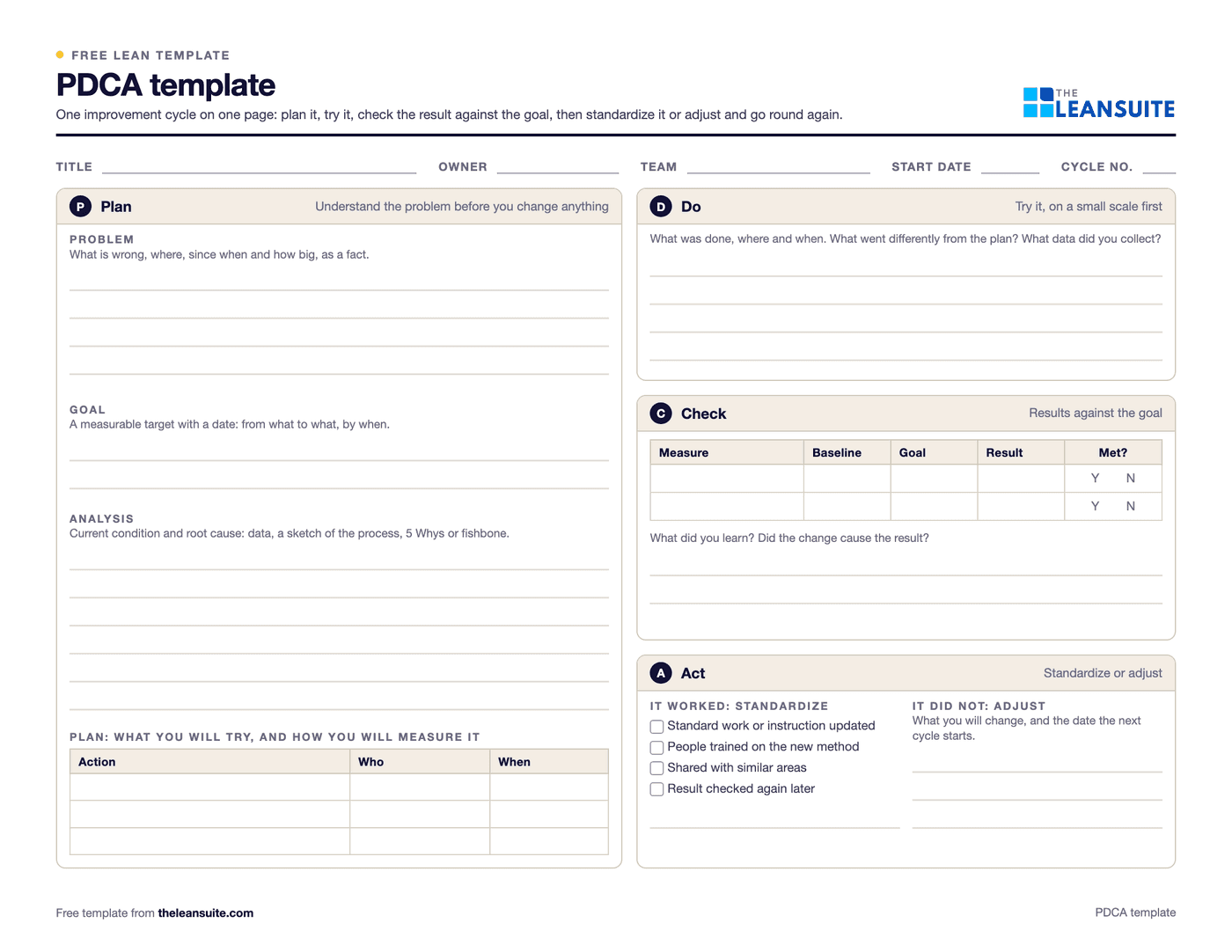
A PDCA template is a one-page form for running one plan-do-check-act cycle: you plan a change from the problem and its cause, try it on a small scale, check the result against the goal, and act by standardizing what worked or adjusting and starting another cycle. This one puts the plan on the left (problem, goal, analysis and an action plan with owners and dates) and do, check and act on the right, with a results table that compares baseline, goal and result.
Free to use: print it, copy it and edit it for your team. Enter your name and work email once to download.
When to use it
When to use a PDCA template
- For a small improvement you can test quickly, such as a new layout, a changed setting or a revised check.
- When you want to test an idea on one line or shift before rolling it out everywhere.
- To coach a team through structured problem solving without the full weight of an A3 or an 8D.
- When a problem needs several tries: number each cycle and keep the sheets together.
How to fill it in
- 1
Fill in the header
Title, owner, team, start date and the cycle number, starting at 1.
- 2
Describe the problem
What is wrong, where, since when and how big, as a fact rather than a cause or a solution.
- 3
Set the goal
A measurable target with a date: from what to what, by when.
- 4
Analyse the cause
The current condition and the root cause, using data, a sketch of the process, the 5 Whys or a fishbone diagram.
- 5
Plan the change and the measure
What you will try, who does it and by when, and how you will measure the result. Record the baseline now.
- 6
Do it on a small scale
Run the change as planned on one line, shift or machine first. Note anything that went differently and collect the data.
- 7
Check against the goal
Fill in baseline, goal and result for each measure, and ask whether the change caused the result.
- 8
Act
If it worked, update the standard, train people and share it with similar areas. If not, write what you will change and start the next cycle.
A filled-in example
Illustrative, not a benchmarkA PDCA cycle on a label printer that keeps jamming on a packing line.
- Plan: jams stop the line several times a shift. Goal: half as many jams within four weeks. Analysis: most jams follow a label roll change, when the roll is threaded differently. Action: a threading diagram at the printer and a short demonstration for each shift.
- Do: tried on one shift for two weeks; an operator asked for the diagram to be moved closer to the printer.
- Check: jams on that shift fell below the goal, while the other shifts stayed at their old level.
- Act: the diagram became part of the printer's standard, every shift was shown it, and it went up at the printers on the other lines.
One cycle on one page: the problem, the evidence, what was tried and whether it worked, ready to copy to other lines.
Common mistakes
Skipping the plan
Going straight to a fix means you cannot tell whether it worked or why. Write the problem, the goal and the cause first.
No measure in the plan
Decide how you will check the result before you start, and record the baseline.
Rolling out before checking
Test on a small scale first. A change that fails everywhere at once is harder to undo.
Stopping at check
If it worked, standardize it and train people; if not, adjust and go round again. Without the act step, gains fade.
Treating one cycle as the end
PDCA is a cycle. Many problems need several turns, each learning from the last.
In LeanSuite
Use this as a Lean Studio board
The same method is one of the 30 ready-made board templates in Lean Studio, LeanSuite's whiteboard: PDCA Cycle, continuous improvement cycle for iterating on a change through Plan, Do, Check, Act.
- Start from the PDCA Cycle template: four quadrants around a circle, one per step.
- Put the plan on stickies in the first quadrant, then move through Do, Check and Act as the cycle runs.
- Use a Line Graph or Single Data widget in Check to show the result against the target.
Worked example · sample data
The sample cycle is a changeover trial on press 2. Plan: cut the changeover from 42 to 30 minutes by moving die pre-heating off-line. Do: a pre-heat stand was built and used on 12 changeovers in week 36. Check: the average came down to 31 minutes, close to target, but two runs went over 35 minutes because the single stand was in use on another press. Act: the team ordered a second stand and updated the changeover standard to include the off-line pre-heat. The one-minute miss against target was not treated as failure; the check told the team exactly which condition broke the result, and that became the next plan.
Open this board in LeanSuite
PDCA Cycle is one of the 30 ready-made boards in Lean Studio, LeanSuite's whiteboard. Try LeanSuite in your browser, or run it on your own lines for 90 days.
What Lean Studio isHow to run a PDCA Cycle session
- 1Plan: state the problem with a number, set the target and the date, and decide exactly what will change and how you will measure it.
- 2Do: run the change on a small scale first, one line or one week, and record what happened, including what went wrong.
- 3Check: compare the measured result with the target, not with a feeling. Put the numbers on the board.
- 4Act: if the target was met, write the change into the standard and train it. If not, keep what worked, adjust the plan and start the next cycle.
- 5Keep the cycles short. A PDCA that takes six months is a project; a PDCA that takes two weeks is how a team learns.
Common mistakes
- Skipping Check. Most teams plan and do; few measure the result against the target before declaring success.
- A plan without a number, so Check has nothing to compare against.
- Changing five things at once in Do, then not knowing which one worked.
- Treating Act as 'done'. Act means updating the standard and training it, or starting the next cycle.
- Running the first cycle on the whole plant instead of one line.
Where it goes next in LeanSuite
- PDCA is one of the ready-made methodologies for a Kaizen project, with phases, due dates per phase and savings tracked against plant targets. Kaizen & Projects
- The result in Check can be a KPI with a target and RAG ranges, so the trend after the change is visible on the dashboard. KPI Dashboards
Download the template
Free to use: print it, copy it and edit it for your team. Enter your name and work email once to download.
Do this in LeanSuite
LeanSuite's continuous improvement software has built-in PDCA, A3 and DMAIC templates, suggests a method for the type of loss you are tackling, from a simple PDCA cycle to a full DMAIC project, and tracks projected and actual savings for each project.
See Continuous Improvement SoftwareIn the lean glossary
Free tools
FAQ
PDCA template: common questions
More free templates
All templates- 5S audit checklist template25 checks, five per S, scored 1 to 5, with a score summary and a chart of the five S's.
- Gemba walk checklistA walk plan and route, 30 prompts in six groups and a findings table with owners and due dates.
- A3 problem solving templateThe standard seven-box A3 on one landscape sheet, from background to follow-up.
- 5 Whys templateA problem statement, five why rows with evidence, the root cause and the countermeasure.
- 8D report templateD0 to D8 on three pages: team, is/is not, containment, occurrence and escape causes, actions and closure.
- Skills matrix templatePeople by skills, a 0 to 4 scale, a training column and a coverage row that shows the gaps.
- Standard work sheet templateTakt time, each element's manual, machine and walk time on a time chart, key points and standard WIP.
- SMED changeover worksheetChangeover steps with times, internal or external, what can move, ideas and before/after totals.
- Kaizen event charter templateScope, team and roles, baseline and target metrics, a five-day schedule, risks and sign-off.