

Free template
PFMEA template (process FMEA)
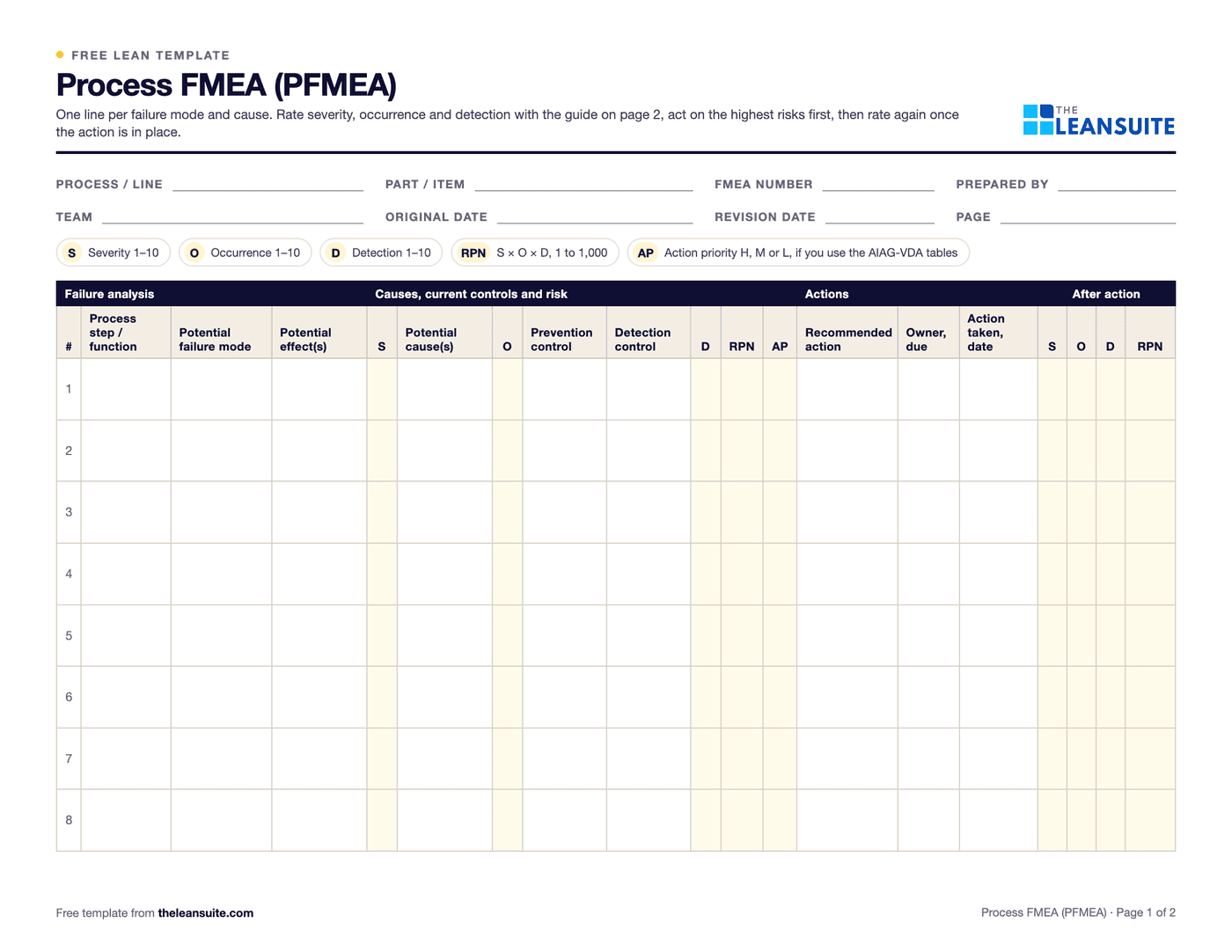
A process FMEA (failure mode and effects analysis) is a team's step-by-step look at how a manufacturing process could fail, what each failure would do to the customer, the next process or the operator, and what could cause it. Each line is rated from 1 to 10 for severity, occurrence and detection, the risk priority number (RPN) is severity × occurrence × detection, and the team acts on the biggest risks before they turn into defects. This template has the standard columns, from the process step to the current prevention and detection controls, an RPN and an action priority (AP) column, the recommended action with an owner and a date, and the ratings again after the action. Page 2 has a general rating guide.
Free to use: print it, copy it and edit it for your team. Enter your name and work email once to download.
When to use it
When to use a PFMEA template
- Before a new process, line or product goes into production, so the risks are handled before the first part ships.
- When a process changes: a new machine, material, supplier, fixture or cycle time.
- After a customer complaint or a serious internal defect, to add the failure that was missed and check similar steps. It is part of D7 of an 8D.
- Before writing or updating a control plan, which takes its checks from the high-risk lines of the FMEA.
- Not as a one-person desk exercise: it needs the people who run, maintain and inspect the process.
How to fill it in
- 1
Set the scope and the team
Write the process, part and team in the header. Bring an operator, a maintenance tech, a quality engineer and the process engineer, and have the process flow in front of you.
- 2
List the steps and how each could fail
Take the process one step at a time. For each, write the ways it could fail to do its job: too big, too small, missing, wrong way round, contaminated, not done.
- 3
Write the effect and rate severity
What happens to the customer, the next step or the operator if the failure gets through. Rate it 1 to 10 with the guide on page 2.
- 4
Find the causes and rate occurrence
For each failure mode, the causes that could produce it, one per line. Note today's prevention control and rate how likely the cause is to happen.
- 5
Note today's detection and rate it
How the failure or its cause would be caught today, and how likely that is before the part leaves the process. A high number means it would probably get through.
- 6
Work out the RPN and choose actions
RPN = S × O × D. Deal with every severity of 9 or 10 first, then the highest RPNs. Give each action an owner and a due date. The Excel version calculates the RPN and flags the high ones.
- 7
Rate it again after the action
Once the action is in, record what was done and rate S, O and D again. Carry the new controls into the control plan and the work instructions.
A filled-in example
Illustrative, not a benchmarkAn example: one line of a process FMEA for the crimping step on a hose assembly.
- Failure mode: crimp diameter too large. Effect: the joint leaks at the customer. Severity 8.
- Cause: the setup sheet has no crimp diameter for the new die. No prevention control. Occurrence 5.
- Detection control: a leak test on one part per batch. Detection 6. RPN 8 × 5 × 6 = 240.
- Actions: add the diameter to the setup sheet with a first-piece check, and leak test every part in line. Owner and due date set.
- After the actions: severity stays 8, occurrence 2, detection 3. RPN 48.
The RPN fell from 240 to 48, but severity is still 8 because a leak would still reach the customer. The line stays in the FMEA, and the first-piece check and the in-line leak test go into the control plan.
Common mistakes
Chasing the RPN number
An RPN of 120 can be 10 × 3 × 4. Deal with high severity whatever the product, and do not set a pass mark that hides it.
Lowering severity on paper
Severity only comes down when the design or the process changes the effect. Better inspection lowers detection, not severity.
Filling it in alone
An engineer writing the FMEA at a desk misses the failures the operators and maintenance see every week.
Adding inspection as every action
Extra checks raise the cost and still let the cause happen. Look first for actions that prevent the cause, such as a fixture or a poka-yoke.
Writing it once for the customer
An FMEA that is not updated after changes and complaints stops matching the process. Review it whenever either happens.
Download the template
Free to use: print it, copy it and edit it for your team. Enter your name and work email once to download.
Run this template in LeanSuite
In LeanSuite defects are logged as tags from the floor, ranked in the QA Matrix with an AA, A, B or C priority, and systemic ones become CAPA projects with approvals, root cause analysis and an action plan.
In the lean glossary
Free tools
FAQ
PFMEA template (process FMEA): common questions
More free templates
All templates- 5S audit checklist template25 checks, five per S, scored 1 to 5, with a score summary and a chart of the five S's.
- Gemba walk checklistA walk plan and route, 30 prompts in six groups and a findings table with owners and due dates.
- Leader standard work templateA team leader's daily, weekly and monthly routine with a box per day, follow-ups and a weekly review.
- Autonomous maintenance (CILR) checklist20 clean, inspect, lubricate and retighten checks with a box per day, an abnormality log and sign-off.
- A3 problem solving templateThe standard seven-box A3 on one landscape sheet, from background to follow-up.
- PDCA templateOne improvement cycle on one landscape page: plan, do, check against the goal, then standardize or adjust.
- 5 Whys templateA problem statement, five why rows with evidence, the root cause and the countermeasure.
- 5W1H templateSix questions with prompts and evidence, turned into a problem statement before the root cause analysis.
- 8D report templateD0 to D8 on three pages: team, is/is not, containment, occurrence and escape causes, actions and closure.
- Poka-yoke worksheetEach step's possible errors, prevention or detection, the method, a device idea and a verified box.
- Skills matrix templatePeople by skills, a 0 to 4 scale, a training column and a coverage row that shows the gaps.
- Standard work sheet templateTakt time, each element's manual, machine and walk time on a time chart, key points and standard WIP.
- One point lesson (OPL) templateOne topic on one page: wrong way and right way pictures, key points, why it matters and a sign-off record.
- SMED changeover worksheetChangeover steps with times, internal or external, what can move, ideas and before/after totals.
- Kaizen event charter templateScope, team and roles, baseline and target metrics, a five-day schedule, risks and sign-off.
- RACI matrix template17 kaizen project tasks by 10 roles, with R, A, C, I drop-downs and a check for one accountable per task.
- Layered process audit (LPA) checklist20 yes, no or N/A checks at the station, a fixed-on-the-spot box, scores by group and a findings table.
- 5S red tag log and red tagsA log of every red-tagged item with its decision, and six printable red tags to cut out.
- Shift handover templateProduction against plan, safety, quality, equipment, materials and people, and the open issues the next shift takes over.
- Kanban card templateSix production and six withdrawal kanban cards to print and cut out, with loop sizing and a card register.
- Pareto chart templateA tally sheet, the categories sorted largest first with cumulative %, and the chart. Excel does the sorting and drawing.
- Control plan templateWhat is checked at each step, against which limits, how, how often, and what to do when a result is out.
- Corrective action request (CAPA) formProblem, containment, root cause, corrective and preventive action, and proof the fix worked, on two pages.
Can't find the template you need?
Tell us what you're looking for. We'll make it and send it to your inbox, free.
A shift handover sheet, a red tag log, a changeover checklist for one machine: if your team uses it on the floor, ask.