

Free template
Kanban card template
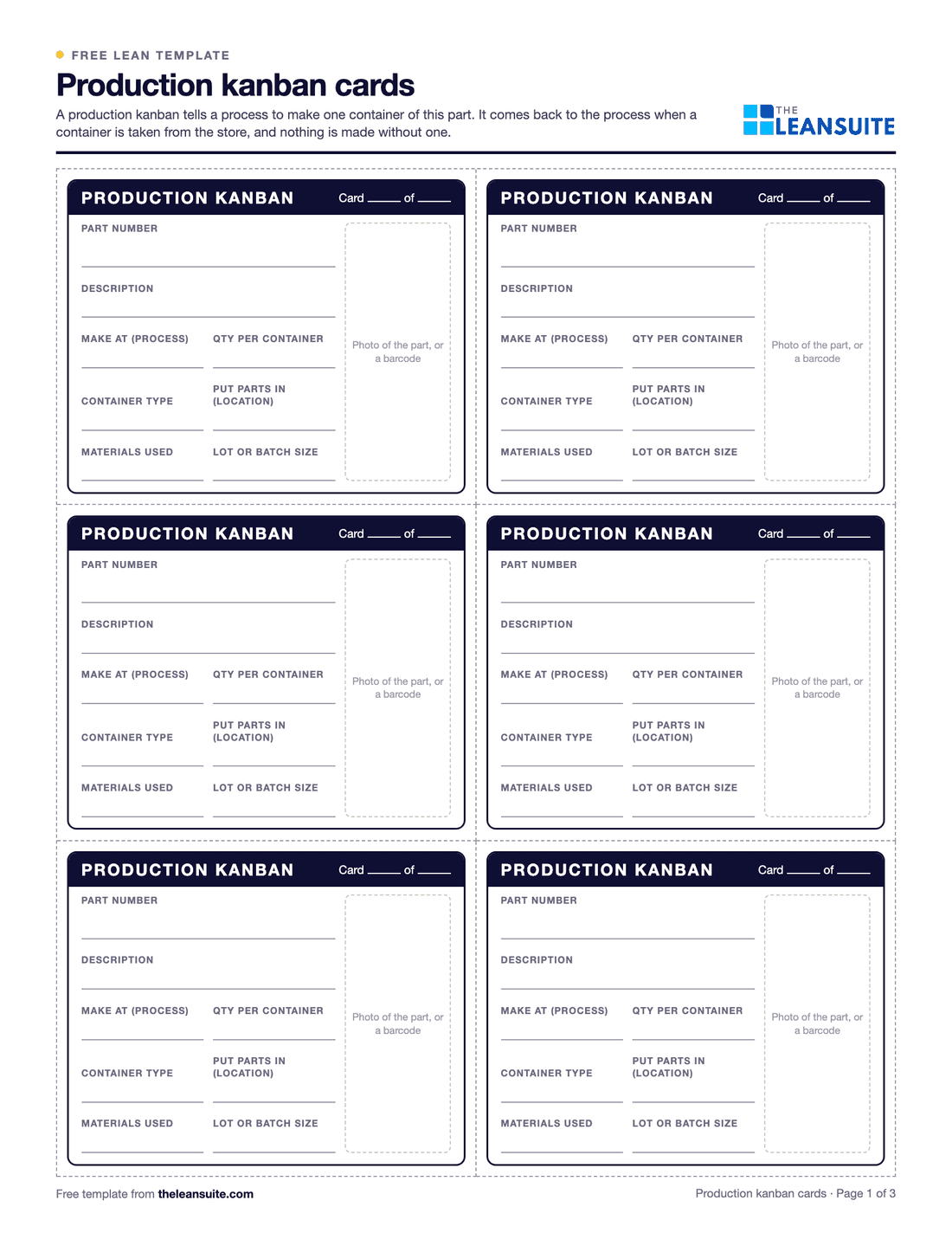
A kanban card is the signal that makes a pull system work: nothing is made or moved without one. A production kanban tells a process to make one container of a part, and a withdrawal kanban tells a material handler to move one container from the store to the process that uses it. This template has six production kanbans on page 1 and six withdrawal kanbans on page 2, each with the part number, description, where it is made or taken from, where it goes, the quantity per container, the container type, a card number such as 3 of 5 and a space for a photo or barcode. Page 3 has the formula for how many cards a loop needs, a register of every card in circulation and the rules for running the cards.
Free to use: print it, copy it and edit it for your team. Enter your name and work email once to download.
When to use it
When to use kanban cards
- To replace a schedule pushed to each process with a pull loop between a supplying process and the one that uses its parts.
- For parts used steadily, such as brackets, fasteners or subassemblies that go into most products.
- Between a supermarket and the line, so material handlers deliver what was used rather than what someone guessed.
- When a paper system is the right first step before any electronic signal, or where cards work better than screens.
- Not for one-off or very irregular parts, which are better made to order.
How to fill it in
- 1
Choose the loop
Pick one part and one loop: the process that makes it, the store where full containers wait and the process that uses them.
- 2
Size the loop
Work out the number of cards with the formula on page 3: daily demand × lead time × (1 + safety factor) ÷ quantity per container, rounded up.
- 3
Fill in the cards
Write the part number, description, where it is made or taken from, where it goes, the quantity and the container. Number the cards 1 of 5, 2 of 5 and so on.
- 4
Print and protect them
Print production and withdrawal kanbans on different colors of card, cut them out and laminate them or put them in sleeves.
- 5
Record every card
Write each loop in the register on page 3, so a lost card is noticed and nobody adds cards without updating it.
- 6
Run the rules and review the loop
Follow the rules on page 3. Review the number of cards when demand or lead time changes, and take cards out when the loop runs well.
A filled-in example
Illustrative, not a benchmarkAn example: a kanban loop between a stamping press and the assembly line that uses its brackets.
- The assembly line uses about 400 brackets a day, in containers of 50.
- From the moment a container is emptied, it takes about half a day for its card to reach the press, for the brackets to be made and for the full container to be back in the store.
- With a safety factor of 0.1: 400 × 0.5 × 1.1 ÷ 50 = 4.4, so 5 production cards, numbered 1 of 5 to 5 of 5.
- After a month the store has never dropped below two full containers, so the team takes one card out of the loop and updates the register.
The press makes brackets only when a card comes back, the store never holds more than the cards allow, and the register shows every card in the loop.
Common mistakes
Making without a card
Running extra parts because the press is free fills the store and breaks the loop. No card, no production.
Too many cards, never reviewed
Cards are inventory. Size the loop from real numbers and take cards out as lead time comes down.
Lost cards nobody misses
A card that goes missing means a container that is never replaced. Keep the register and check it regularly.
Batching cards
Holding cards until there are enough for a big run adds lead time. Make in the order the cards arrive, or level the work with a heijunka box.
Starting with the hardest part
Begin with a steady, simple part, learn how the loop behaves, then add more.
Download the template
Free to use: print it, copy it and edit it for your team. Enter your name and work email once to download.
Run this template in LeanSuite
LeanSuite turns video of each process step into a current-state value stream map with measured cycle times, inventory and lead time, and converts the inventory it counts between steps into days of WIP.
In the lean glossary
FAQ
Kanban card template: common questions
More free templates
All templates- 5S audit checklist template25 checks, five per S, scored 1 to 5, with a score summary and a chart of the five S's.
- Gemba walk checklistA walk plan and route, 30 prompts in six groups and a findings table with owners and due dates.
- Leader standard work templateA team leader's daily, weekly and monthly routine with a box per day, follow-ups and a weekly review.
- Autonomous maintenance (CILR) checklist20 clean, inspect, lubricate and retighten checks with a box per day, an abnormality log and sign-off.
- A3 problem solving templateThe standard seven-box A3 on one landscape sheet, from background to follow-up.
- PDCA templateOne improvement cycle on one landscape page: plan, do, check against the goal, then standardize or adjust.
- 5 Whys templateA problem statement, five why rows with evidence, the root cause and the countermeasure.
- 5W1H templateSix questions with prompts and evidence, turned into a problem statement before the root cause analysis.
- 8D report templateD0 to D8 on three pages: team, is/is not, containment, occurrence and escape causes, actions and closure.
- Poka-yoke worksheetEach step's possible errors, prevention or detection, the method, a device idea and a verified box.
- Skills matrix templatePeople by skills, a 0 to 4 scale, a training column and a coverage row that shows the gaps.
- Standard work sheet templateTakt time, each element's manual, machine and walk time on a time chart, key points and standard WIP.
- One point lesson (OPL) templateOne topic on one page: wrong way and right way pictures, key points, why it matters and a sign-off record.
- SMED changeover worksheetChangeover steps with times, internal or external, what can move, ideas and before/after totals.
- Kaizen event charter templateScope, team and roles, baseline and target metrics, a five-day schedule, risks and sign-off.
- RACI matrix template17 kaizen project tasks by 10 roles, with R, A, C, I drop-downs and a check for one accountable per task.
- Layered process audit (LPA) checklist20 yes, no or N/A checks at the station, a fixed-on-the-spot box, scores by group and a findings table.
- PFMEA template (process FMEA)Failure modes, effects and causes rated for severity, occurrence and detection, with RPN before and after action.
- 5S red tag log and red tagsA log of every red-tagged item with its decision, and six printable red tags to cut out.
- Shift handover templateProduction against plan, safety, quality, equipment, materials and people, and the open issues the next shift takes over.
- Pareto chart templateA tally sheet, the categories sorted largest first with cumulative %, and the chart. Excel does the sorting and drawing.
- Control plan templateWhat is checked at each step, against which limits, how, how often, and what to do when a result is out.
- Corrective action request (CAPA) formProblem, containment, root cause, corrective and preventive action, and proof the fix worked, on two pages.
Can't find the template you need?
Tell us what you're looking for. We'll make it and send it to your inbox, free.
A shift handover sheet, a red tag log, a changeover checklist for one machine: if your team uses it on the floor, ask.