

Free template
Poka-yoke worksheet
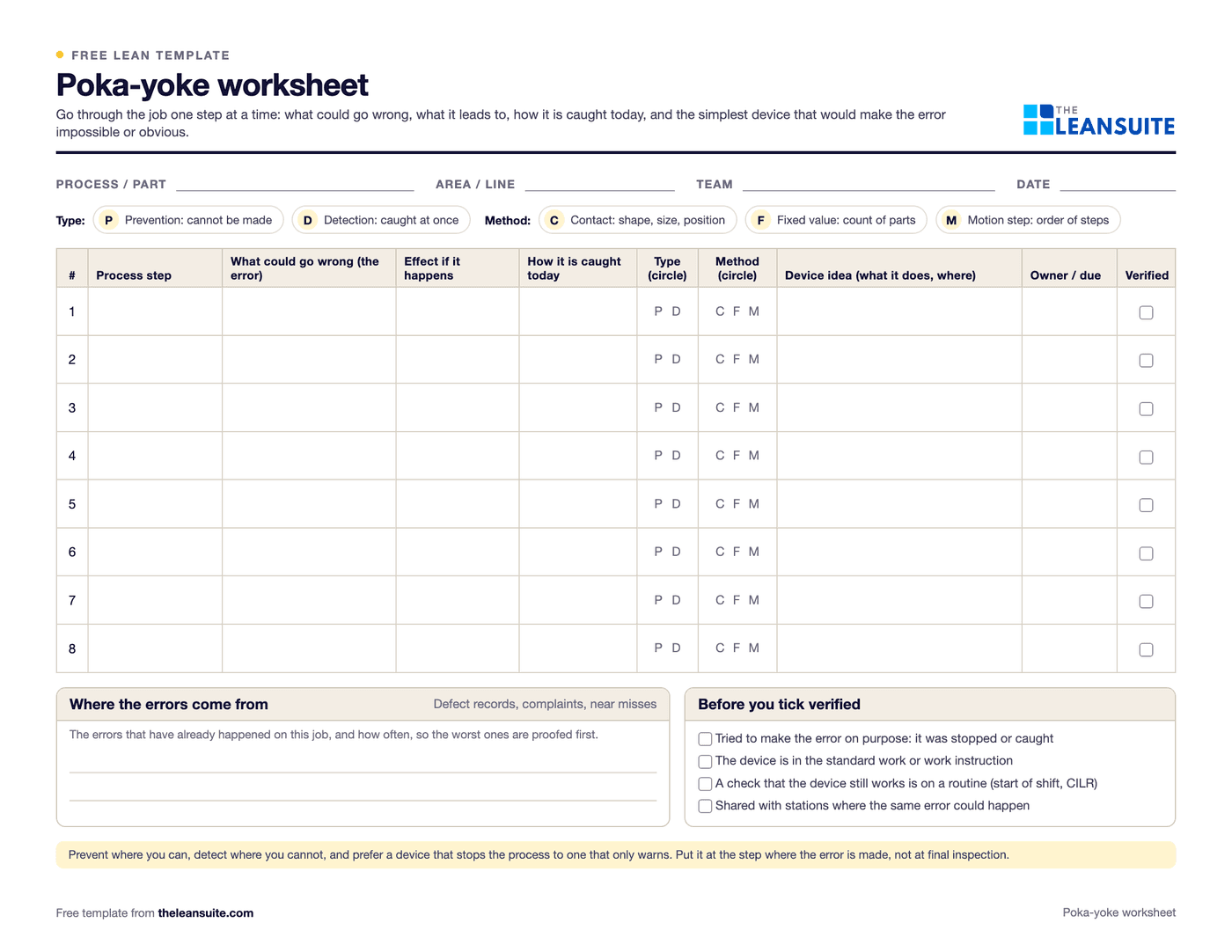
Poka-yoke, Japanese for mistake-proofing, is a device or method that stops a mistake from being made, or makes it obvious the moment it is made, so it cannot turn into a defect. This worksheet takes one job step by step. For each step you write the errors that could happen and what they lead to, how they are caught today, whether the fix should prevent the error or detect it, and which method fits: contact, fixed value or motion step. Then you describe the device, give it an owner and a due date, and tick it as verified once someone has tried to make the error on purpose and the device stopped it.
Free to use: print it, copy it and edit it for your team. Enter your name and work email once to download.
When to use it
When to use a poka-yoke worksheet
- After a root cause analysis that ends at a human error training has not stopped, such as a part fitted the wrong way round or a step left out.
- When a defect has reached a customer, to stop the error at the step where it is made. It fits the permanent corrective action of an 8D.
- When a new product, fixture or station is set up, to go through each step for possible errors before production starts.
- On steps where one slip becomes scrap, rework or an injury, such as choosing between two similar parts or setting a torque.
- Not in place of finding the cause: if nobody knows why the error happens, start with a 5 Whys or a fishbone diagram.
How to fill it in
- 1
Fill in the header
Process or part, area or line, team and date. Take the sheet to the station and go through the job with the people who do it.
- 2
List the steps
Write each step of the job in order, in a few words. Start from the standard work or work instruction if there is one, and check it against what really happens.
- 3
Write what could go wrong
For each step, the errors that could happen: a step left out, the wrong part, the wrong way round, the wrong setting, too many or too few. Add the errors that have already happened, from defect records and complaints.
- 4
Note the effect and today's control
What the error leads to (scrap, rework, a complaint, an injury) and how it is caught today, if at all. Errors caught only at final inspection, or not at all, come first.
- 5
Choose prevention or detection
Prevention makes the error impossible, like a fixture a part only fits one way. Detection lets the error happen but catches it at once and stops or warns, like a sensor that counts the screws. Use detection only where prevention can't be done.
- 6
Choose the method and the device
Contact: the device checks shape, size, position or colour. Fixed value: it checks that a set number of parts or moves is done. Motion step: it checks the steps happen in order. Describe or sketch the simplest device that would work.
- 7
Test it and add it to the standard
Give each idea an owner and a due date. Once the device is fitted, try to make the error on purpose, tick verified if it is stopped or caught, and add the device and a regular check that it still works to the standard work.
A filled-in example
Illustrative, not a benchmarkA worksheet for a bracket assembly station where the left-hand and right-hand brackets look almost the same.
- Step: fit the bracket. Error: a right-hand bracket fitted to a left-hand unit. Effect: the unit is rejected at the customer. Caught today: a visual check at final inspection.
- Prevention, contact method: a locating pin on the fixture that only the correct bracket's hole fits over.
- Step: fit four screws. Error: a screw left out. Effect: a loose bracket. Caught today: not caught.
- Detection, fixed-value method: the screwdriver controller counts four tightenings, and the fixture clamp does not open until it has.
- Step: label the unit, then fit the cover. Error: cover fitted first, so the label is missed. Detection, motion-step method: the cover bin opens only after the label has been scanned.
The sheet ends with three device ideas, one for each method, each with an owner and a date. The pin prevents the wrong bracket, and the screw count and the label scan catch the other two errors at the station. Each device is tested by trying to make the error before it goes into the standard work.
Common mistakes
Adding inspection instead
A check at the end finds defects after they are made. Put the device at the step where the error happens.
Blaming the operator
Mistake-proofing starts from the idea that anyone can make a mistake. Ask how the process lets the error happen, not who made it.
Settling for a warning when a stop is possible
A light or a buzzer can be missed or ignored. Where the error matters, prefer a device that stops the process or will not take the wrong part.
Starting with something complicated
Many good devices are a pin, a guide, a template or a counter. Try the simplest thing that makes the error impossible or obvious.
Never checking the device again
Sensors get bypassed and pins wear. Put a check that each device still works into a start-of-shift routine or the machine's CILR checklist.
Download the template
Free to use: print it, copy it and edit it for your team. Enter your name and work email once to download.
Run this template in LeanSuite
In LeanSuite quality issues are logged as tags, ranked in the QA Matrix and traced to their root cause, and digital instructions and checklists with number limits, required photos and signatures build quality into every task.
In the lean glossary
Free tools
FAQ
Poka-yoke worksheet: common questions
More free templates
All templates- 5S audit checklist template25 checks, five per S, scored 1 to 5, with a score summary and a chart of the five S's.
- Gemba walk checklistA walk plan and route, 30 prompts in six groups and a findings table with owners and due dates.
- Leader standard work templateA team leader's daily, weekly and monthly routine with a box per day, follow-ups and a weekly review.
- Autonomous maintenance (CILR) checklist20 clean, inspect, lubricate and retighten checks with a box per day, an abnormality log and sign-off.
- A3 problem solving templateThe standard seven-box A3 on one landscape sheet, from background to follow-up.
- PDCA templateOne improvement cycle on one landscape page: plan, do, check against the goal, then standardize or adjust.
- 5 Whys templateA problem statement, five why rows with evidence, the root cause and the countermeasure.
- 5W1H templateSix questions with prompts and evidence, turned into a problem statement before the root cause analysis.
- 8D report templateD0 to D8 on three pages: team, is/is not, containment, occurrence and escape causes, actions and closure.
- Skills matrix templatePeople by skills, a 0 to 4 scale, a training column and a coverage row that shows the gaps.
- Standard work sheet templateTakt time, each element's manual, machine and walk time on a time chart, key points and standard WIP.
- One point lesson (OPL) templateOne topic on one page: wrong way and right way pictures, key points, why it matters and a sign-off record.
- SMED changeover worksheetChangeover steps with times, internal or external, what can move, ideas and before/after totals.
- Kaizen event charter templateScope, team and roles, baseline and target metrics, a five-day schedule, risks and sign-off.
- RACI matrix template17 kaizen project tasks by 10 roles, with R, A, C, I drop-downs and a check for one accountable per task.