

Free template
Near miss report form
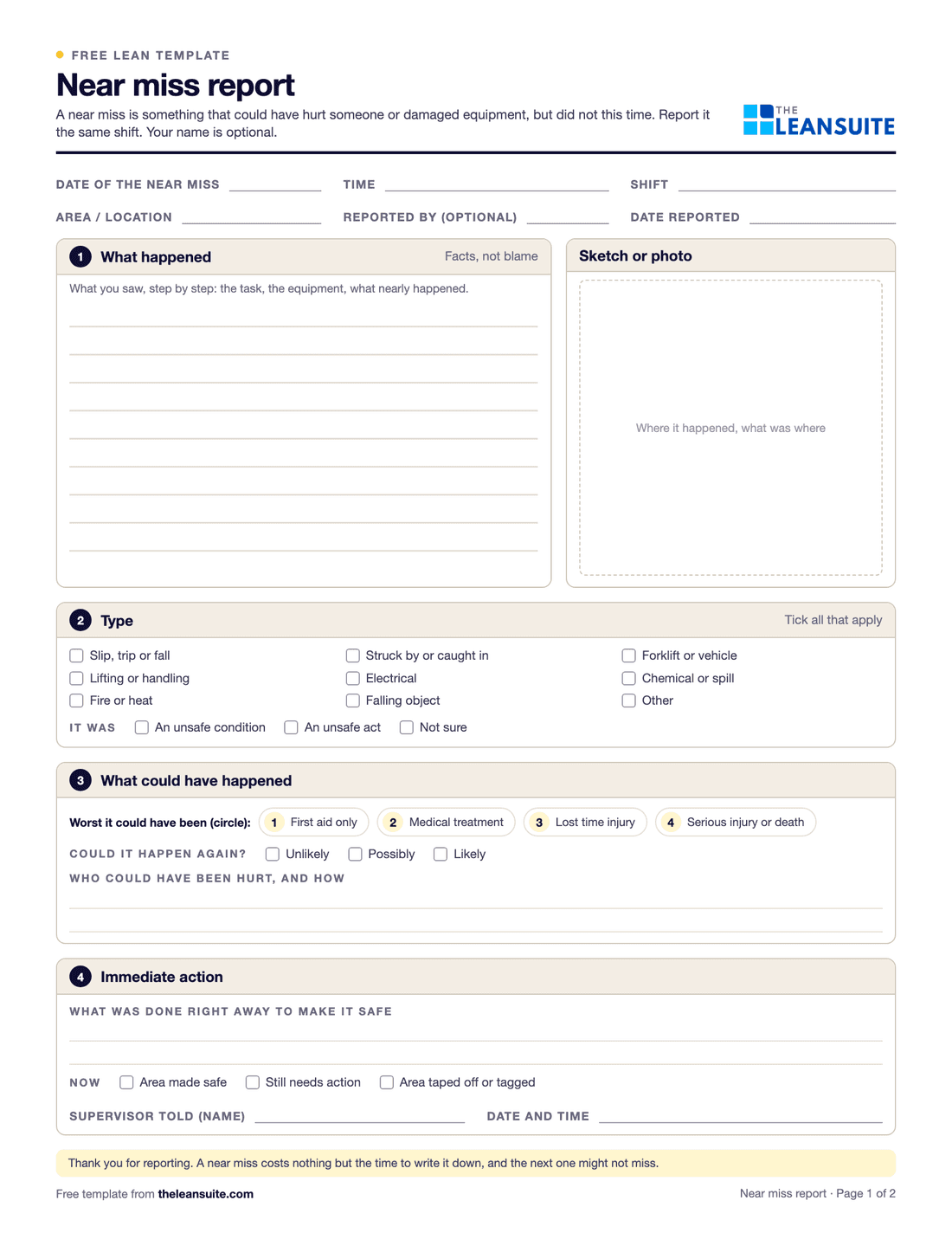
A near miss is an unplanned event that could have hurt someone or damaged equipment but did not, this time. A near miss report captures it while it is fresh, so the cause can be fixed before the next one does harm. Page 1 of this form is for the person who saw it: what happened, where and when, the type of event, the worst it could have been, who could have been hurt and what was done right away. Page 2 is for the supervisor or safety lead: why it happened, corrective actions by type of control with owners and due dates, and closure, including telling the reporter what was done. The Excel version is a near miss log with a status and days open for each report, overdue actions flagged, and counts by potential severity and type.
Free to use: print it, copy it and edit it for your team. Enter your name and work email once to download.
When to use it
When to use a near miss report form
- Every time someone sees something that could have caused an injury or damage, the same shift.
- Where people have no phone or app to report with, or as the backup when the system is down.
- When a near miss program is starting or restarting, so reports come in the same format.
- To track reports to closure and see which hazards keep coming up.
How to fill it in
- 1
Report it the same shift
Write what happened, where and when, while it is fresh. The name is optional.
- 2
Say how bad it could have been
Circle the worst outcome that could credibly have happened, from first aid to a serious injury, and whether it could happen again.
- 3
Record the immediate action
What was done to make the area safe, and which supervisor was told.
- 4
Find the cause
The supervisor or safety lead asks why until they reach a cause they can fix, and talks to the people involved.
- 5
Fix it with the strongest control
Choose actions from the top of the hierarchy of controls first: eliminate, substitute, engineer, then administrative controls, then PPE. Give each an owner and a due date.
- 6
Close it and tell the reporter
Check the actions on the floor, tell the person who reported it what was done, and check other areas with the same hazard.
A filled-in example
Illustrative, not a benchmarkAn example: a near miss reported in a warehouse and written up the same shift.
- What happened: a forklift reversing out of an aisle passed within a few feet of an order picker who stepped out from behind a rack.
- Worst it could have been: 4, a serious injury. It could happen again, as the aisle end has no view either way.
- Immediate action: the aisle end was coned off and pickers were briefed at the next break.
- Root cause: racking at the aisle end blocks the view for drivers and pedestrians, and there is no marked crossing.
- Corrective actions: a convex mirror and a marked pedestrian crossing (engineering), and a stop-and-sound rule at aisle ends (administrative), each with an owner and a due date.
The actions were checked on the floor two weeks later, the picker who reported it was told what changed, and the two other aisle ends with the same layout got the same fix.
Common mistakes
Blaming the reporter
If a report leads to blame, the next near miss goes unreported. Thank people for every report.
Stopping at the immediate action
Coning off an area is containment, not a fix. Find the cause and remove it.
Retraining as the only action
Training and signs are weak controls. Look for a way to remove the hazard or engineer it out first.
No feedback
People who never hear back stop reporting. Tell the reporter what was done.
Closing on paper
Check the actions in the area before you close the report.
Download the template
Free to use: print it, copy it and edit it for your team. Enter your name and work email once to download.
Run this template in LeanSuite
In LeanSuite anyone logs a near miss from a station QR code with a photo, anonymously if the form allows it; rules send each report to an owner with a due date, a serious one can become a safety CAPA, and the reporter is told when it is fixed.
In the lean glossary
Free tools
FAQ
Near miss report form: common questions
More free templates
All templates- 5S audit checklist template25 checks, five per S, scored 1 to 5, with a score summary and a chart of the five S's.
- Gemba walk checklistA walk plan and route, 30 prompts in six groups and a findings table with owners and due dates.
- Leader standard work templateA team leader's daily, weekly and monthly routine with a box per day, follow-ups and a weekly review.
- Autonomous maintenance (CILR) checklist20 clean, inspect, lubricate and retighten checks with a box per day, an abnormality log and sign-off.
- A3 problem solving templateThe standard seven-box A3 on one landscape sheet, from background to follow-up.
- PDCA templateOne improvement cycle on one landscape page: plan, do, check against the goal, then standardize or adjust.
- 5 Whys templateA problem statement, five why rows with evidence, the root cause and the countermeasure.
- 5W1H templateSix questions with prompts and evidence, turned into a problem statement before the root cause analysis.
- 8D report templateD0 to D8 on three pages: team, is/is not, containment, occurrence and escape causes, actions and closure.
- Poka-yoke worksheetEach step's possible errors, prevention or detection, the method, a device idea and a verified box.
- Skills matrix templatePeople by skills, a 0 to 4 scale, a training column and a coverage row that shows the gaps.
- Standard work sheet templateTakt time, each element's manual, machine and walk time on a time chart, key points and standard WIP.
- One point lesson (OPL) templateOne topic on one page: wrong way and right way pictures, key points, why it matters and a sign-off record.
- SMED changeover worksheetChangeover steps with times, internal or external, what can move, ideas and before/after totals.
- Kaizen event charter templateScope, team and roles, baseline and target metrics, a five-day schedule, risks and sign-off.
- RACI matrix template17 kaizen project tasks by 10 roles, with R, A, C, I drop-downs and a check for one accountable per task.
- Layered process audit (LPA) checklist20 yes, no or N/A checks at the station, a fixed-on-the-spot box, scores by group and a findings table.
- PFMEA template (process FMEA)Failure modes, effects and causes rated for severity, occurrence and detection, with RPN before and after action.
- 5S red tag log and red tagsA log of every red-tagged item with its decision, and six printable red tags to cut out.
- Shift handover templateProduction against plan, safety, quality, equipment, materials and people, and the open issues the next shift takes over.
- Kanban card templateSix production and six withdrawal kanban cards to print and cut out, with loop sizing and a card register.
- Pareto chart templateA tally sheet, the categories sorted largest first with cumulative %, and the chart. Excel does the sorting and drawing.
- Control plan templateWhat is checked at each step, against which limits, how, how often, and what to do when a result is out.
- Corrective action request (CAPA) formProblem, containment, root cause, corrective and preventive action, and proof the fix worked, on two pages.
- Idea suggestion formA one-page idea form with the supervisor's answer and points, and an idea log that tracks days to answer.
- Just Do It (JDI) card templateSix Just Do It cards per sheet for quick fixes, with the rules for what counts and a log of every card.
- Quick kaizen templateOne page for a small improvement: before and after, the cause, the countermeasure, the results and whether the standard changed.
- Time study sheetTime each element over 10 cycles and work out the average, lowest repeatable and standard time. Excel does the sums.
- Spaghetti diagram templateSquared paper to trace every trip, a tally of trips and distance, and a before and after comparison.
- OEE tracking sheetOne row per shift for a week. The Excel version works out availability, performance, quality and OEE and charts the week.
- Safety observation card templateFour behavior-based safety cards per sheet, with safe and at-risk checks, the conversation and a tally sheet.
- Job safety analysis (JSA) templateJob steps, hazards, risk scored before and after the controls, the hierarchy of controls, PPE and sign-off.
- Risk assessment matrix template (5×5)A color-coded 5 × 5 severity and likelihood matrix, a scoring guide and a risk register.
- Incident investigation report templateWhat happened, people, evidence and timeline, root cause with 5 Whys and contributing factors, actions and sign-off.
- Toolbox talk templateA record of a short safety talk: topic, key points, questions raised, actions and an attendee sign-in sheet.
- Lockout/tagout (LOTO) procedure templateA machine-specific LOTO procedure: energy sources and isolation points, the steps from shutdown to restart, and the annual review.
- Forklift inspection checklist23 pre-shift checks for a week on one page, a do-not-operate rule, and a defect and repair log.
- Non-conformance report (NCR) formA two-page NCR from the requirement against what was found to disposition and closure, and an Excel NCR log.
- CAPA log templateAn Excel CAPA tracker with status, days open, late flags and counts by source, plus a printable log and monthly review.
- Supplier corrective action request (SCAR) formA SCAR from the problem and containment asked for to the supplier's 8D-style response, verification and closure.
- First article inspection (FAI) report templatePart information, a ballooned characteristic table with tolerances and results, material and process certificates, and sign-off.
- Preventive maintenance checklist templateA PM checklist per machine with readings and sign-off, and a PM schedule that works out the next due date.
- Equipment downtime log (MTTR and MTBF)A breakdown and downtime log, with MTTR, MTBF and downtime by machine and cause worked out in Excel.
- Environmental aspects and impacts registerAn ISO 14001-style register of aspects and impacts, with significance scoring, legal requirements, controls and owners.
- Manufacturing process instruction (MPI) templateOperation steps with parameters, tools, quality checks, safety and a photo each, plus revision history and approval.
- Engineering process instruction (EPI) templateScope, parameters and limits, equipment and materials, validation steps, acceptance criteria, change history and approvals.
- Training sign-off sheetAn attendance and sign-off record where each person signs they understood, with a competence check and an Excel log.
- On-the-job training (OJT) checklistA job breakdown and the four TWI Job Instruction steps with sign-offs, the tries and the date the trainee qualified.
- New hire onboarding checklist (manufacturing)29 onboarding items from before day 1 to the 90-day review, with owners, dates and review notes.
- Competency assessment formEach task rated 0 to 4 on the skills matrix scale with the evidence seen, then the gaps and a training plan.
- Cross-training plan templateWho is learning which task, from and to which level, by when, and how many are qualified on each task.
- Absenteeism tracker templateA monthly attendance grid with codes, absence rate by person and team, and an optional Bradford factor.
Can't find the template you need?
Tell us what you're looking for. We'll make it and send it to your inbox, free.
A shift handover sheet, a red tag log, a changeover checklist for one machine: if your team uses it on the floor, ask.